## Code Snippet: Image Transformation Function
### Overview
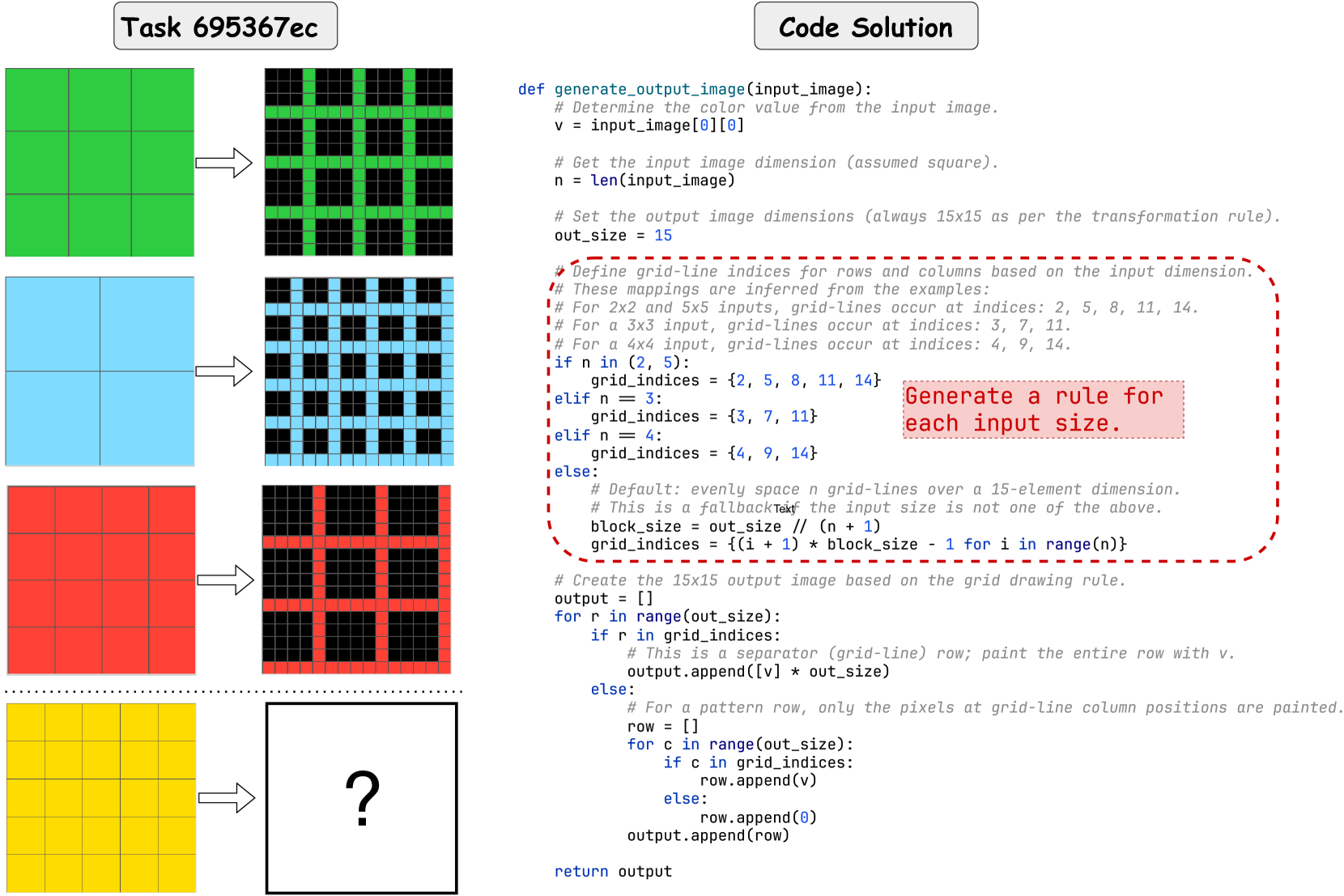
The image presents a code snippet (Python) defining a function `generate_output_image` that transforms an input image (assumed square) into a 15x15 output image based on a grid-drawing rule. The code includes comments explaining the logic and a visual representation of the transformation process with input and output images.
### Components/Axes
The image is divided into two main sections:
1. **Code Solution:** Contains the Python code defining the `generate_output_image` function.
2. **Task 695367ec:** Contains example input and output images.
The code itself includes comments that act as labels, explaining the purpose of each section. The input and output images are visually presented, demonstrating the transformation.
### Detailed Analysis or Content Details
**Code Transcription:**
```python
def generate_output_image(input_image):
# Determine the color value from the input image.
v = input_image[0][0]
# Get the input image dimension (assumed square).
n = len(input_image)
# Set the output image dimensions (always 15x15 as per the transformation rule).
out_size = 15
# Define grid-line indices for rows and columns based on the input dimension.
# These mappings are inferred from the examples:
# For 2x2 and 5x5 inputs, grid-lines occur at indices: 2, 5, 8, 11, 14.
# For a 3x3 input, grid-lines occur at indices: 3, 7, 11.
# For a 4x4 input, grid-lines occur at indices: 4, 9, 14.
if n in (2, 5):
grid_indices = [2, 5, 8, 11, 14]
elif n == 3:
grid_indices = [3, 7, 11]
elif n == 4:
grid_indices = [4, 9, 14]
else:
# Default: evenly space grid-lines over a 15-element dimension.
# This is a fallback if the input size is not one of the above.
block_size = out_size // (n + 1)
grid_indices = [(i + 1) * block_size - 1 for i in range(n)]
# Create the 15x15 output image based on the grid drawing rule.
output = []
for r in range(out_size):
row = []
if r in grid_indices:
# This is a separator (grid-line) row; paint the entire row with v.
row.extend([v] * out_size)
else:
# For a pattern row, only the pixels at grid-line column positions are painted.
for c in range(out_size):
if c in grid_indices:
row.append(v)
else:
row.append(0) # Assuming 0 represents a default color (e.g., black)
output.append(row)
return output
```
**Input/Output Image Analysis:**
* **Input Image (Left):** A 4x4 grid. The color of the top-left pixel is visually identified as a dark shade (likely black or a dark gray).
* **Output Image (Right):** A 15x15 grid. Horizontal and vertical lines are present, forming a grid pattern. The lines are the same color as the top-left pixel of the input image. The rest of the pixels are a lighter color (likely white or a light gray). The grid lines occur at indices 4, 9, and 14.
### Key Observations
* The function transforms an input image into a 15x15 image with a grid pattern.
* The color of the grid lines is determined by the color of the top-left pixel of the input image.
* The grid line positions are determined by the input image's dimension.
* The code provides specific grid line indices for input sizes of 2x2, 3x3, 4x4, and 5x5.
* A default grid line calculation is used for input sizes not explicitly defined.
* The default color for non-grid pixels is assumed to be 0.
### Interpretation
The code implements a visual transformation that maps an input image's color to a grid pattern in a larger output image. The grid's structure is dependent on the input image's size, suggesting a scaling or interpolation process. The function effectively extracts a single color value from the input and uses it to create a structured visual representation. The use of different grid line indices for different input sizes indicates that the function is designed to handle various input resolutions and maintain a consistent visual output. The fallback mechanism ensures that the function can handle any input size, even if it's not explicitly defined in the code. The transformation could be used for image resizing, feature extraction, or creating stylized visual effects. The question mark at the bottom right of the image suggests a prompt for further exploration or a request for a solution to a related problem.