## Diagram: Robotic Arm Interaction with Distracted Sink Environment
### Overview
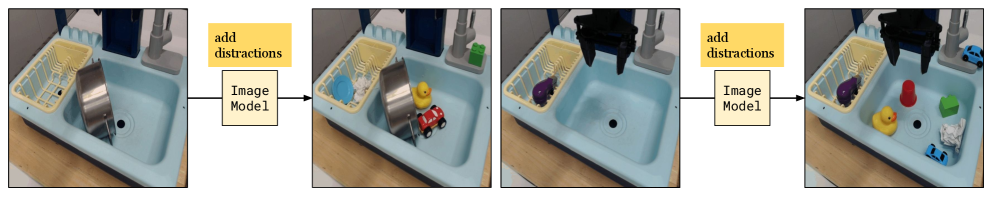
The image depicts a robotic arm interacting with a simulated sink environment containing various objects. The scene is divided into two stages:
1. **Initial State**: A sink with a stainless steel pot, yellow dish rack, and gray faucet.
2. **Distracted State**: Additional objects (toys, cups, blocks) are added to the sink, and the robotic arm is shown interacting with the environment.
### Components/Axes
- **Sink**: Light blue basin with a yellow dish rack (left side) and gray faucet (right side).
- **Robotic Arm**: Black mechanical arm with a two-pronged gripper, positioned above the sink.
- **Objects**:
- Stainless steel pot (tilted in initial state).
- Yellow rubber duck, red toy car, purple toy, green block, red cup, blue toy car, crumpled white cloth.
- **Text Labels**:
- "add distractions" (yellow box, top-left of first two panels).
- "Image Model" (white box, bottom-center of first two panels).
### Detailed Analysis
1. **Initial State (Left Panels)**:
- Sink contains a stainless steel pot, yellow dish rack, and gray faucet.
- No distractions present.
- Robotic arm is absent in the first panel but appears in the second panel above the sink.
2. **Distracted State (Right Panels)**:
- Sink cluttered with:
- Yellow rubber duck (center-left).
- Red toy car (center-right).
- Purple toy (dish rack).
- Green block (near faucet).
- Red cup (near faucet).
- Blue toy car (bottom-right).
- Crumpled white cloth (bottom-right).
- Robotic arm actively interacts with the environment (gripper positioned near objects).
3. **Image Model Processing**:
- Arrows indicate the flow from the "add distractions" stage to the "Image Model" analysis.
- The model processes the cluttered scene, suggesting a focus on object recognition or manipulation under distraction.
### Key Observations
- **Distraction Complexity**: The addition of 7 objects (toys, cups, blocks) increases environmental complexity.
- **Robotic Arm Positioning**: The arm’s gripper is centrally located in the distracted state, implying active engagement with objects.
- **Object Distribution**: Objects are scattered unevenly, with higher density near the faucet and bottom-right corner.
### Interpretation
This setup simulates a real-world scenario where a robotic system must operate in cluttered environments. The "Image Model" likely evaluates the arm’s ability to:
1. Identify target objects (e.g., the stainless steel pot) amid distractions.
2. Adjust gripper positioning for precise manipulation.
3. Handle occlusions caused by overlapping objects.
The progression from a clean to a cluttered sink tests the system’s robustness to visual noise. The presence of diverse object shapes (cylindrical pot, spherical duck, angular blocks) suggests a focus on generalizability in object recognition. The crumpled cloth introduces texture variability, further challenging the model.
No numerical data or quantitative metrics are provided in the image. The diagram emphasizes qualitative analysis of robotic perception and interaction in dynamic environments.