## Diagram: Image Model with Distractions
### Overview
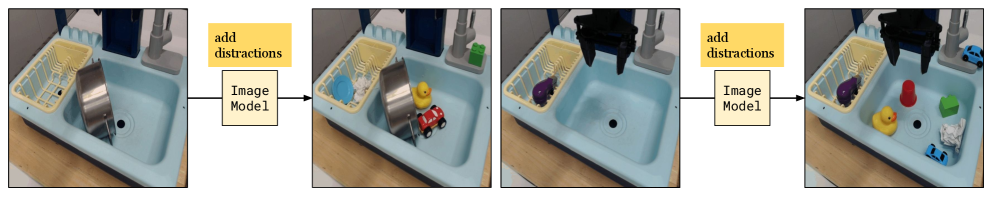
The image depicts a sequence of four images showing a toy sink with objects being added as distractions. The sequence illustrates the input and output of an "Image Model" at two different stages of distraction.
### Components/Axes
* **Images:** Four images of a toy sink.
* **Text Boxes:** Two yellow boxes labeled "add distractions" and two beige boxes labeled "Image Model".
* **Arrows:** Arrows connecting the images and text boxes, indicating the flow of the process.
### Detailed Analysis
The diagram shows a progression of images, starting with a simple scene and adding distractions in subsequent steps.
* **Image 1:** A toy sink with a yellow dish rack on the left and a silver cylindrical object inside the sink.
* **Text Box 1:** A yellow box labeled "add distractions" is positioned to the right of Image 1.
* **Image Model 1:** A beige box labeled "Image Model" is positioned below the "add distractions" box, connected by an arrow from Image 1.
* **Image 2:** The toy sink now contains a blue dish in the dish rack, a yellow rubber duck, and a red toy car in the sink.
* **Text Box 2:** A yellow box labeled "add distractions" is positioned to the right of Image 2.
* **Image Model 2:** A beige box labeled "Image Model" is positioned below the "add distractions" box, connected by an arrow from Image 2.
* **Image 3:** The toy sink now contains a purple object in the dish rack.
* **Image 4:** The toy sink now contains a purple object in the dish rack, a red cup, a yellow rubber duck, a green cube, a crumpled white paper, and two blue toy cars in the sink.
### Key Observations
* The diagram illustrates the concept of adding distractions to an image and processing it through an "Image Model".
* The objects added as distractions vary in color, shape, and size.
* The "Image Model" boxes suggest that the images are inputs to a model, and the subsequent images show the model's output after distractions are added.
### Interpretation
The diagram likely represents a test or demonstration of an image model's ability to handle distractions. The sequence shows how the model might process an image with increasing levels of clutter or irrelevant objects. The purpose could be to evaluate the model's robustness, accuracy, or ability to filter out noise. The diagram suggests that the "Image Model" is being tested for its ability to recognize or process objects in the presence of distractions.