\n
## Diagram: Sequential Process of Adding Distractions to a Sink Environment
### Overview
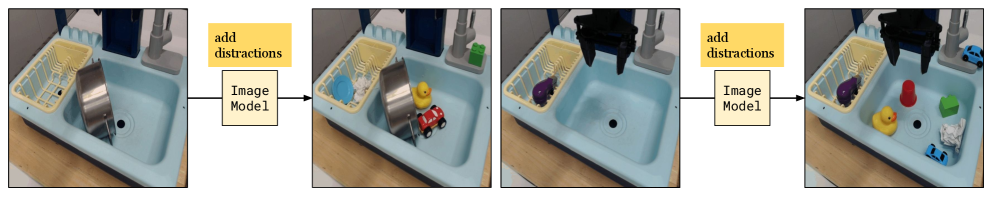
The image displays a four-panel sequence illustrating a process where objects are progressively added to a sink environment, with annotations indicating the involvement of an "Image Model." The sequence flows from left to right, connected by arrows.
### Components/Axes
* **Panels:** Four rectangular image panels arranged horizontally.
* **Flow Arrows:** Black arrows connect the panels, indicating the sequence direction (left to right).
* **Text Annotations:**
* Above the first arrow (between Panel 1 and Panel 2): A yellow rectangular box containing the text "add distractions".
* Below the first arrow: A white rectangular box containing the text "Image Model".
* Above the second arrow (between Panel 3 and Panel 4): A yellow rectangular box containing the text "add distractions".
* Below the second arrow: A white rectangular box containing the text "Image Model".
* **Scene Elements (Common to all panels):**
* A light blue kitchen sink basin.
* A white dish rack on the left side of the sink.
* A wooden countertop surface.
* A faucet and pipes visible in the background.
### Detailed Analysis
**Panel 1 (Leftmost):**
* **Content:** A relatively empty sink.
* **Objects:** A large, stainless steel cooking pot is placed inside the sink, leaning against the left side. The dish rack is empty.
**Panel 2 (Second from left):**
* **Transition:** Annotated with "add distractions" and "Image Model".
* **Objects Added:** Compared to Panel 1, three new objects appear:
1. A light blue bowl (in the dish rack).
2. A yellow rubber duck (in the sink, near the pot).
3. A small red toy car (in the sink, near the duck).
* **Objects Removed:** The large stainless steel pot from Panel 1 is no longer present.
**Panel 3 (Third from left):**
* **Content:** The sink is mostly empty again, but with new elements.
* **Objects:**
1. A purple, spherical object (possibly a toy or fruit) sits in the sink.
2. A large, black, multi-pronged object (resembling a robotic gripper or a complex tool) is suspended above the center of the sink.
* **Objects Removed:** The blue bowl, yellow duck, and red car from Panel 2 are absent.
**Panel 4 (Rightmost):**
* **Transition:** Annotated with "add distractions" and "Image Model".
* **Objects Added:** Compared to Panel 3, several new objects appear:
1. A red plastic cup (in the sink).
2. A green rectangular block (in the sink).
3. A blue toy car (in the sink, near the green block).
4. A crumpled piece of white paper or foil (in the sink).
* **Objects Retained:** The purple spherical object and the black suspended object from Panel 3 remain in place.
### Key Observations
1. **Process Pattern:** The sequence follows a clear pattern: a base scene (Panel 1 or 3) is shown, then an "add distractions" step mediated by an "Image Model" results in a more cluttered scene (Panel 2 or 4).
2. **Object Permanence:** Objects are not persistent across the entire sequence. The pot from Panel 1 disappears. The distractions from Panel 2 disappear before Panel 3. This suggests each "base scene" (1 and 3) might be a separate starting point for a test.
3. **Nature of "Distractions":** The added objects are varied in color, shape, and type (kitchenware, toys, abstract shapes), likely chosen to challenge visual recognition systems.
4. **The "Image Model":** Its placement below the arrow suggests it is the agent or system responsible for processing the scene or generating the "distractions." The black gripper-like object in Panels 3 and 4 could be a physical manifestation or tool associated with this model.
### Interpretation
This diagram visually documents an experimental or testing protocol for an **Image Model**, likely in the field of computer vision or robotics. The core demonstration is the model's interaction with a physical environment (the sink) under increasing visual complexity.
* **What it suggests:** The process tests the model's ability to operate or maintain performance when "distractions" (clutter, irrelevant objects) are introduced into its workspace. The two separate sequences (1→2 and 3→4) might represent different test trials or scenarios.
* **Relationship between elements:** The "Image Model" is the central actor. The "add distractions" command is the experimental variable. The sink environment is the controlled testbed. The changing objects are the measured outcome or the introduced noise.
* **Notable implication:** The removal of objects between sequences (e.g., the pot disappearing) indicates these are discrete trials, not a continuous accumulation. The presence of the black gripper in the second sequence (Panels 3 & 4) but not the first might indicate a change in the model's hardware configuration or a different type of test (e.g., manipulation vs. pure observation).
* **Underlying purpose:** This setup is characteristic of research into **robust perception** and **scene understanding**. The goal is likely to evaluate how well the Image Model can identify target objects, understand spatial relationships, or plan actions when the visual scene is non-ideal and filled with irrelevant items. The sink provides a consistent, structured background against which the variable distractions are placed.