\n
## Screenshot: Incorrect Program Code
### Overview
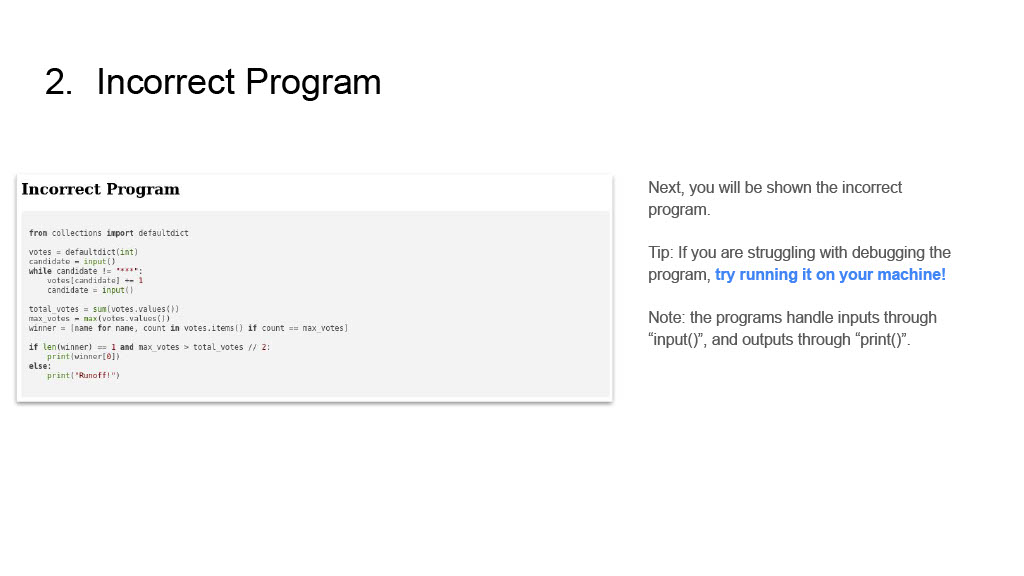
The image presents a screenshot of a slide titled "2. Incorrect Program". The slide is divided into two main sections: a code block labeled "Incorrect Program" and a text block providing context and instructions. The code appears to be Python, intended to calculate a winner based on votes.
### Components/Axes
The slide contains the following elements:
* **Title:** "2. Incorrect Program" (top-center)
* **Left Section:** Code block labeled "Incorrect Program" (left-center)
* **Right Section:** Text block with instructions and notes (right-center)
* **Text within Right Section:**
* "Next, you will be shown the incorrect program."
* "Tip: If you are struggling with debugging the program, try running it on your machine!"
* "Note: the programs handle inputs through “input()”, and outputs through “print()”."
### Content Details
The Python code block contains the following:
```python
from collections import defaultdict
votes = defaultdict(int)
candidate = input()
while candidate != "***":
votes[candidate] += 1
candidate = input()
total_votes = sum(votes.values())
max_votes = max(votes.values())
winner = [name for name, count in votes.items() if count == max_votes]
if len(winner) == 1 and max_votes > total_votes // 2:
print(winner[0])
else:
print("Runoff!")
```
### Key Observations
The code is designed to take candidate names as input until "***" is entered. It then calculates the total votes, the maximum number of votes, and identifies the winner(s). The code checks if there is a single winner with a majority of the votes (more than half). If so, it prints the winner's name. Otherwise, it prints "Runoff!".
### Interpretation
The slide presents a flawed program intended for a voting system. The purpose is likely to demonstrate a debugging exercise or illustrate potential errors in program logic. The note about input/output methods ("input()" and "print()") suggests the user is expected to interact with the program directly. The "Tip" encourages hands-on debugging. The code itself appears logically sound at first glance, but could contain subtle errors that lead to incorrect results in specific scenarios. The slide is part of a learning module focused on program correctness and debugging.