## Screenshot: Incorrect Program Code Snippet
### Overview
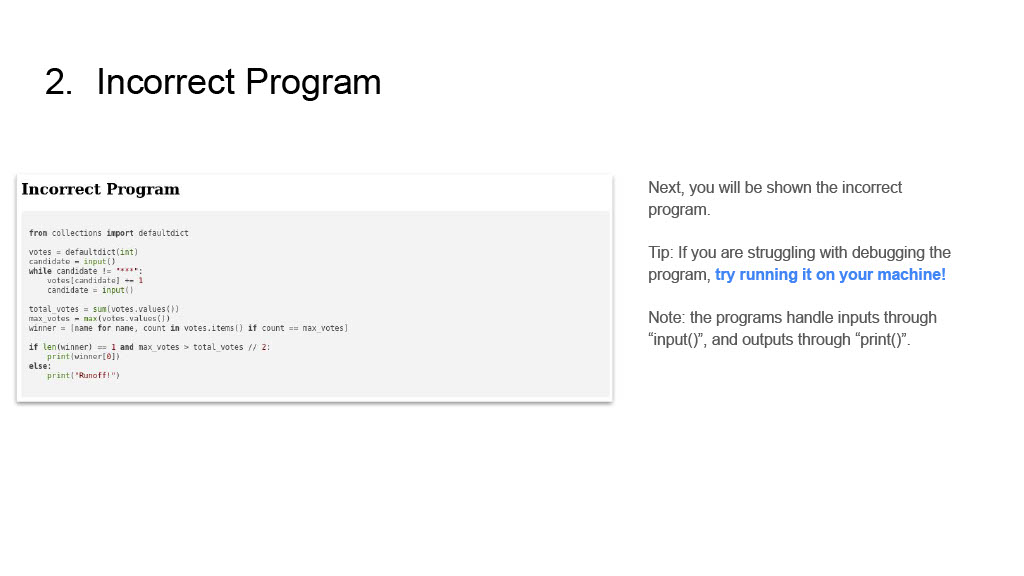
The image displays a presentation slide or document page titled "2. Incorrect Program." It features a code snippet within a light gray box on the left, accompanied by explanatory text on the right. The content appears to be part of an instructional or debugging exercise, presenting a Python program labeled as "incorrect" for the viewer to analyze.
### Components/Axes
1. **Main Title (Top Left):** "2. Incorrect Program"
2. **Code Block Container:**
* **Header:** "Incorrect Program" (bold, within the gray box).
* **Content:** A block of Python code with syntax highlighting (keywords like `from`, `import`, `while`, `if`, `else` are in a different color, likely blue or purple, though exact color is not specified).
3. **Explanatory Text (Right Side):** Three separate paragraphs of instructional text.
4. **Layout:** The code block is positioned on the left side of the frame. The explanatory text is aligned to the right of the code block, starting roughly at the vertical midpoint of the code box.
### Detailed Analysis
**1. Code Transcription (Python):**
```python
from collections import defaultdict
votes = defaultdict(int)
candidate = input()
while candidate != '****':
votes[candidate] += 1
candidate = input()
total_votes = sum(votes.values())
max_votes = max(votes.values())
winner = [name for name, count in votes.items() if count == max_votes]
if len(winner) == 1 and max_votes > total_votes // 2:
print(winner[0])
else:
print('Runoff!')
```
**2. Explanatory Text Transcription:**
* **Paragraph 1:** "Next, you will be shown the incorrect program."
* **Paragraph 2 (Tip):** "Tip: If you are struggling with debugging the program, **try running it on your machine!**" (The phrase "try running it on your machine!" is highlighted in blue).
* **Paragraph 3 (Note):** "Note: the programs handle inputs through “input()”, and outputs through “print()”."
### Key Observations
* **Purpose:** The code implements a simple voting system. It reads candidate names via `input()` until the sentinel value `'****'` is entered, tallies votes, and then determines a winner.
* **Stated Incorrectness:** The program is explicitly labeled as "incorrect," implying it contains a logical error or does not meet specified requirements, though the specific flaw is not stated in the image.
* **Potential Logic:** The code checks for a single winner (`len(winner) == 1`) who has more than half of the total votes (`max_votes > total_votes // 2`). If this condition is not met, it prints "Runoff!". A common logical error in such programs could be related to handling ties or the definition of a majority.
* **User Guidance:** The text actively encourages the viewer to engage with the code by running it, suggesting a hands-on debugging exercise.
### Interpretation
This image is a pedagogical tool. It presents a concrete, self-contained programming problem. The "incorrect" label frames the code not as a solution, but as a puzzle to be solved. The accompanying text guides the learner's approach: first, understand the code's intended function (a voting tally), then use practical tools (running the program) to discover its flaw.
The code's structure suggests it aims to implement a "majority wins" system. The potential incorrectness likely lies in the edge cases: for example, if no candidate receives a majority, it correctly calls for a runoff. However, if there is a tie for the highest number of votes between multiple candidates (e.g., two candidates each have 5 votes, and that is the maximum), the list `winner` will have a length greater than 1. The condition `len(winner) == 1` will fail, and it will print "Runoff!", which is logically correct. Therefore, the stated "incorrectness" might be more subtle, perhaps related to input handling, the sentinel value, or an unstated requirement not visible in this isolated snippet. The image successfully sets up a debugging scenario by providing the code and prompting investigation.