## Flow Diagram: Knowledge Graph of Thoughts
### Overview
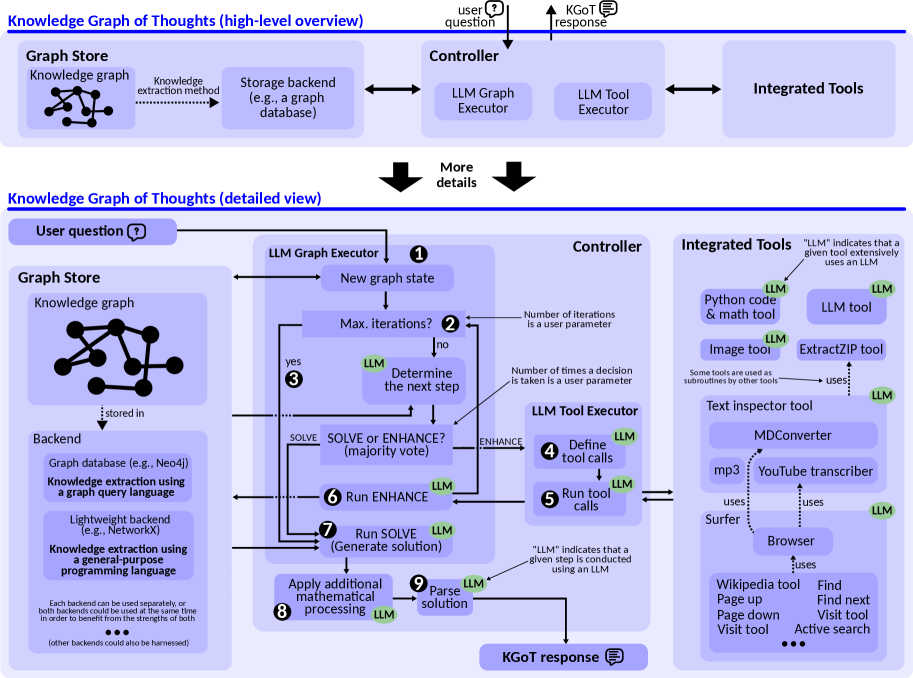
The image presents two flow diagrams illustrating the Knowledge Graph of Thoughts (KGoT) process. The first diagram provides a high-level overview, while the second offers a detailed view of the process. Both diagrams depict the flow of information and actions between components such as the Graph Store, Controller, and Integrated Tools, with a focus on the role of Large Language Models (LLMs).
### Components/Axes
**High-Level Overview:**
* **Title:** Knowledge Graph of Thoughts (high-level overview)
* **Components:**
* Graph Store: Contains a "Knowledge graph" and performs "Knowledge extraction method". It connects to a "Storage backend (e.g., a graph database)".
* Controller: Contains "LLM Graph Executor" and "LLM Tool Executor".
* Integrated Tools
* **Flow:** The flow is generally left to right, starting from the Graph Store, moving to the Controller, and then to Integrated Tools.
* **Input/Output:** "user question" and "KGOT response" are shown at the top.
**Detailed View:**
* **Title:** Knowledge Graph of Thoughts (detailed view)
* **Components:**
* User question
* Graph Store: Contains a "Knowledge graph" and is connected to a "Backend".
* Backend: Includes "Graph database (e.g., Neo4j)", "Lightweight backend (e.g., NetworkX)".
* LLM Graph Executor: Contains steps for processing the graph.
* Controller: Contains "LLM Tool Executor".
* Integrated Tools: Includes various tools like "Python code & math tool", "Image tool", "ExtractZIP tool", "Text inspector tool", "MDConverter", "YouTube transcriber", "Surfer", "Browser", "Wikipedia tool", "Find tool", "Visit tool", and "Active search".
* **Flow:** The flow is more complex, involving loops and conditional branches within the LLM Graph Executor.
* **Annotations:** "LLM" indicates that a given step is conducted using an LLM or that a given tool extensively uses an LLM.
### Detailed Analysis
**High-Level Overview:**
* The diagram shows a simplified flow from knowledge graph storage and extraction to the controller, which then interacts with integrated tools.
**Detailed View:**
1. **User question:** The process starts with a user question.
2. **LLM Graph Executor:**
* Step 1: "New graph state"
* Step 2: "Max. iterations?" (Number of iterations is a user parameter). If "no", the process moves to "Determine the next step".
* Step 3: If "yes" from "Max. iterations?", the process loops back to "Determine the next step".
* "Determine the next step" leads to "SOLVE or ENHANCE? (majority vote)".
* Step 6: "Run ENHANCE"
* Step 7: "Run SOLVE (Generate solution)"
* Step 8: "Apply additional mathematical processing"
* Step 9: "Parse solution"
3. **LLM Tool Executor:**
* Step 4: "Define tool calls"
* Step 5: "Run tool calls"
4. **Backend:**
* Graph database (e.g., Neo4j): Knowledge extraction using a graph query language.
* Lightweight backend (e.g., NetworkX): Knowledge extraction using a general-purpose programming language.
5. **Integrated Tools:**
* Python code & math tool
* Image tool
* ExtractZIP tool
* Text inspector tool: MDConverter, YouTube transcriber
* Surfer
* Browser: Wikipedia tool, Find tool, Visit tool, Active search
6. **KGOT response:** The process ends with a KGOT response.
### Key Observations
* The detailed view provides a granular breakdown of the LLM Graph Executor and LLM Tool Executor processes.
* The use of LLMs is highlighted throughout the process, indicated by the "LLM" annotations.
* The diagram emphasizes the iterative nature of the LLM Graph Executor, with loops for determining the next step and maximizing iterations.
* The Integrated Tools section showcases a variety of tools used in the process, including those for code execution, image processing, text inspection, and web browsing.
### Interpretation
The diagrams illustrate the architecture and workflow of a Knowledge Graph of Thoughts system. The high-level overview provides a simplified view of the system's components and their interactions, while the detailed view offers a more in-depth understanding of the process. The system leverages LLMs to process knowledge graphs, execute tools, and generate responses to user questions. The iterative nature of the LLM Graph Executor suggests a process of refinement and optimization, where the system continuously improves its understanding and response based on the available information. The integration of various tools highlights the system's ability to leverage external resources and capabilities to enhance its performance. The choice between "SOLVE" and "ENHANCE" suggests a decision-making process where the system selects the most appropriate strategy based on the specific task and available resources.