\n
## Diagram: Knowledge Graph of Thoughts - High-Level & Detailed View
### Overview
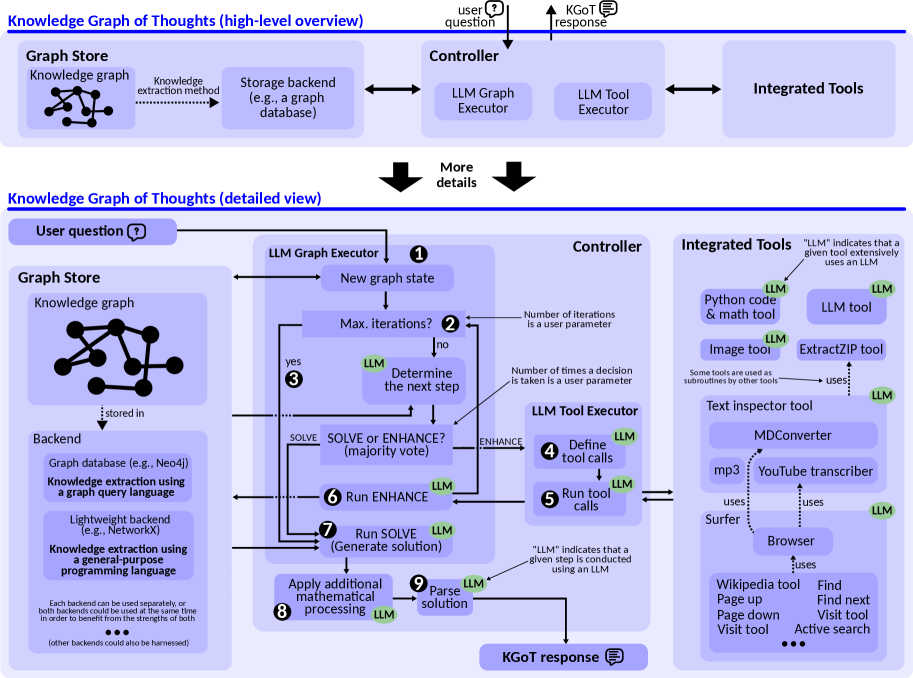
This diagram illustrates the architecture of a "Knowledge Graph of Thoughts" system, presenting both a high-level overview and a detailed view of its components and workflow. The system takes a user question as input and generates a Knowledge Graph of Thoughts (KGOT) response. It leverages a combination of knowledge graphs, Large Language Models (LLMs), and integrated tools.
### Components/Axes
The diagram is divided into two main sections: a high-level overview at the top and a detailed view at the bottom, separated by a "More details" banner. Key components include:
* **User Question:** Input to the system.
* **Controller:** Manages the overall process.
* **LLM Graph Executor:** Executes graph-related operations using LLMs.
* **LLM Tool Executor:** Executes tool calls using LLMs.
* **Integrated Tools:** A collection of tools used by the LLM Tool Executor (Python code & math tool, Image tool, Text inspector, MDConverter, mp3, YouTube transcriber, Browser).
* **Graph Store:** Stores the knowledge graph.
* **Backend:** The underlying data storage and knowledge extraction mechanism.
* **KGOT Response:** The output of the system.
The detailed view includes numbered steps (1-9) representing the workflow. There are also annotations indicating where LLMs are used extensively.
### Detailed Analysis or Content Details
**High-Level Overview:**
* **User Question** (top-left): An icon representing a user asking a question.
* **Controller** (top-center): A rectangular box labeled "Controller".
* **LLM Graph Executor** (top-right): A rectangular box labeled "LLM Graph Executor".
* **LLM Tool Executor** (top-right): A rectangular box labeled "LLM Tool Executor".
* **Integrated Tools** (top-right): A rectangular box labeled "Integrated Tools".
* **KGOT Response** (top-right): An icon representing the system's response.
* **Knowledge Store** (top-left): A circular diagram representing a knowledge graph with nodes and edges. Text: "Knowledge graph", "Knowledge extraction method".
* **Storage Backend** (top-center): A rectangular box labeled "Storage backend (e.g., a graph database)".
**Detailed View:**
1. **New graph state** (left-center): A box labeled "New graph state".
2. **Max. iterations?** (center-left): A diamond-shaped decision node labeled "Max. iterations?". An arrow labeled "no" leads to step 3.
3. **Determine the next step** (center-left): A box labeled "Determine the next step (majority vote)". An arrow labeled "yes" loops back to step 1. This step is performed by an LLM.
4. **Define tool calls** (center-right): A box labeled "Define tool calls". This step is performed by an LLM.
5. **Run tool calls** (center-right): A box labeled "Run tool calls".
6. **Run ENHANCE** (bottom-left): A box labeled "Run ENHANCE". This step is performed by an LLM.
7. **Run SOLVE** (bottom-left): A box labeled "Run SOLVE (Generate solution)". This step is performed by an LLM.
8. **Apply additional mathematical processing** (bottom-left): A box labeled "Apply additional mathematical processing". This step is performed by an LLM.
9. **Parse solution** (bottom-right): A box labeled "Parse solution". This step is performed by an LLM.
**Integrated Tools (right side):**
* **Python code & math tool:** Labeled "LLM" indicating LLM usage.
* **Image tool:** Labeled "LLM". Includes "ExtractZIP tool".
* **Text inspector:** Labeled "LLM".
* **MDConverter:** Labeled "LLM".
* **mp3:** Labeled "LLM".
* **YouTube transcriber:** Labeled "LLM".
* **Browser:** Labeled "LLM". Includes "Wikipedia tool" with options "Find", "Find next", "Visit tool", "Active search".
* Annotations: "LLM" indicates that a given step extensively uses an LLM. "uses" arrows connect tools to LLM.
**Backend (bottom-left):**
* **Graph database (e.g., Neo4j)**
* **Knowledge extraction using a graph query language**
* **Lightweight backend using knowledge extraction and a general-purpose language**
* Text: "Each backend can be used separately or at the same time in order to benefit from the strengths of both."
* Text: "(other backends could also be harnessed)"
### Key Observations
* The system is heavily reliant on LLMs, as indicated by the "LLM" annotations throughout the detailed view.
* The workflow involves an iterative process (steps 1-3) until a maximum number of iterations is reached.
* The system utilizes a variety of integrated tools to enhance its capabilities.
* The backend can leverage different knowledge extraction methods and storage solutions.
* The diagram clearly distinguishes between the high-level architecture and the detailed workflow.
### Interpretation
The diagram depicts a sophisticated system for reasoning and problem-solving using knowledge graphs and LLMs. The iterative loop (1-3) suggests a process of refinement and exploration within the knowledge graph. The use of multiple integrated tools allows the system to handle diverse types of information and tasks. The backend flexibility indicates that the system can be adapted to different data sources and knowledge extraction techniques. The diagram highlights the central role of LLMs in orchestrating the entire process, from graph manipulation to tool execution and solution generation. The system appears designed to be robust and adaptable, capable of tackling complex queries by leveraging both structured knowledge (the graph) and the generative capabilities of LLMs. The inclusion of "majority vote" in step 3 suggests a mechanism for handling uncertainty or conflicting information. The diagram is a blueprint for a system that aims to combine the strengths of symbolic reasoning (knowledge graphs) and statistical learning (LLMs).