## Chart: Density Plot Comparison
### Overview
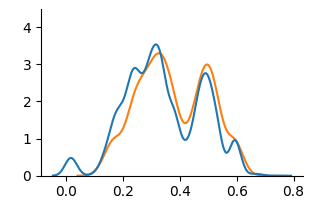
The image presents a density plot comparing two distributions, one represented by a blue line and the other by an orange line. The plot shows the probability density of a variable across a range of values, allowing for a visual comparison of the shapes and central tendencies of the two distributions.
### Components/Axes
* **X-axis:** Ranges from approximately -0.1 to 0.8, with tick marks at intervals of 0.2.
* **Y-axis:** Ranges from 0 to 4.0, with tick marks at intervals of 1.
* **Blue Line:** Represents one distribution.
* **Orange Line:** Represents another distribution.
### Detailed Analysis
* **Blue Line:**
* Starts near 0 at x = -0.1.
* Rises to a peak around x = 0.3, with a density of approximately 3.5.
* Dips slightly, then rises to another peak around x = 0.45, with a density of approximately 2.5.
* Decreases to near 0 at x = 0.8.
* **Orange Line:**
* Starts near 0 at x = -0.1.
* Rises to a peak around x = 0.2, with a density of approximately 2.5.
* Rises to another peak around x = 0.5, with a density of approximately 3.0.
* Decreases to near 0 at x = 0.8.
### Key Observations
* Both distributions have a similar range, from approximately -0.1 to 0.8.
* The blue distribution has a higher peak density around x = 0.3, while the orange distribution has a higher peak density around x = 0.5.
* Both distributions have a small peak near x = 0.0.
### Interpretation
The density plot visually compares two distributions, highlighting differences in their shapes and peak densities. The blue distribution appears to be more concentrated around x = 0.3, while the orange distribution is more concentrated around x = 0.5. This suggests that the underlying data for the blue distribution tends to have values closer to 0.3, while the data for the orange distribution tends to have values closer to 0.5. The small peak near x = 0.0 in both distributions suggests that there is a small proportion of data points with values close to 0 in both datasets.