\n
## Diagram: Simulation Interface Overview
### Overview
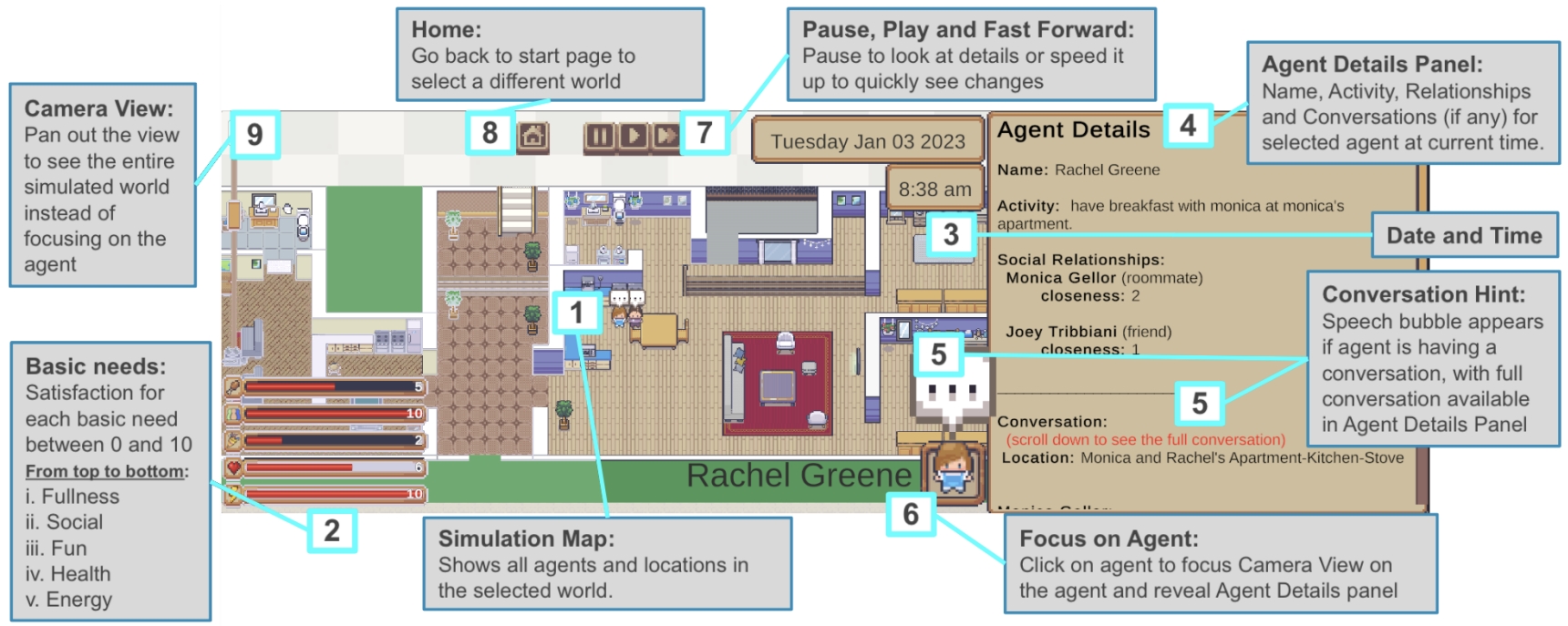
This diagram illustrates the user interface of a simulation environment, likely for modeling social interactions and agent behavior. The interface is divided into several key sections: a simulation map, agent details panel, controls, and status indicators. The simulation appears to be running as of Tuesday, January 03 2023 at 8:38 am.
### Components/Axes
The diagram contains the following labeled components:
* **Simulation Map (1):** Displays all agents and locations in the selected world.
* **Basic Needs (2):** Indicates satisfaction levels for each need (Food, Social, Fun, Health, Energy) on a scale of 0 to 10. The bars are stacked vertically, with Food at the top and Energy at the bottom.
* **Agent Details Panel (3 & 4):** Displays information about the currently selected agent, including name, activity, relationships, and conversations. Section 3 shows the current time and agent name, while section 4 provides a description of the panel's function.
* **Conversation Hint (5):** Indicates the presence of a conversation for the selected agent, with a speech bubble icon.
* **Focus on Agent (6):** Explains how to focus the camera view on an agent.
* **Pause, Play, and Fast Forward (7):** Controls for simulation speed.
* **Home (8):** Button to return to the start page and select a different world.
* **Camera View (9):** Function to pan out the view to see the entire simulated world.
* **Date and Time:** Displayed in the Agent Details Panel.
### Detailed Analysis or Content Details
The simulation map (1) shows a top-down view of an apartment interior. An agent labeled "Rachel Greene" (6) is visible within the map.
The "Basic Needs" (2) indicators show the following approximate satisfaction levels:
* Food: 9/10
* Social: 10/10
* Fun: 8/10
* Health: 10/10
* Energy: 10/10
The "Agent Details Panel" (3) displays the following information for Rachel Greene:
* Name: Rachel Greene
* Activity: have breakfast with monica at monica's apartment.
* Social Relationships:
* Monica Geller (roommate) - closeness: 2
* Joey Tribbiani (friend) - closeness: 1
* Conversation: (scroll down to see the full conversation)
* Location: Monica and Rachel's Apartment-Kitchen-Stove
The "Conversation Hint" (5) shows a speech bubble, indicating Rachel Greene is currently engaged in a conversation.
The simulation controls (7) include standard play/pause/fast-forward buttons.
### Key Observations
* Rachel Greene appears to be in a good state, with high satisfaction levels across all basic needs.
* Her current activity is having breakfast with Monica, and she has established relationships with both Monica and Joey.
* The simulation is currently running, as indicated by the time display and the active conversation hint.
* The closeness values for social relationships are numerical, suggesting a quantifiable measure of relationship strength.
### Interpretation
This diagram represents a simulation environment designed to model agent behavior and social interactions. The interface provides a comprehensive view of the simulated world, allowing users to monitor agent states, activities, and relationships. The numerical representation of basic needs and social closeness suggests a quantitative approach to modeling agent well-being and social dynamics. The ability to control simulation speed and focus on individual agents allows for detailed observation and analysis of agent behavior. The interface appears to be designed for researchers or developers interested in studying social simulations and agent-based modeling. The layout is intuitive, with clear labels and visual cues to guide the user. The inclusion of a conversation hint suggests that communication and dialogue play a significant role in the simulation.