## Screenshot: Annotated Simulation Interface
### Overview
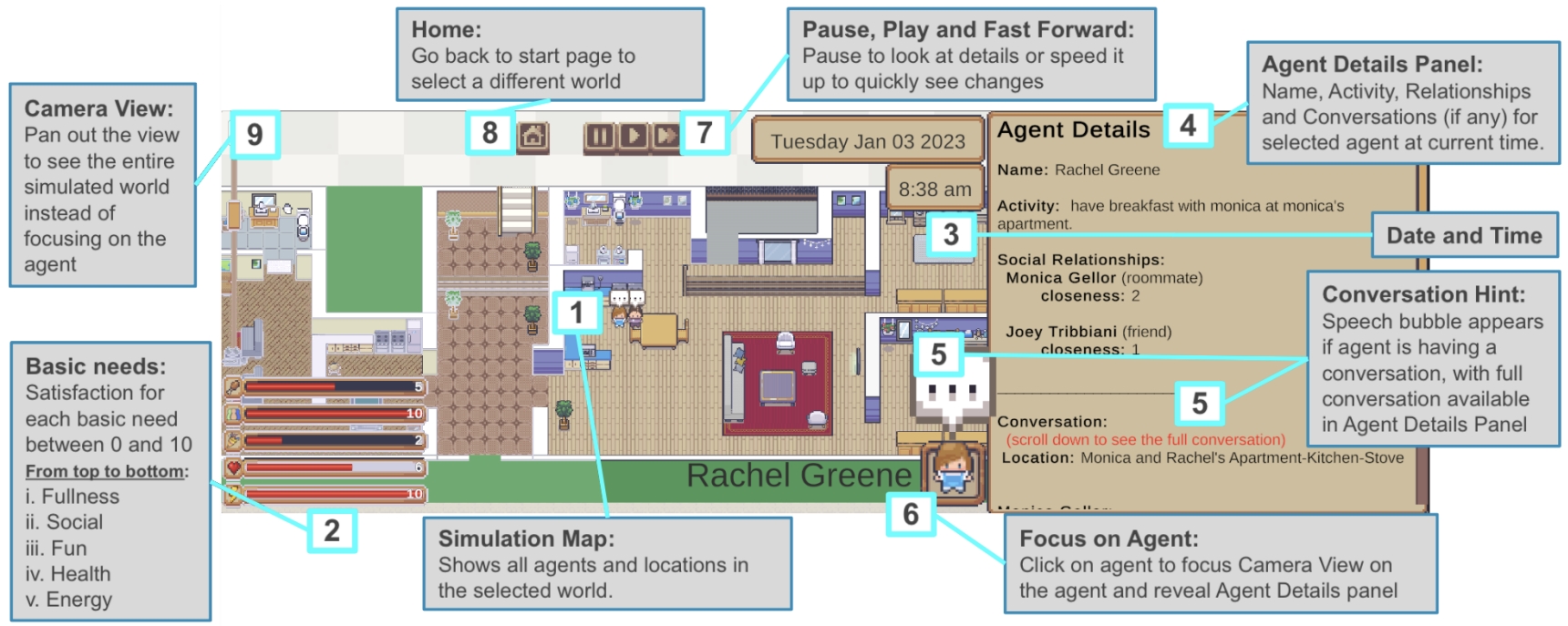
This image is an annotated screenshot of a life simulation interface, likely from a game or research tool. It displays a top-down view of an apartment environment with a selected agent ("Rachel Greene") and includes numerous UI elements and informational panels. The interface is designed to monitor and control the simulation, showing agent status, needs, relationships, and the environment. The image is heavily annotated with numbered callouts (1-9) and explanatory text boxes that describe each component's function.
### Components/Axes
The interface is segmented into several key regions:
1. **Central Simulation Map (Label 1):** A top-down, pixel-art style view of an apartment (Monica and Rachel's Apartment). It shows furniture, rooms (kitchen, living room, bedroom), and agent sprites. The selected agent, Rachel Greene, is highlighted with a name label.
2. **Left Panel - Basic Needs (Label 2):** A vertical panel displaying five satisfaction bars for the selected agent. Each bar has a numerical value (0-10) and an icon.
3. **Top Bar - Controls & Time:**
* **Camera View (Label 9):** A button to pan out the view.
* **Home (Label 8):** A button to return to the start page.
* **Pause, Play and Fast Forward (Label 7):** Playback control buttons (pause, play, fast-forward).
* **Date and Time (Label 3):** A display showing "Tuesday Jan 03 2023" and "8:38 am".
4. **Right Panel - Agent Details (Label 4):** A large panel displaying information about the selected agent.
5. **Interactive Elements:**
* **Conversation Hint (Label 5):** A speech bubble icon above the agent, indicating an active conversation.
* **Focus on Agent (Label 6):** A button to center the camera on the selected agent and open the Agent Details panel.
### Detailed Analysis
**Text Transcription & Data Extraction:**
* **Label 1 - Simulation Map:** "Simulation Map: Shows all agents and locations in the selected world."
* **Label 2 - Basic Needs Panel:**
* Title: "Basic needs:"
* Description: "Satisfaction for each basic need between 0 and 10"
* List (From top to bottom):
* "i. Fullness" - Bar value: **5** (approx. 50% full, red/orange bar).
* "ii. Social" - Bar value: **10** (full, green bar).
* "iii. Fun" - Bar value: **2** (low, red bar).
* "iv. Health" - Bar value: **6** (moderate, yellow/orange bar).
* "v. Energy" - Bar value: **10** (full, green bar).
* **Label 3 - Date and Time:** "Tuesday Jan 03 2023", "8:38 am".
* **Label 4 - Agent Details Panel:**
* Title: "Agent Details"
* Description: "Name, Activity, Relationships and Conversations (if any) for selected agent at current time."
* Content:
* "Name: Rachel Greene"
* "Activity: have breakfast with monica at monica's apartment."
* "Social Relationships:"
* "Monica Gellor (roommate) closeness: 2"
* "Joey Tribbiani (friend) closeness: 1"
* "Conversation: (scroll down to see the full conversation)"
* "Location: Monica and Rachel's Apartment-Kitchen-Stove"
* **Label 5 - Conversation Hint:** "Conversation Hint: Speech bubble appears if agent is having a conversation, with full conversation available in Agent Details Panel".
* **Label 6 - Focus on Agent:** "Focus on Agent: Click on agent to focus Camera View on the agent and reveal Agent Details panel".
* **Label 7 - Playback Controls:** "Pause, Play and Fast Forward: Pause to look at details or speed it up to quickly see changes".
* **Label 8 - Home:** "Home: Go back to start page to select a different world".
* **Label 9 - Camera View:** "Camera View: Pan out the view to see the entire simulated world instead of focusing on the agent".
**Spatial Grounding:**
* The **Basic Needs panel** is fixed to the left edge of the screen.
* The **Agent Details panel** occupies the right side of the screen.
* The **Date/Time display** and **Playback controls** are centered in the top bar.
* The **Simulation Map** fills the central area.
* The **speech bubble (Conversation Hint)** is positioned directly above the Rachel Greene sprite in the kitchen area.
### Key Observations
1. **Agent State:** Rachel Greene is in a mixed state. Her **Social** and **Energy** needs are fully satisfied (10/10), while her **Fun** need is critically low (2/10). Her **Fullness** is moderate (5/10), and **Health** is fair (6/10).
2. **Activity Context:** The agent's activity ("have breakfast with monica") directly correlates with her location ("Kitchen-Stove") and her high Social need satisfaction.
3. **Relationship Data:** The interface quantifies social bonds with a "closeness" score. Monica (roommate) has a higher closeness (2) than Joey (friend, closeness 1).
4. **Interface Design:** The UI is designed for granular observation and control, allowing a user to monitor internal states (needs), external context (location, activity), social dynamics, and manipulate time flow.
### Interpretation
This interface represents a **life simulation sandbox**, likely used for behavioral research, game AI development, or interactive storytelling. The data suggests a system where agents have autonomous goals driven by a **hierarchy of needs** (similar to Maslow's theory). The current snapshot shows an agent fulfilling social and physiological needs (eating with a friend) while neglecting leisure (low Fun).
The **"closeness" metric** implies a dynamic relationship system where interactions affect bond strength. The ability to pause, fast-forward, and focus on specific agents indicates the tool is meant for **detailed analysis of simulated social ecosystems**. The pixel-art aesthetic and "Friends" character names (Rachel, Monica, Joey) suggest this could be a research project or game mod simulating the TV show's environment to study emergent social behavior. The core purpose is to make the internal state and external world of simulated characters transparent and manipulable for the user.