## Screenshot: Simulation Game Interface
### Overview
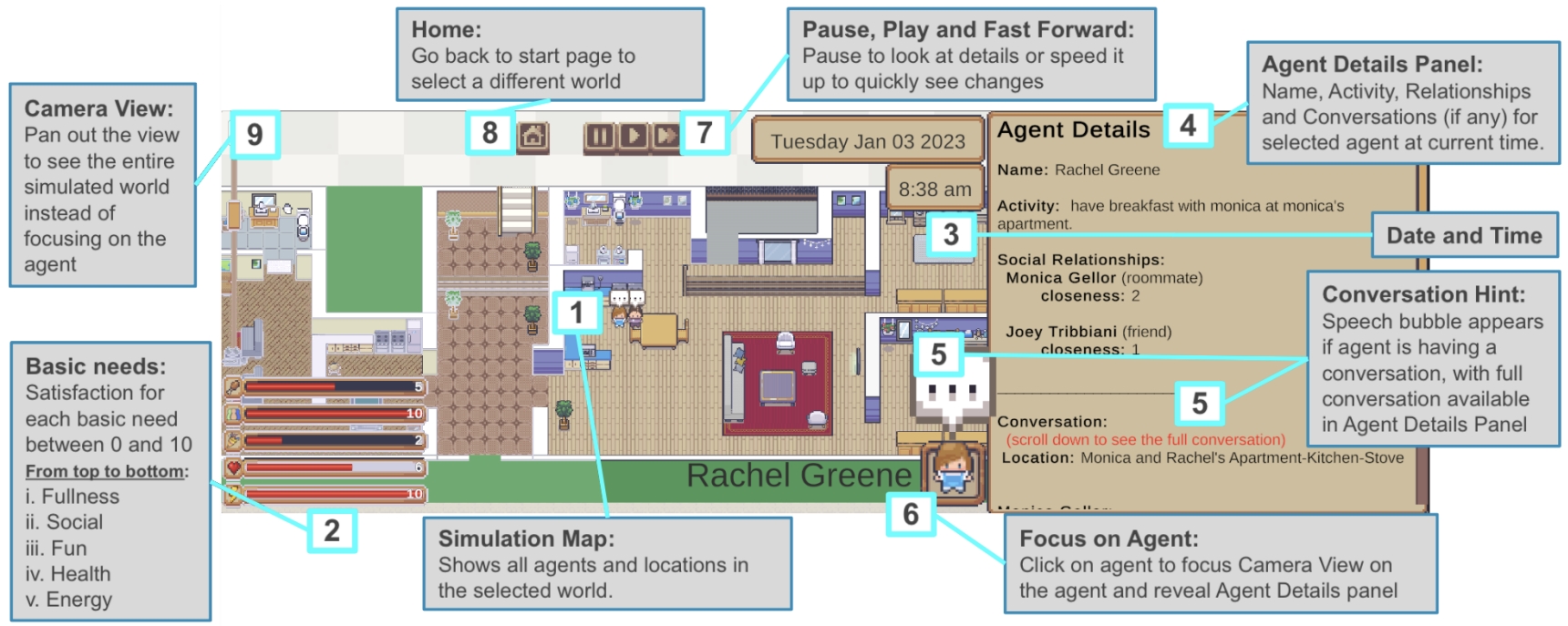
This image depicts a user interface (UI) for a simulation game, likely resembling *The Sims*. The screen shows a top-down view of a simulated apartment, agent details, and interactive controls. Key elements include a simulation map, agent statistics, basic needs indicators, and UI annotations explaining functionality.
### Components/Axes
1. **Simulation Map**
- Top-down view of an apartment with labeled rooms (e.g., kitchen, living room, bathroom).
- Annotations (1–9) point to UI elements with explanatory text.
- Example: "1. Focus on Agent: Click on agent to focus Camera View on the agent and reveal Agent Details panel."
2. **Agent Details Panel**
- Displays information about the selected agent (Rachel Greene).
- Fields include:
- **Name**: Rachel Greene
- **Activity**: "have breakfast with monica at monica's apartment."
- **Social Relationships**:
- Monica Gellor (roommate, closeness: 2)
- Joey Tribbiani (friend, closeness: 1)
- **Conversation**: Location specified as "Monica and Rachel's Apartment-Kitchen-Stove."
3. **Basic Needs Indicators**
- Five horizontal bars representing satisfaction levels (0–10) for:
- Fullness (5/10)
- Social (10/10)
- Fun (2/10)
- Health (6/10)
- Energy (10/10)
4. **UI Controls**
- **Home**: "Go back to start page to select a different world."
- **Pause/Play/Fast Forward**: "Pause to look at details or speed it up to quickly see changes."
- **Date and Time**: "Tuesday Jan 03 2023, 8:38 am."
- **Conversation Hint**: Speech bubble appears during conversations; full conversation available in Agent Details Panel.
### Detailed Analysis
- **Agent Activity**: Rachel Greene is engaged in breakfast with Monica at her apartment.
- **Social Dynamics**:
- Monica Gellor (roommate) has a closeness rating of 2.
- Joey Tribbiani (friend) has a closeness rating of 1.
- **Need Satisfaction**:
- Social and Energy are fully satisfied (10/10).
- Fun is critically low (2/10), suggesting potential for boredom or disengagement.
- **UI Functionality**:
- Annotations (1–9) guide user interaction, such as focusing on agents, pausing the simulation, or navigating the world.
- The simulation map (labeled "2") shows all agents and locations in the selected world.
### Key Observations
- **High Social Satisfaction**: Despite low closeness ratings with friends, Rachel’s social need is fully met, possibly due to ongoing interactions.
- **Low Fun Need**: Indicates Rachel may require new activities or stimuli to avoid dissatisfaction.
- **Conversation Context**: The conversation occurs in the kitchen-stove area, linking activity and location data.
- **Temporal Context**: The simulation is paused at 8:38 AM on January 3, 2023, allowing detailed observation.
### Interpretation
This interface emphasizes real-time monitoring and control of simulated agents. The low Fun need suggests Rachel may soon experience negative mood effects, requiring intervention (e.g., introducing entertainment). The social relationships panel highlights the importance of closeness metrics in shaping interactions. The UI’s granular annotations (e.g., "Camera View" for world exploration) imply a design focused on player immersion and strategic management of agent needs. The paused state allows players to analyze data without time pressure, reinforcing the game’s emphasis on deliberate decision-making.