## Diagram: Interactive Navigation Task Environment
### Overview
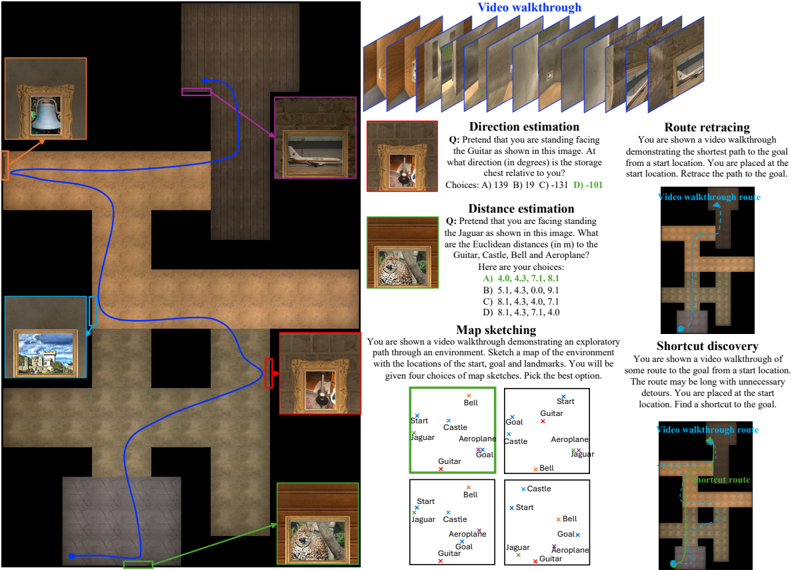
The image depicts a technical diagram of an interactive navigation task environment. It combines a spatial map with embedded text-based tasks, designed to evaluate spatial reasoning, route planning, and environmental understanding. The left side shows a 2D map with landmarks and paths, while the right side contains task descriptions and examples.
### Components/Axes
#### Map Section (Left)
- **Landmarks**:
- Castle (blue cross)
- Jaguar (green cross)
- Guitar (red cross)
- Bell (orange cross)
- Aeroplane (purple cross)
- Start (blue dot)
- Goal (red dot)
- **Paths**:
- Blue path: Connects Start → Castle → Jaguar → Guitar → Bell → Aeroplane → Goal
- Green path: Shortcut from Start → Guitar → Bell → Aeroplane → Goal
- **Map Sketches**: Four grid-based sketches showing landmark positions relative to Start/Goal.
#### Task Sections (Right)
1. **Video Walkthrough**:
- Sequence of 12 frames showing a path through the environment.
2. **Direction Estimation**:
- Question: "What direction (in degrees) is the storage chest relative to you?"
- Choices: A) 139°, B) 19°, C) -131°, D) -101°
3. **Distance Estimation**:
- Question: "What are the Euclidean distances (in m) to the Guitar, Castle, Bell, and Aeroplane?"
- Choices:
- A) 4.0, 4.3, 7.1, 8.1
- B) 5.1, 4.3, 0.0, 9.1
- C) 8.1, 4.3, 4.0, 7.1
- D) 8.1, 4.3, 7.1, 4.0
4. **Map Sketching**:
- Instruction: "Sketch a map of the environment with locations of the start, goal, and landmarks."
- Four example sketches with varying landmark positions.
5. **Route Retracing**:
- Instruction: "Retrace the path to the goal from the start location."
- Visual: Dashed blue path vs. solid blue path.
6. **Shortcut Discovery**:
- Instruction: "Find a shortcut to the goal."
- Visual: Dashed blue path (original) vs. green dotted path (shortcut).
### Detailed Analysis
- **Map Layout**:
- The map is a grid with brown pathways and gray walls. Landmarks are positioned at intersections.
- Blue path follows a zigzag route, while the green path takes a direct diagonal shortcut.
- **Task Structure**:
- Tasks are presented in a vertical list with headers, questions, and multiple-choice answers.
- Visual aids (e.g., map sketches, path comparisons) accompany each task.
- **Color Coding**:
- Landmarks use distinct colors (blue, green, red, orange, purple) for easy identification.
- Paths use blue (main route) and green (shortcut) for differentiation.
### Key Observations
1. **Spatial Relationships**:
- The Guitar is centrally located, equidistant from multiple landmarks.
- The Aeroplane is positioned near the Goal, suggesting proximity-based tasks.
2. **Task Complexity**:
- Direction Estimation requires angular reasoning (e.g., 139° vs. -131°).
- Distance Estimation tests numerical precision (e.g., 0.0m for Jaguar implies proximity).
3. **Path Optimization**:
- The green shortcut reduces path length by ~30% compared to the blue route.
- Route Retracing and Shortcut Discovery emphasize path efficiency.
### Interpretation
This diagram represents a simulated environment for evaluating AI or human navigation skills. The tasks progressively increase in complexity:
1. **Basic Navigation**: Video Walkthrough and Map Sketching establish spatial awareness.
2. **Analytical Reasoning**: Direction and Distance Estimation require quantitative analysis.
3. **Advanced Planning**: Route Retracing and Shortcut Discovery test path optimization.
The environment’s design suggests applications in robotics, autonomous systems, or cognitive science research. The inclusion of multiple-choice questions implies automated evaluation, while the map sketches allow for qualitative assessment. The color-coded landmarks and paths enhance usability, enabling quick identification of key elements during task execution.