## Diagram: Image Editing and Robot Policy Instructions
### Overview
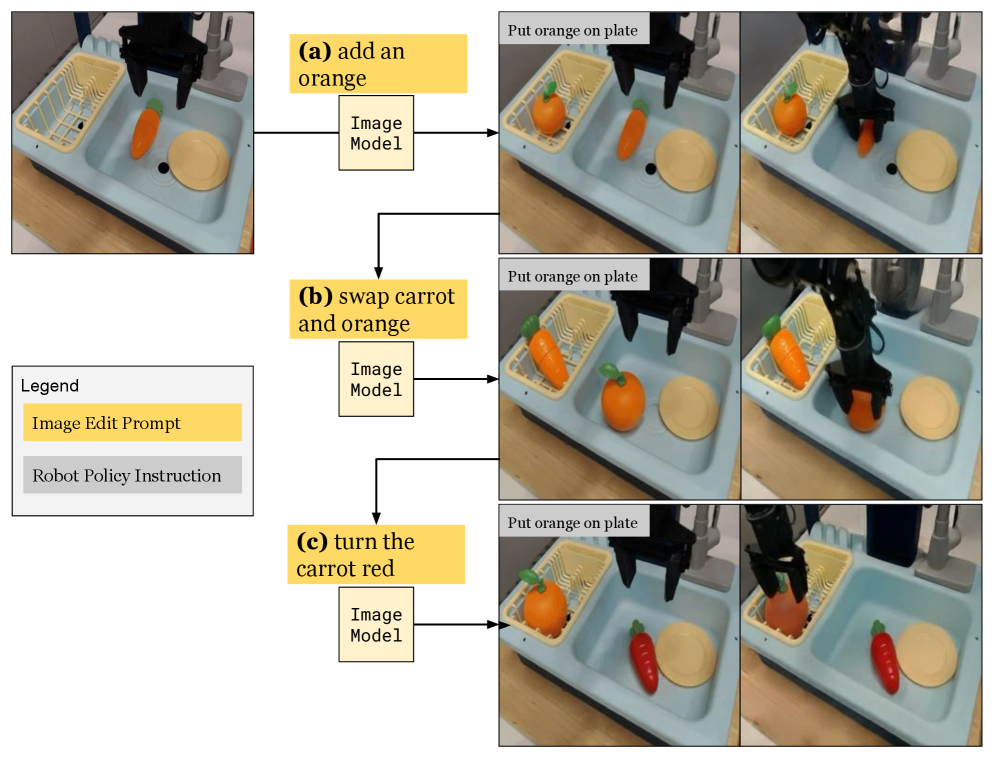
The image presents a diagram illustrating the interaction between image editing prompts and robot policy instructions. It shows how different image editing prompts lead to different robot actions, specifically manipulating objects (orange and carrot) in a sink. The diagram is structured into three scenarios, each demonstrating a different image editing prompt and its corresponding robot policy execution.
### Components/Axes
* **Legend:** Located in the bottom-left corner.
* Yellow: "Image Edit Prompt"
* Gray: "Robot Policy Instruction"
* **Image Edit Prompts:** Represented by yellow boxes.
* (a) add an orange
* (b) swap carrot and orange
* (c) turn the carrot red
* **Image Model:** Represented by white boxes, placed below each image edit prompt.
* Labeled "Image Model" in each scenario.
* **Robot Policy Instruction:** Represented by a sequence of two images showing the robot's actions.
* "Put orange on plate" is the instruction displayed above each sequence of images.
* **Objects:**
* Orange
* Carrot
* Plate
* Sink
### Detailed Analysis
**Scenario (a): add an orange**
* **Image Edit Prompt:** "(a) add an orange" (yellow box)
* **Image Model:** "Image Model" (white box)
* **Robot Policy Instruction:** "Put orange on plate"
* **Initial State:** A carrot and a plate are in the sink.
* **Intermediate State:** An orange is added to the sink, and the robot arm is picking up the orange.
* **Final State:** The orange is placed on the plate.
**Scenario (b): swap carrot and orange**
* **Image Edit Prompt:** "(b) swap carrot and orange" (yellow box)
* **Image Model:** "Image Model" (white box)
* **Robot Policy Instruction:** "Put orange on plate"
* **Initial State:** A carrot and an orange are in the sink.
* **Intermediate State:** The robot arm is picking up the orange.
* **Final State:** The orange is placed on the plate, and the carrot is in the orange's initial position.
**Scenario (c): turn the carrot red**
* **Image Edit Prompt:** "(c) turn the carrot red" (yellow box)
* **Image Model:** "Image Model" (white box)
* **Robot Policy Instruction:** "Put orange on plate"
* **Initial State:** A carrot and an orange are in the sink.
* **Intermediate State:** The robot arm is picking up the orange.
* **Final State:** The orange is placed on the plate, and the carrot is now red.
### Key Observations
* Each scenario starts with a different image editing prompt.
* The "Image Model" box is consistent across all scenarios.
* The robot policy instruction "Put orange on plate" is the same for all scenarios, but the initial state and the final state of the sink contents differ based on the image editing prompt.
* The robot arm is consistently shown picking up the orange in the intermediate state.
### Interpretation
The diagram demonstrates how image editing prompts can be used to influence robot behavior. Even with the same robot policy instruction ("Put orange on plate"), different image editing prompts lead to different initial states and, consequently, different actions by the robot. This highlights the potential of using image editing as a way to guide and control robot tasks. The diagram suggests a system where an image model interprets the image editing prompt and translates it into a specific robot policy execution. The consistent "Image Model" box implies that the same model is used for all prompts, suggesting a modular and reusable system. The scenarios show that the system can handle object addition, object swapping, and object property modification (color change).