## Diagram: Sequential Image Editing for Robot Policy Instruction
### Overview
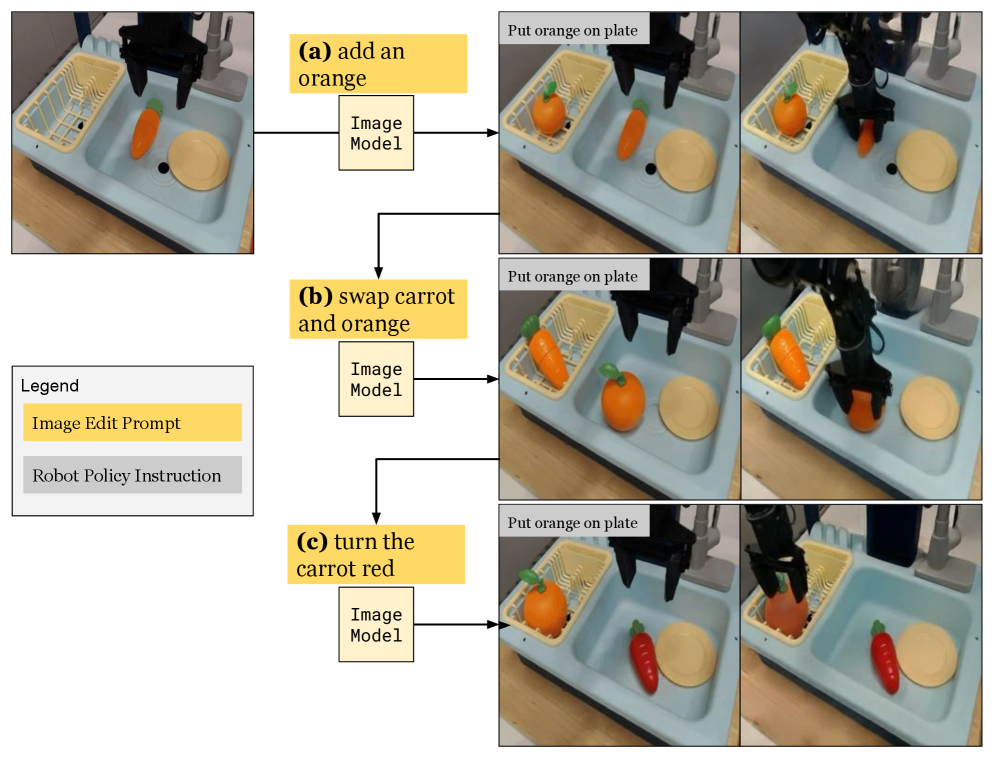
The image is a technical diagram illustrating a three-step process where natural language prompts are used to edit an initial scene image via an "Image Model," and the resulting edited image is then used to generate a "Robot Policy Instruction" for a robotic arm to perform a physical task. The diagram demonstrates a method for guiding robot actions through visual scene modifications rather than direct reprogramming.
### Components/Axes
The diagram is organized into a left column containing a legend and a main area with three horizontal rows, labeled (a), (b), and (c). Each row follows the same flow:
1. **Input:** An initial photograph of a scene.
2. **Process:** A yellow "Image Edit Prompt" box points to an "Image Model" box.
3. **Output:** Two sequential photographs showing the result of the image edit and the subsequent robot action.
**Legend (Located in the middle-left):**
* **Title:** "Legend"
* **Yellow Box:** "Image Edit Prompt"
* **Gray Box:** "Robot Policy Instruction"
**Row Labels:**
* **(a)** add an orange
* **(b)** swap carrot and orange
* **(c)** turn the carrot red
**Recurring Text in Output Images:**
* A gray text box in the top-left corner of each output image reads: "Put orange on plate". This is the constant "Robot Policy Instruction."
### Detailed Analysis
The diagram details three distinct editing scenarios applied to the same initial scene.
**Initial Scene (Common to all rows):**
A light blue plastic sink or tray contains:
* A yellow dish rack on the left.
* An orange carrot lying in the center.
* A beige plate on the right.
* A black robotic gripper is positioned above the scene.
**Row (a): "add an orange"**
1. **Edit Prompt:** "add an orange" (Yellow box).
2. **Image Model Output:** The scene is edited to include a new orange fruit placed inside the yellow dish rack. The original carrot and plate remain.
3. **Robot Action:** The robotic arm is shown descending, its gripper holding the newly added orange, moving it toward the plate.
**Row (b): "swap carrot and orange"**
1. **Edit Prompt:** "swap carrot and orange" (Yellow box).
2. **Image Model Output:** The positions of the carrot and the orange are exchanged. The orange is now in the center of the tray, and the carrot is in the dish rack.
3. **Robot Action:** The robotic arm is shown descending, its gripper holding the orange (now from the center of the tray), moving it toward the plate.
**Row (c): "turn the carrot red"**
1. **Edit Prompt:** "turn the carrot red" (Yellow box).
2. **Image Model Output:** The color of the carrot is changed from orange to red. Its position and the position of the orange in the dish rack remain unchanged from the initial state of row (a).
3. **Robot Action:** The robotic arm is shown descending, its gripper holding the now-red carrot, moving it toward the plate.
### Key Observations
1. **Consistent Robot Instruction:** Despite three different visual edits to the scene, the "Robot Policy Instruction" text ("Put orange on plate") remains identical in all output sequences.
2. **Action-Object Discrepancy:** In rows (a) and (b), the robot correctly acts on the *orange* as per the instruction. However, in row (c), the robot acts on the *red carrot*, which contradicts the literal text instruction but aligns with the visual salience created by the edit ("turn the carrot red").
3. **Spatial Consistency:** The plate (the target location) and the dish rack (a container) maintain their positions across all edits. The edits only manipulate the objects (carrot, orange) within this fixed environment.
4. **Process Flow:** The arrows clearly define a unidirectional pipeline: Text Prompt → Image Model → Edited Image → Robot Policy → Physical Action.
### Interpretation
This diagram illustrates a research concept in **vision-based robotic manipulation**, specifically exploring **instruction following via visual scene editing**.
* **Core Idea:** Instead of translating a language command directly into robot actions, the system first uses the command to *modify a visual representation* of the world. The robot's policy is then conditioned on this edited image, not the original text. This decouples high-level intent (the edit prompt) from low-level control.
* **What the Data Suggests:** The experiment shows that the robot's behavior is driven by the *visual outcome* of the edit, not the semantic meaning of the original instruction. In row (c), the instruction "Put orange on plate" is overridden by the visually dominant red carrot, which the robot then moves. This highlights the power and potential pitfall of visual conditioning: the robot follows what it *sees* as the salient object post-edit.
* **Significance:** This approach could make robot systems more flexible. A single, fixed "put object on plate" policy can be guided to manipulate different objects by simply editing the scene image with a prompt, without retraining the low-level policy. However, it also reveals a need for robust alignment between the visual edit's intent and the downstream policy's interpretation to avoid errors like the one in row (c).
* **Underlying Mechanism:** The "Image Model" is likely a text-guided image editing AI (e.g., a diffusion model). The "Robot Policy" is a pre-trained vision-based control system. The diagram proposes using the former as a "visual planner" for the latter.