TECHNICAL ASSET FINGERPRINT
0f342b1603812b8fe8877b23
Click to view fullscreen
Press ESC or click to close
FOUND IN PAPERS
EXPERT: gemini-2.0-flash VERSION 1
RUNTIME: nugit/gemini/gemini-2.0-flash
INTEL_VERIFIED
## Flow Diagram: Expert System Response Generation
### Overview
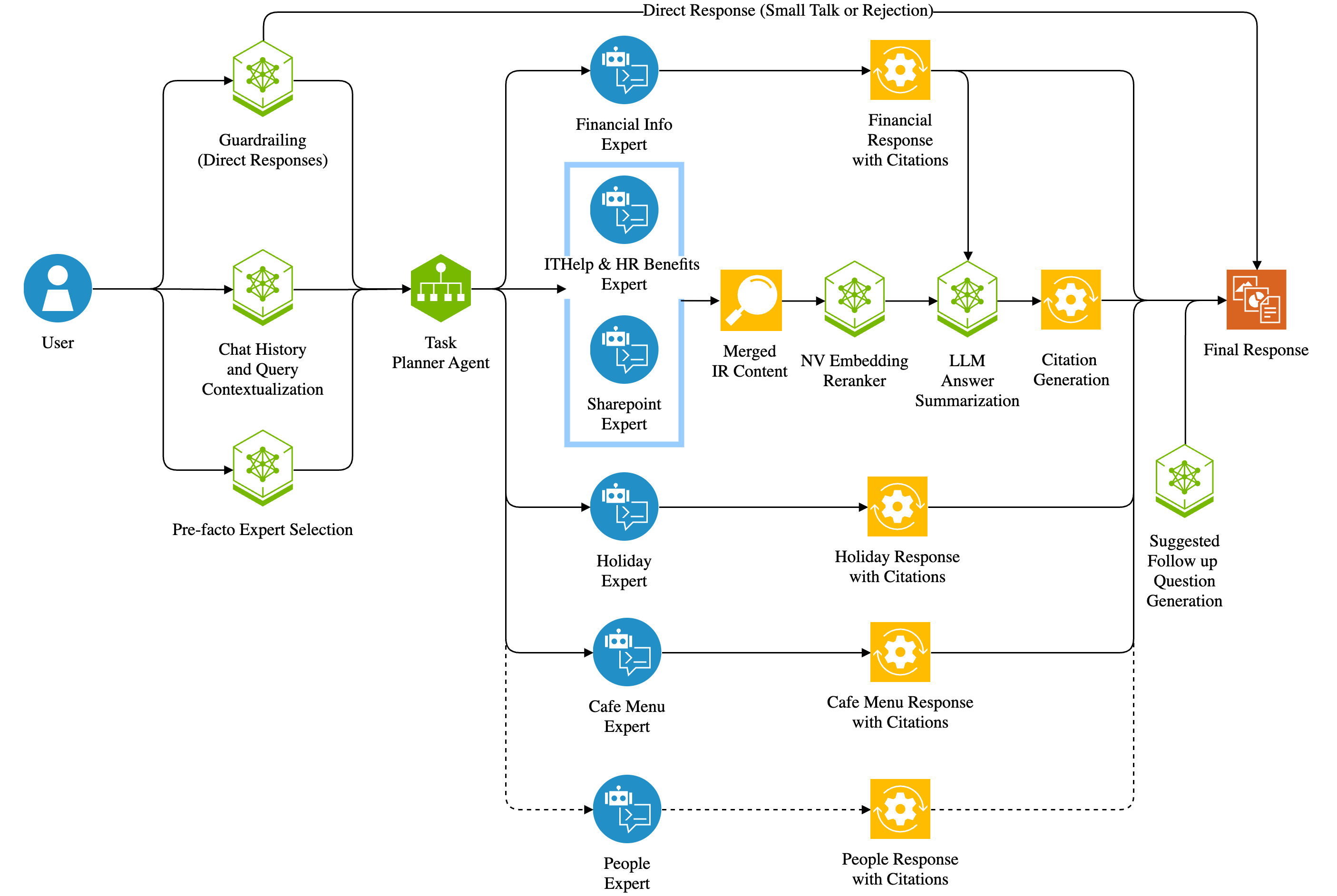
The image is a flow diagram illustrating the process of generating a response to a user query within an expert system. The diagram outlines the steps from initial user input to the final response, including various expert modules, data processing stages, and response generation components.
### Components/Axes
* **User:** Represents the initial user input.
* **Chat History and Query Contextualization:** A green hexagon that processes the user's input and chat history.
* **Task Planner Agent:** A green hexagon that plans the tasks required to answer the user's query.
* **Pre-facto Expert Selection:** A green hexagon that selects the appropriate expert modules based on the query.
* **Guardrailing (Direct Responses):** A green hexagon that provides direct responses or rejections for small talk.
* **Financial Info Expert:** A blue circle containing a robot icon, representing an expert module for financial information.
* **ITHelp & HR Benefits Expert:** A blue circle containing a robot icon, representing an expert module for IT help and HR benefits. This module has a light blue outline.
* **Sharepoint Expert:** A blue circle containing a robot icon, representing an expert module for Sharepoint information. This module has a light blue outline.
* **Holiday Expert:** A blue circle containing a robot icon, representing an expert module for holiday information.
* **Cafe Menu Expert:** A blue circle containing a robot icon, representing an expert module for cafe menu information.
* **People Expert:** A blue circle containing a robot icon, representing an expert module for people information.
* **Merged IR Content:** A yellow magnifying glass, representing the merging of information retrieval content.
* **NV Embedding Reranker:** A green hexagon that reranks the embedded content.
* **LLM Answer Summarization:** A green hexagon that summarizes the answer using a Large Language Model.
* **Citation Generation:** A yellow gear that generates citations for the response.
* **Financial Response with Citations:** A yellow gear that provides a financial response with citations.
* **Holiday Response with Citations:** A yellow gear that provides a holiday response with citations.
* **Cafe Menu Response with Citations:** A yellow gear that provides a cafe menu response with citations.
* **People Response with Citations:** A yellow gear that provides a people response with citations.
* **Suggested Follow up Question Generation:** A green hexagon that generates suggested follow-up questions.
* **Final Response:** An orange rectangle representing the final output to the user.
* **Direct Response (Small Talk or Rejection):** A text label indicating a direct response path.
### Detailed Analysis
1. **User Input:** The process begins with the user's query, represented by a blue person icon on the left.
2. **Contextualization:** The query is then processed by the "Chat History and Query Contextualization" module (green hexagon).
3. **Task Planning:** The contextualized query is passed to the "Task Planner Agent" (green hexagon).
4. **Expert Selection:** The "Pre-facto Expert Selection" module (green hexagon) determines the relevant expert modules.
5. **Expert Modules:**
* **Financial Info Expert:** If the query relates to financial information, this module (blue circle) is activated. It leads to "Financial Response with Citations" (yellow gear).
* **ITHelp & HR Benefits Expert:** For IT help or HR benefits queries, this module (blue circle with light blue outline) is used. It leads to "Merged IR Content" (yellow magnifying glass).
* **Sharepoint Expert:** For Sharepoint queries, this module (blue circle with light blue outline) is used. It leads to "Merged IR Content" (yellow magnifying glass).
* **Holiday Expert:** For holiday-related queries, this module (blue circle) is activated. It leads to "Holiday Response with Citations" (yellow gear).
* **Cafe Menu Expert:** For cafe menu queries, this module (blue circle) is activated. It leads to "Cafe Menu Response with Citations" (yellow gear).
* **People Expert:** For people-related queries, this module (blue circle) is activated. It leads to "People Response with Citations" (yellow gear).
6. **Data Processing:**
* **Merged IR Content:** The output from the "ITHelp & HR Benefits Expert" and "Sharepoint Expert" modules is processed by the "Merged IR Content" module (yellow magnifying glass).
* **NV Embedding Reranker:** The merged content is then reranked by the "NV Embedding Reranker" (green hexagon).
* **LLM Answer Summarization:** The reranked content is summarized by the "LLM Answer Summarization" module (green hexagon).
* **Citation Generation:** Citations are generated by the "Citation Generation" module (yellow gear).
7. **Response Generation:**
* The outputs from the "Financial Response with Citations," "Holiday Response with Citations," "Cafe Menu Response with Citations," and "People Response with Citations" modules, as well as the "Citation Generation" module, are combined to form the "Final Response" (orange rectangle).
8. **Follow-up Questions:** The "Suggested Follow up Question Generation" module (green hexagon) generates potential follow-up questions based on the response.
9. **Direct Response:** The "Guardrailing (Direct Responses)" module (green hexagon) can provide direct responses or rejections for small talk, bypassing the expert modules.
### Key Observations
* The diagram illustrates a modular approach to response generation, with different expert modules handling specific types of queries.
* The system incorporates several data processing steps, including content merging, reranking, and summarization, to improve the quality of the response.
* The inclusion of citation generation ensures that the response is well-supported and credible.
* The system can handle both complex queries requiring expert knowledge and simple queries that can be answered directly.
### Interpretation
The flow diagram depicts a sophisticated expert system designed to provide accurate and relevant responses to user queries. The system leverages a combination of expert modules, data processing techniques, and response generation components to deliver high-quality results. The modular design allows for easy expansion and adaptation to new domains of knowledge. The inclusion of follow-up question generation enhances the user experience by encouraging further interaction and exploration. The system is designed to handle a variety of queries, from simple small talk to complex requests requiring expert knowledge.
DECODING INTELLIGENCE...
EXPERT: nemotron-free VERSION 1
RUNTIME: free/nvidia/nemotron-nano-12b-v2-vl:free
INTEL_VERIFIED
## Flowchart: AI-Powered Response Generation System
### Overview
The diagram illustrates a modular AI system for generating context-aware responses to user queries. It features a user interface, contextualization module, task planner agent, domain-specific experts, and response generation components. The system employs a hybrid approach combining direct responses with expert-driven content synthesis.
### Components/Axes
1. **User Interface** (Blue Circle)
- Represents end-user interaction point
2. **Contextualization Module** (Green Hexagon)
- Processes: Chat History Analysis, Query Contextualization
3. **Task Planner Agent** (Green Hexagon)
- Coordinates expert selection and response orchestration
4. **Domain Experts** (Blue Circles)
- Financial Info Expert
- ITHelp & HR Benefits Expert
- Sharepoint Expert
- Holiday Expert
- Cafe Menu Expert
- People Expert
5. **Response Generation Pipeline** (Orange Squares)
- Financial Response with Citations
- Holiday Response with Citations
- Cafe Menu Response with Citations
- People Response with Citations
6. **Content Synthesis Modules** (Green Hexagons)
- Merged IR Content
- NV Embedding Reranker
- LLM Answer Summarization
- Citation Generation
7. **Output Components** (Red Square)
- Final Response
- Suggested Follow-up Question Generation
### Flow Direction
- Left-to-right primary flow: User → Contextualization → Task Planner → Expert Selection → Response Generation → Final Output
- Feedback loops exist between experts and synthesis modules
- Dotted lines indicate optional/fallback pathways
### Detailed Analysis
1. **User Input** (Blue Circle)
- Initiates interaction with system
- Connects to contextualization module
2. **Contextualization Module** (Green Hexagon)
- Processes historical chat data
- Analyzes query context before task planning
3. **Task Planner Agent** (Green Hexagon)
- Central decision node for expert selection
- Connects to all domain experts
4. **Domain Expert Pathways**
- Each expert has dedicated response generation pipeline
- All experts feed into content synthesis modules
5. **Content Synthesis** (Green Hexagons)
- Merged IR Content: Combines multiple information sources
- NV Embedding Reranker: Prioritizes relevant information
- LLM Answer Summarization: Condenses information
- Citation Generation: Attributes sources
6. **Output Generation**
- Final Response: Primary output to user
- Suggested Follow-up: Optional secondary output
### Key Observations
1. **Modular Architecture**: System decomposes complex queries into specialized components
2. **Expert-Driven Accuracy**: Domain-specific experts ensure factual precision
3. **Citation Integration**: All expert responses include source attribution
4. **Fallback Mechanism**: Direct responses available when no expert matches
5. **Context Awareness**: Chat history integration maintains conversation continuity
### Interpretation
This system demonstrates a sophisticated approach to AI response generation by:
1. **Specialization**: Using domain experts for factual accuracy
2. **Contextual Understanding**: Maintaining conversation history for coherence
3. **Transparency**: Providing citations for verifiability
4. **Flexibility**: Combining expert responses with direct answers
5. **User Engagement**: Suggesting follow-up questions to extend interaction
The architecture suggests a balance between automated responses and human-like expertise, with the task planner agent acting as an intelligent routing system. The dotted line from "People Expert" indicates potential uncertainty in expert selection for certain queries, allowing fallback to direct responses when needed.
DECODING INTELLIGENCE...