## Diagram: Malware Evasion Algorithm
### Overview
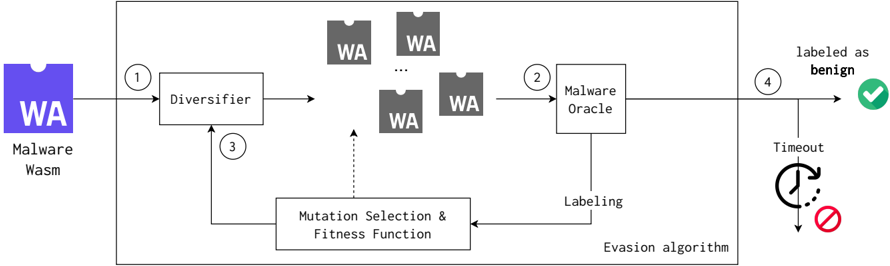
The image is a diagram illustrating a malware evasion algorithm. It shows the process of transforming a malware sample to evade detection by a malware oracle. The process involves diversification, mutation, selection, and fitness evaluation, ultimately aiming to have the malware sample labeled as benign.
### Components/Axes
* **Input:** Malware Wasm (WebAssembly) - Represented by a purple icon with "WA" inside.
* **Diversifier:** A process that generates multiple variations of the input malware.
* **Malware Oracle:** A component that labels the malware samples.
* **Mutation Selection & Fitness Function:** A process that selects and mutates malware samples based on their fitness (ability to evade detection).
* **Output:** Labeled as benign (green checkmark) or Timeout (clock icon with a red prohibition sign).
* **Flow Arrows:** Numbered 1 through 4, indicating the sequence of steps.
### Detailed Analysis
1. **Malware Wasm:** A purple icon labeled "WA" and "Malware Wasm" represents the initial malware sample.
2. **Step 1:** The malware sample is fed into the "Diversifier" (arrow labeled "1").
3. **Diversifier:** The "Diversifier" block generates multiple variations of the malware, represented by gray icons labeled "WA".
4. **Step 2:** These variations are then fed into the "Malware Oracle" (arrow labeled "2").
5. **Malware Oracle:** The "Malware Oracle" labels the samples. The "Labeling" output from the Malware Oracle feeds into the "Mutation Selection & Fitness Function".
6. **Mutation Selection & Fitness Function:** This block selects and mutates the malware samples. The output of this block feeds back into the "Diversifier" (arrow labeled "3"). A dotted arrow also connects this block to the gray "WA" icons, suggesting a selection process.
7. **Step 4:** The output of the "Malware Oracle" is either "labeled as benign" (arrow labeled "4" leading to a green checkmark) or "Timeout" (leading to a clock icon with a red prohibition sign).
8. **Evasion Algorithm:** The entire process within the larger rectangular box is labeled as the "Evasion algorithm".
### Key Observations
* The diagram illustrates a closed-loop feedback system where the malware is continuously mutated and tested against the "Malware Oracle" until it is either labeled as benign or a timeout occurs.
* The "Diversifier" plays a key role in generating variations of the malware.
* The "Mutation Selection & Fitness Function" drives the evolution of the malware towards evading detection.
### Interpretation
The diagram depicts a typical malware evasion strategy using a genetic algorithm approach. The malware is diversified, and then a fitness function (based on the "Malware Oracle's" labeling) guides the mutation and selection process. The goal is to evolve the malware to a state where it is no longer recognized as malicious by the "Malware Oracle". The "Timeout" condition suggests a limit on the number of iterations or the time spent on the evasion process. This diagram highlights the iterative nature of malware development and the constant arms race between malware authors and security systems.