## Image Comparison: Good vs. Bad Examples of Simulated Actions
### Overview
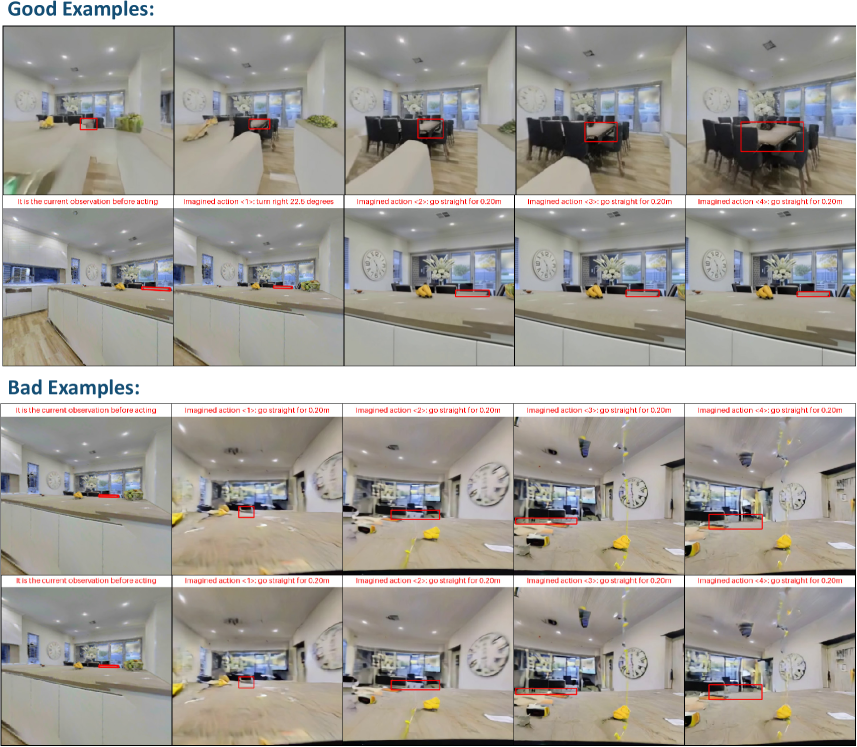
The image presents a comparison of "Good Examples" and "Bad Examples" of a simulated agent performing actions in an indoor environment. Each example consists of a sequence of images showing the agent's current observation and the imagined outcomes of subsequent actions. The "Good Examples" demonstrate a coherent and realistic progression of actions, while the "Bad Examples" show unrealistic or flawed simulations.
### Components/Axes
The image is divided into two main sections: "Good Examples" at the top and "Bad Examples" at the bottom. Each section contains multiple rows of images. Each row represents a different scenario. Within each row, there are five images:
1. "It is the current observation before acting" - The initial view of the environment.
2. "Imagined action <1>:" - The result of the first imagined action.
3. "Imagined action <2>:" - The result of the second imagined action.
4. "Imagined action <3>:" - The result of the third imagined action.
5. "Imagined action <4>:" - The result of the fourth imagined action.
Each image contains a red rectangular bounding box highlighting a specific area of interest.
### Detailed Analysis or ### Content Details
**Good Examples:**
* **Row 1:**
* Image 1: "It is the current observation before acting." - Shows a living room with a sofa, dining table, and chairs. The red box is on the sofa.
* Image 2: "Imagined action <1>: turn right 22.5 degrees." - The view has shifted slightly to the right. The red box is on the sofa.
* Image 3: "Imagined action <2>: go straight for 0.20m." - The view has moved closer to the dining table. The red box is on the dining table.
* Image 4: "Imagined action <3>: go straight for 0.20m." - The view has moved closer to the dining table. The red box is on the dining table.
* Image 5: "Imagined action <4>: go straight for 0.20m." - The view has moved closer to the dining table. The red box is on the dining table.
* **Row 2:**
* Image 1: "It is the current observation before acting." - Shows a kitchen counter with objects on it. The red box is on the counter.
* Image 2: "Imagined action <1>: turn right 22.5 degrees." - The view has shifted slightly to the right. The red box is on the counter.
* Image 3: "Imagined action <2>: go straight for 0.20m." - The view has moved slightly forward. The red box is on the counter.
* Image 4: "Imagined action <3>: go straight for 0.20m." - The view has moved slightly forward. The red box is on the counter.
* Image 5: "Imagined action <4>: go straight for 0.20m." - The view has moved slightly forward. The red box is on the counter.
**Bad Examples:**
* **Row 1:**
* Image 1: "It is the current observation before acting." - Shows a living room similar to the first "Good Examples" row. The red box is on the sofa.
* Image 2: "Imagined action <1>: go straight for 0.20m." - The view is distorted and blurry. The red box is on the sofa.
* Image 3: "Imagined action <2>: go straight for 0.20m." - The view is distorted and blurry. The red box is on the sofa.
* Image 4: "Imagined action <3>: go straight for 0.20m." - The view is distorted and blurry. The red box is on the sofa.
* Image 5: "Imagined action <4>: go straight for 0.20m." - The view is distorted and blurry. The red box is on the sofa.
* **Row 2:**
* Image 1: "It is the current observation before acting." - Shows a kitchen counter similar to the second "Good Examples" row. The red box is on the counter.
* Image 2: "Imagined action <1>: go straight for 0.20m." - The view is distorted and blurry. The red box is on the counter.
* Image 3: "Imagined action <2>: go straight for 0.20m." - The view is distorted and blurry. The red box is on the counter.
* Image 4: "Imagined action <3>: go straight for 0.20m." - The view is distorted and blurry. The red box is on the counter.
* Image 5: "Imagined action <4>: go straight for 0.20m." - The view is distorted and blurry. The red box is on the counter.
### Key Observations
* The "Good Examples" demonstrate a realistic simulation of actions, with smooth transitions and clear views.
* The "Bad Examples" show distorted and blurry views, indicating a failure in the simulation process.
* The red bounding boxes highlight areas of interest, but their specific purpose is not explicitly stated.
### Interpretation
The image illustrates the importance of accurate simulation in an agent's ability to understand and interact with its environment. The "Good Examples" suggest that the agent can successfully predict the outcome of its actions, while the "Bad Examples" indicate a breakdown in the simulation process, potentially leading to incorrect decisions. The distortion in the "Bad Examples" could be due to errors in the agent's perception, action execution, or environment modeling. The red bounding boxes likely represent the agent's focus of attention or the objects it is interacting with.