\n
## Diagram: Pony Code Generation Workflow
### Overview
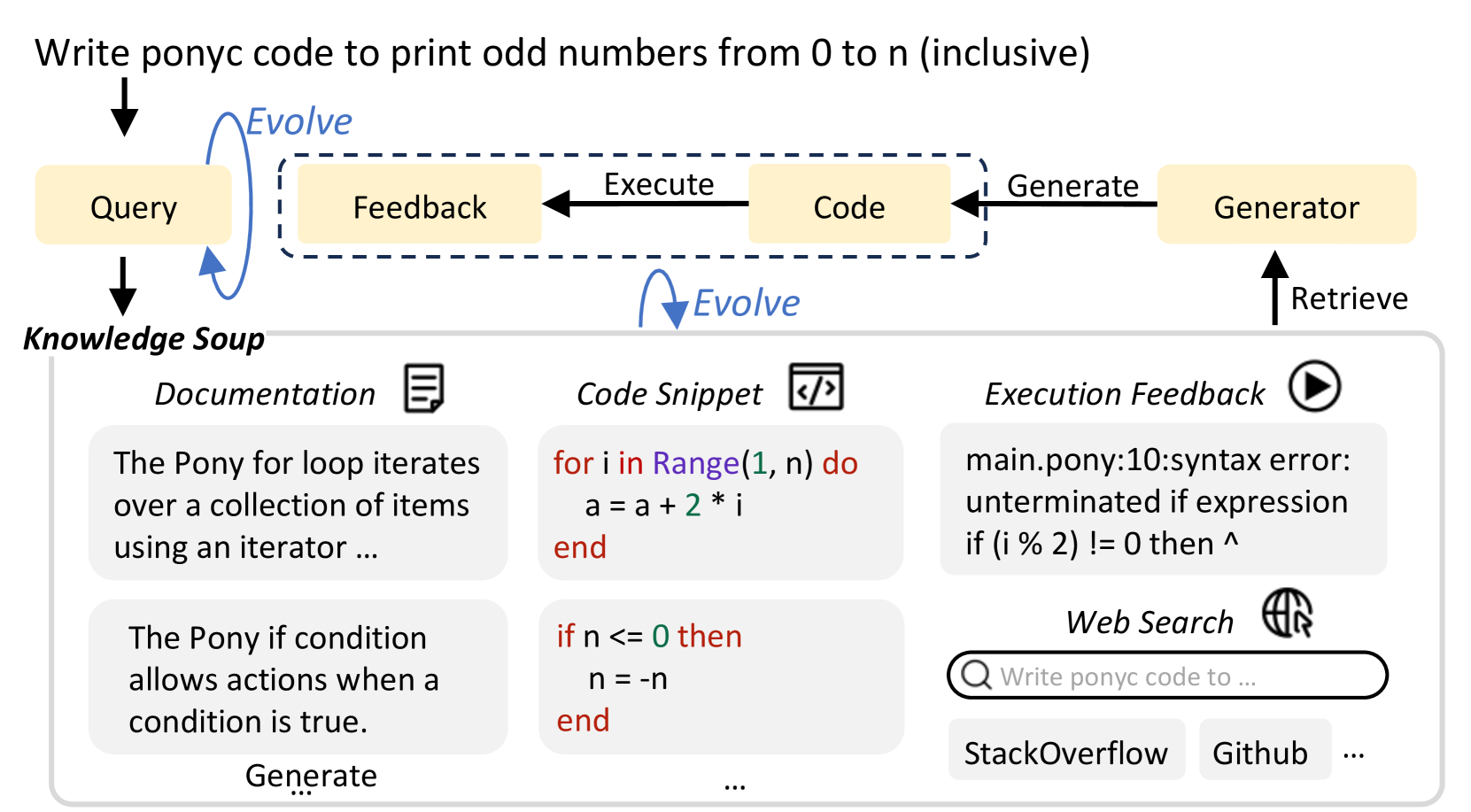
This diagram illustrates a workflow for generating Pony code from a natural language query. It depicts a cyclical process involving a "Generator" interacting with a "Knowledge Soup" and an "Evolve" component, with feedback loops for refinement. The diagram highlights the stages of query input, code generation, execution, and feedback integration.
### Components/Axes
The diagram consists of several key components:
* **Query:** The initial input, a natural language request ("Write ponyc code to print odd numbers from 0 to n (inclusive)").
* **Generator:** A central component responsible for code generation and retrieval.
* **Knowledge Soup:** A repository of information including documentation and code snippets.
* **Evolve:** A component that refines the process through feedback.
* **Code:** The generated Pony code.
* **Execution Feedback:** Error messages and results from code execution.
* **Web Search:** A tool for finding relevant information online.
The diagram uses arrows to indicate the flow of information and processes. The arrows are color-coded:
* Black arrows: represent the primary flow of the process.
* Gray dashed arrows: represent feedback loops.
* Orange arrows: represent the "Execute" and "Generate" actions.
* Blue arrows: represent the "Retrieve" action.
### Detailed Analysis or Content Details
**Top Section (Workflow):**
* **Query Input:** "Write ponyc code to print odd numbers from 0 to n (inclusive)" enters from the top, indicated by a downward-pointing arrow.
* **Generator:** Located in the top-right, the Generator receives the query and produces code.
* **Feedback Loop:** A gray dashed arrow labeled "Feedback" connects the "Code" output back to the "Query" input, indicating a refinement process.
* **Execute:** An orange arrow labeled "Execute" connects the "Code" to the "Evolve" component.
* **Generate:** An orange arrow labeled "Generate" connects the "Evolve" component to the "Generator".
* **Retrieve:** A blue arrow labeled "Retrieve" connects the "Generator" to the "Knowledge Soup".
**Bottom Section (Knowledge Soup):**
* **Documentation:** A rectangular box labeled "Documentation" with a book icon. Contains the text: "The Pony for loop iterates over a collection of items using an iterator ...".
* **Code Snippet:** A rectangular box labeled "Code Snippet" with a code icon. Contains the following Pony code:
```pony
for i in Range(1, n) do
a = a + 2 * i
end
if n <= 0 then
n = -n
end
```
* **Execution Feedback:** A rectangular box labeled "Execution Feedback" with a play icon. Contains the text: "main.pony:10:syntax error: unterminated if expression if (i% 2) != 0 then ^".
* **Web Search:** A rectangular box labeled "Web Search" with a globe icon. Contains the search query: "Write ponyc code to ...". Below are buttons labeled "StackOverflow" and "Github".
### Key Observations
* The diagram emphasizes an iterative process of code generation, execution, and refinement.
* The "Knowledge Soup" provides the Generator with necessary information (documentation, code examples).
* The "Execution Feedback" highlights the importance of error handling and debugging.
* The inclusion of "Web Search" suggests the system can leverage external resources for assistance.
* The diagram shows a syntax error in the generated code, indicating the need for further refinement.
### Interpretation
The diagram illustrates a sophisticated system for automated code generation. It's not a simple one-shot process; instead, it's a continuous cycle of generating code, testing it, receiving feedback (including error messages), and refining the code based on that feedback. The "Knowledge Soup" acts as a crucial resource, providing the system with the information it needs to generate correct and efficient code. The inclusion of web search suggests the system can also learn from and adapt to external knowledge sources. The presence of a syntax error in the "Execution Feedback" demonstrates that the system is not perfect and requires ongoing improvement. This workflow is likely part of a larger AI-powered development environment designed to assist programmers or even automate code creation entirely. The "Evolve" component is key to this process, suggesting a machine learning or optimization algorithm is at play.