## Diagram: PlayStation Controller Layout
### Overview
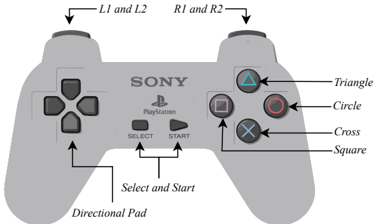
The image is a diagram of a PlayStation controller, labeling its various buttons and directional pad. The controller is light gray, and the labels point to specific features.
### Components/Axes
* **Controller Body:** Light gray, showing the general shape of the PlayStation controller.
* **Directional Pad:** Located on the bottom-left of the controller.
* **Select and Start Buttons:** Positioned in the center of the controller.
* **Triangle Button:** Located on the top-right of the controller; labeled "Triangle". The button is green.
* **Circle Button:** Located on the right of the controller; labeled "Circle". The button is red.
* **Cross Button:** Located on the bottom-right of the controller; labeled "Cross". The button is blue.
* **Square Button:** Located on the left of the controller; labeled "Square". The button is pink.
* **L1 and L2 Buttons:** Located on the top-left of the controller.
* **R1 and R2 Buttons:** Located on the top-right of the controller.
* **Sony PlayStation Logo:** Located in the center of the controller, between the Select and Start buttons.
### Detailed Analysis or Content Details
The diagram provides a clear visual representation of the PlayStation controller layout. Each button and the directional pad are labeled with arrows pointing to their respective locations. The labels are clear and easy to read.
### Key Observations
* The diagram focuses on the button layout and labeling.
* The positioning of the buttons is accurately depicted.
* The color of the Triangle, Circle, Cross, and Square buttons are also shown.
### Interpretation
The diagram serves as a simple and effective guide to the PlayStation controller layout. It is useful for identifying the location of each button and understanding its function. The diagram is straightforward and easy to understand, making it suitable for a wide audience.