## Diagram: Sony PlayStation Controller Layout
### Overview
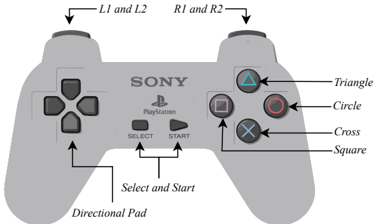
The image is a technical diagram illustrating the button layout and labeling of a Sony PlayStation controller (specifically resembling a DualShock model). It is a grayscale schematic with black text labels and arrows pointing to specific components. The diagram serves as a reference for identifying the names and locations of all primary inputs on the controller.
### Components/Axes
The diagram is organized into labeled regions. All text is in English.
**Top Shoulder Buttons:**
* **Top-Left:** Labeled "L1 and L2" with an arrow pointing to the left shoulder button area.
* **Top-Right:** Labeled "R1 and R2" with an arrow pointing to the right shoulder button area.
**Center Branding:**
* **Center-Top:** The word "SONY" is printed in a bold, sans-serif font.
* **Below "SONY":** The "PlayStation" logo (a stylized "PS" symbol) and the word "PlayStation" are present.
**Central Control Buttons:**
* **Center, below logo:** Two oblong buttons labeled "SELECT" (left) and "START" (right). Arrows from the label "Select and Start" at the bottom point to these two buttons.
**Left Input Cluster:**
* **Left Side:** A cross-shaped directional pad. An arrow from the label "Directional Pad" at the bottom-left points to it.
**Right Action Button Cluster:**
* **Top Button (Green Triangle):** Labeled "Triangle" with an arrow. The button itself contains a green triangle symbol.
* **Right Button (Red Circle):** Labeled "Circle" with an arrow. The button contains a red circle symbol.
* **Bottom Button (Blue Cross):** Labeled "Cross" with an arrow. The button contains a blue "X" symbol.
* **Left Button (Pink Square):** Labeled "Square" with an arrow. The button contains a pink square symbol.
### Detailed Analysis
The diagram is a 2D line drawing with flat shading to indicate form. It does not contain numerical data, charts, or graphs. The information is purely anatomical and nominal.
**Spatial Grounding & Component Isolation:**
* **Header Region (Top):** Contains the shoulder button labels (L1/L2, R1/R2).
* **Main Body Region:**
* **Upper Center:** Branding (SONY, PlayStation).
* **Mid Center:** Select and Start buttons.
* **Left Quadrant:** Directional Pad.
* **Right Quadrant:** The four action buttons (Triangle, Circle, Cross, Square) arranged in a diamond pattern.
* **Footer Region (Bottom):** Contains the labels "Directional Pad" and "Select and Start" with their corresponding arrows.
**Text Transcription:**
All visible text has been extracted and listed in the Components section above. The text is exclusively in English.
### Key Observations
1. **Labeling Convention:** Each primary input has a clear, direct text label connected by an arrow. The action buttons are labeled both by name (e.g., "Triangle") and by their colored symbol.
2. **Symmetry:** The diagram highlights the symmetrical design of the controller, with mirrored shoulder buttons and a balanced layout of the D-pad and action buttons.
3. **Color Coding:** While the diagram is grayscale, the labels for the action buttons reference their standard colors (Green Triangle, Red Circle, Blue Cross, Pink Square), which is critical information for user manuals.
4. **Functional Grouping:** Components are logically grouped: movement (D-pad), primary actions (shape buttons), system controls (Select/Start), and auxiliary triggers (shoulder buttons).
### Interpretation
This diagram is a foundational technical reference for understanding the physical interface of a PlayStation controller. Its purpose is to eliminate ambiguity for a user or developer by providing a definitive map of input names and locations.
* **Relationship Between Elements:** The layout reflects a design philosophy separating movement (left thumb), primary actions (right thumb), and secondary/trigger actions (index fingers). The central placement of Select/Start indicates their system-level, non-gameplay-critical function.
* **Notable Design Choice:** The use of distinct geometric shapes (triangle, circle, cross, square) as primary action buttons, rather than letters or numbers, creates a language-agnostic and visually memorable interface. The accompanying color coding (referenced in text) adds a second layer of quick identification.
* **Utility:** This image would be essential in a user manual, a game development SDK guide, or any technical documentation where precise reference to controller inputs is required. It allows for clear communication (e.g., "press the Triangle button") without relying on a photograph that might have different lighting or angle.