## Diagram: System Architecture for Automated Bookkeeping Task Execution
### Overview
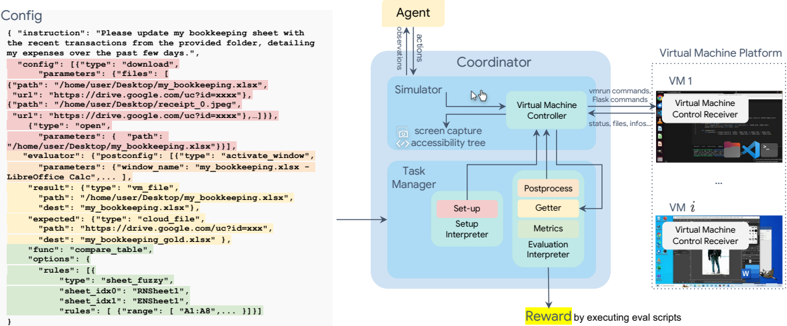
The image depicts a technical system architecture for automating bookkeeping tasks, combining configuration code with a multi-component workflow. The left side shows a configuration snippet for file operations, while the right side illustrates the system's components and data flow.
### Components/Axes
**Left Panel (Configuration Code):**
- **Structure**: JSON-like configuration with color-coded sections:
- **Pink**: Configuration headers (e.g., `"config": {"type": "download", ...}`)
- **Yellow**: File paths/URLs (e.g., `"path": "/home/user/Desktop/my_bookkeeping.xlsx"`)
- **Green**: Evaluation rules (e.g., `"sheet_idx0": "RNSheet1"`)
- **Key Elements**:
- `instruction`: "Please update my bookkeeping sheet..."
- `result`: `"type": "vm_file", "path": "/home/user/Desktop/my_bookkeeping.xlsx"`
- `func`: `"compare_table"` with unspecified options
- `rules`: Sheet comparison logic (e.g., `"range": ["A1:A8", ...]`)
**Right Panel (System Architecture):**
- **Components**:
1. **Agent**: Top-left, initiates tasks
2. **Coordinator**: Central hub connecting:
- **Simulator** (left)
- **Virtual Machine Controller** (right)
- **Task Manager** (bottom)
3. **Virtual Machine Platform**: Right-side box with multiple VM instances (VM1, VMi)
4. **Postprocess**: Includes:
- **Getter**
- **Metrics**
- **Evaluation Interpreter**
5. **Reward**: Generated via "executing eval scripts"
- **Flow Direction**:
- Arrows indicate data flow from Agent → Coordinator → Simulator/VM Controller → Task Manager → Postprocess → Reward
- Screen capture and accessibility tree elements connect Simulator to VM Controller
### Detailed Analysis
**Configuration Code**:
- **Download Task**: Targets `my_bookkeeping.xlsx` from Google Drive (URL: `https://drive.google.com/uc?id=xxxx`)
- **File Operations**:
- Downloads `my_bookkeeping.xlsx` and `receipt_0.jpeg`
- Compares downloaded file with cloud version (`https://drive.google.com/uc?id=xxxx`)
- **Evaluation**: Uses LibreOffice Calc for table comparison with sheet-specific rules
**System Architecture**:
- **Agent-Coordinator Interaction**:
- Agent sends `observations` and `actions` to Coordinator
- Coordinator manages task execution across VMs
- **Virtual Machine Layer**:
- Multiple VM instances (VM1, VMi) run control receivers
- VM Controller handles `vmrun` and `Plask` commands
- **Postprocessing Pipeline**:
- **Getter**: Retrieves data
- **Metrics**: Quantifies performance
- **Evaluation Interpreter**: Converts metrics to actionable insights
- **Reward Mechanism**: Final output generated through script execution
### Key Observations
1. **Color-Coded Configuration**:
- Pink/yellow/green highlighting suggests hierarchical importance (headers → paths → rules)
2. **VM Scalability**:
- Multiple VM instances imply parallel task execution capability
3. **Closed-Loop System**:
- Feedback from Evaluation Interpreter likely informs Agent's future actions
4. **Security Considerations**:
- Google Drive URLs use `uc?id=` format typical for shared file access
### Interpretation
This system demonstrates a closed-loop automation framework where:
1. **Configuration Code** defines specific file operations (download/compare)
2. **Agent** acts as the decision-making layer, initiating tasks based on instructions
3. **Coordinator** orchestrates resource allocation across virtual machines
4. **Postprocess** transforms raw data into evaluable metrics
5. **Reward System** likely uses reinforcement learning principles, where evaluation results inform future task prioritization
The architecture suggests a hybrid approach combining:
- **Rule-based automation** (explicit file operations in config)
- **Machine learning elements** (reward system, metrics interpretation)
- **Cloud integration** (Google Drive access)
- **Virtualization** for isolated task execution environments
Notable gaps include unspecified evaluation metrics and reward calculation logic, which would be critical for understanding the system's optimization goals.