## Screenshot: Music Production Software Interface
### Overview
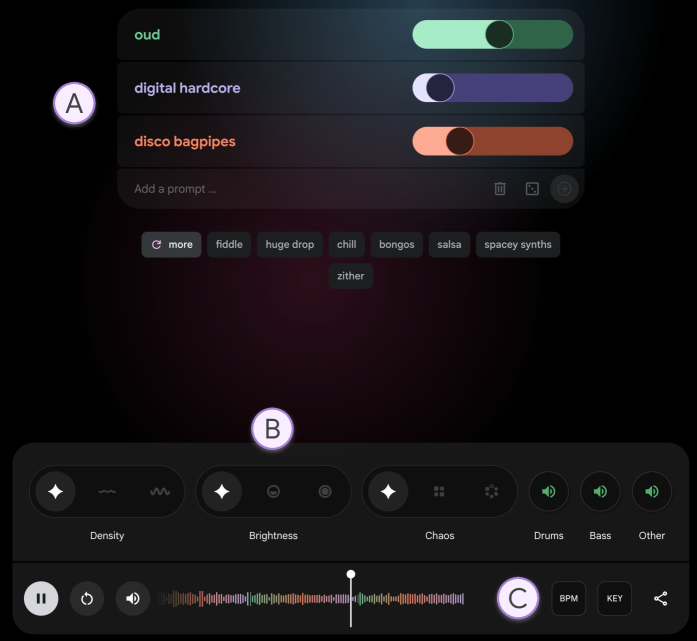
The image depicts a digital audio workstation (DAW) interface with two primary sections:
1. **Section A (Top)**: Audio effect toggles and sliders.
2. **Section B (Bottom)**: Parameter controls, waveform visualization, and playback controls.
### Components/Axes
#### Section A (Top)
- **Audio Effect Toggles**:
- `OUD` (Green slider, 70% position)
- `Digital Hardcore` (Purple slider, 30% position)
- `Disco Bagpipes` (Orange slider, 50% position)
- **Buttons**:
- `Add a prompt...` (Text input field)
- `More` (Dropdown with options: `Fiddle`, `Huge Drop`, `Chill`, `Bongos`, `Salsa`, `Spacy Synths`, `Zither`)
#### Section B (Bottom)
- **Parameter Controls**:
- `Density` (Slider with `+` and `-` icons)
- `Brightness` (Slider with `+` and `-` icons)
- `Chaos` (Slider with `+` and `-` icons)
- `Drums`, `Bass`, `Other` (Toggle buttons)
- **Waveform Visualization**:
- Multi-colored waveform (Red, Green, Blue, Purple)
- Playhead (White vertical line at 50% position)
- **Playback Controls**:
- `Pause` (|| icon)
- `Play` (▶️ icon)
- `Stop` (■ icon)
- `BPM` (Text label)
- `Key` (Text label)
- `Share` (Icon)
### Detailed Analysis
- **Section A**:
- The `OUD` effect is the most activated (70% slider), suggesting emphasis on traditional instrumentation.
- `Digital Hardcore` is minimally applied (30%), while `Disco Bagpipes` is moderately used (50%).
- The `More` dropdown includes genre-specific instruments, indicating customization options.
- **Section B**:
- The waveform shows a complex audio track with overlapping instruments (colors likely represent different tracks).
- Playhead at 50% suggests mid-track editing.
- Parameter sliders (`Density`, `Brightness`, `Chaos`) are unadjusted (default position).
### Key Observations
1. **Contrast in Effects**: Traditional (`OUD`) vs. electronic (`Digital Hardcore`, `Disco Bagpipes`) effects are both present but used at varying intensities.
2. **Unadjusted Parameters**: Sliders for `Density`, `Brightness`, and `Chaos` remain at default, implying no active modulation.
3. **Waveform Complexity**: Multiple colors in the waveform suggest layered tracks, but the legend for color mapping is not visible.
### Interpretation
This interface is designed for granular audio manipulation, blending traditional and electronic elements. The lack of parameter adjustments in Section B suggests the user is in an initial editing phase, focusing on effect selection rather than fine-tuning. The absence of a visible legend for the waveform colors limits clarity on track separation. The `Share` button implies collaboration features, while the `BPM` and `Key` labels hint at tempo and key signature tools for composition.
**Note**: No numerical data or explicit trends are present beyond slider positions. The interface prioritizes visual and interactive controls over textual data representation.