## Image Comparison: Good vs. Bad Examples of Object Detection in Simulated Environments
### Overview
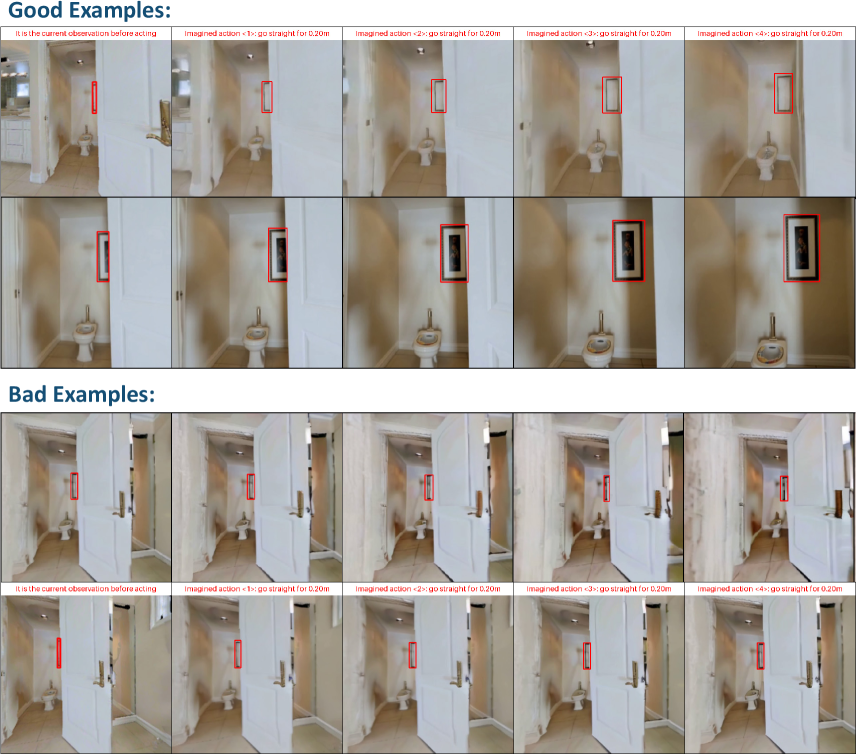
The image presents a comparison of "Good Examples" and "Bad Examples" of an object detection task within a simulated environment. Each example consists of a series of images depicting a virtual bathroom scene from a first-person perspective. The task involves identifying and localizing a specific object (likely a picture frame) as the viewpoint moves through the environment. Red bounding boxes indicate the detected object. The "Good Examples" show accurate and consistent detection, while the "Bad Examples" show inaccurate or inconsistent detection.
### Components/Axes
* **Title:** "Good Examples:" (top-left)
* **Title:** "Bad Examples:" (mid-left)
* **Image Rows:** Two rows, one for "Good Examples" and one for "Bad Examples."
* **Image Columns:** Five columns in each row, representing different "Imagined actions."
* **Image Labels (Good Examples):**
* Column 1: "It is the current observation before acting"
* Column 2: "Imagined action <1>: go straight for 0.20m"
* Column 3: "Imagined action <2>: go straight for 0.20m"
* Column 4: "Imagined action <3>: go straight for 0.20m"
* Column 5: "Imagined action <4>: go straight for 0.20m"
* **Image Labels (Bad Examples):**
* Column 1: "It is the current observation before acting"
* Column 2: "Imagined action <1>: go straight for 0.20m"
* Column 3: "Imagined action <2>: go straight for 0.20m"
* Column 4: "Imagined action <3>: go straight for 0.20m"
* Column 5: "Imagined action <4>: go straight for 0.20m"
* **Objects:** The primary object of interest is a picture frame on the wall.
* **Bounding Boxes:** Red rectangles indicating the detected object location.
### Detailed Analysis or ### Content Details
**Good Examples:**
* **Initial Observation:** A tall, narrow object (likely a door frame or narrow picture) is detected with a red bounding box.
* **Action 1-4:** The picture frame on the wall is consistently detected with a red bounding box. The bounding box appears to accurately enclose the picture frame in each subsequent image.
**Bad Examples:**
* **Initial Observation:** A tall, narrow object (likely a door frame or narrow picture) is detected with a red bounding box.
* **Action 1-4:** The red bounding box appears to detect the door frame or a similar vertical structure in the environment, rather than the picture frame on the wall. The bounding box is consistently misplaced and does not accurately enclose the intended object.
### Key Observations
* The "Good Examples" demonstrate successful object detection, with the bounding box accurately identifying the picture frame across different viewpoints.
* The "Bad Examples" demonstrate a failure in object detection, with the bounding box consistently misidentifying a different object (likely the door frame).
* The simulated environment includes a bathroom setting with a toilet, door, and wall-mounted picture frame.
* The "Imagined action" involves moving straight for 0.20 meters in each step.
### Interpretation
The image illustrates the performance of an object detection algorithm in a simulated environment. The "Good Examples" indicate that the algorithm can accurately identify and localize the target object (picture frame) under ideal conditions. The "Bad Examples" highlight potential challenges, such as misidentification of similar objects or sensitivity to changes in viewpoint. The comparison suggests that the algorithm's performance is not robust and can be easily misled by the environment's features. This could be due to factors like insufficient training data, poor feature extraction, or inadequate handling of occlusions or variations in lighting. The experiment demonstrates the importance of evaluating object detection algorithms under diverse and challenging conditions to ensure reliable performance in real-world applications.