\n
## Screenshot: Figma & Code Editor - UI Design & Implementation
### Overview
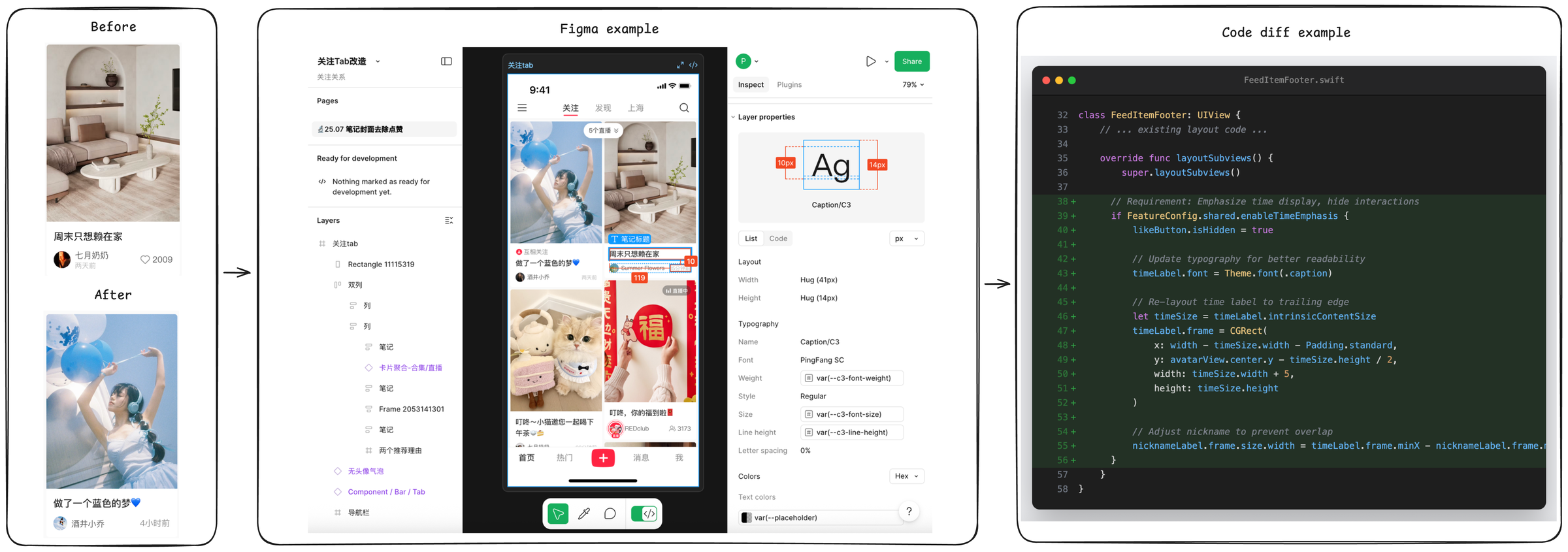
This screenshot displays a UI design environment (Figma) alongside a code editor, likely showing the implementation of the designed UI. The Figma interface shows a mobile screen design with "before" and "after" states, and the code editor displays Swift code related to a `FeedItemFooter` component. The image appears to be demonstrating a design-to-code workflow.
### Components/Axes
The screenshot is divided into three main sections:
1. **Left:** Figma interface showing a mobile screen design.
2. **Center:** Figma interface showing layer properties.
3. **Right:** Code editor displaying Swift code.
**Figma Interface (Left):**
* **Top Bar:** Contains Figma controls: "Pages", "Assets", "Layers", "Plugins", "Share", Zoom control (75%).
* **Design Canvas:** Displays two mobile screen designs labeled "Before" and "After" with a right-pointing arrow between them.
* **"Before" Screen:** Contains a product image, text in Chinese, and a date "2009".
* **"After" Screen:** Contains a different product image, text in Chinese, and a date "2023/04/01".
* **Bottom Bar:** Contains UI elements and text in Chinese.
**Figma Interface (Center):**
* **Header:** Displays "Layer properties" and a section with "Ag" and a red "New" badge.
* **Layer List:** Shows a hierarchy of layers: "List", "Code", "pa".
* **Properties Panel:** Displays properties for a layer named "Caption/C3".
* **Layout:** Width: 140px, Height: 140px.
* **Typography:**
* Name: Caption/C3
* Font: PingFang SC
* Weight: w3-12-font-weight
* Style: Regular
* Size: 13px
* Line height: 18px
* Letter spacing: -0.1px
* Text color: #333333
* Text align: left
* **Effects:** Drop Shadow with values.
**Code Editor (Right):**
* **File Name:** `FeedItemFooter.swift`
* **Code Snippet:** Swift code defining a `FeedItemFooter` class.
### Detailed Analysis or Content Details
**Figma - "Before" Screen (Approximate):**
* Product Image: A person wearing a hat and jacket.
* Chinese Text: “黑衣搭配连衣裙” (Heiyi dāpèi liányīqún) - Translation: "Black outfit with a dress".
* Date: 2009
**Figma - "After" Screen (Approximate):**
* Product Image: A person wearing a blue outfit.
* Chinese Text: “粉色搭配连衣裙” (Fěnsè dāpèi liányīqún) - Translation: "Pink outfit with a dress".
* Date: 2023/04/01
**Figma - Layer Properties:**
* Layer Name: "Caption/C3"
* Width: 140 pixels
* Height: 140 pixels
* Font: PingFang SC, Regular, 13px
* Text Color: #333333
**Code Editor - Swift Code (Snippet):**
```swift
class FeedItemFooter: UIView {
// ... existing layout code ...
override func layoutSubviews() {
super.layoutSubviews()
// Requirement: Emphasize timeline display, hide interactions
isLikeButton.isHidden = true
// Update typography for better readability
timelineLabel.font = Theme.font.caption
// Re-layout time label to trailing edge
let timelineLabel.frame = CGRect(
x: width - timelineSize.width - padding.standard,
y: avatarView.centerY - timelineSize.height / 2,
width: timelineSize.width + 5,
height: timelineSize.height
)
// Adjust nickname frame to prevent overlap
nicknameLabel.frame.size.width = timelineLabel.frame.minX - nicknameLabel.frame.origin.x
}
}
```
* The code defines a `FeedItemFooter` class, likely a custom view in a mobile application.
* It overrides the `layoutSubviews()` method to adjust the layout of subviews.
* It hides a `isLikeButton` and updates the font of a `timelineLabel`.
* It repositions the `timelineLabel` to the trailing edge of the view.
* It adjusts the width of a `nicknameLabel` to prevent overlap with the `timelineLabel`.
### Key Observations
* The "Before" and "After" screens in Figma demonstrate a visual update to a product display.
* The layer properties in Figma show detailed styling information for a text element.
* The Swift code implements the layout of a UI component, referencing design elements like fonts and labels.
* The code snippet focuses on adjusting the layout of elements within a `FeedItemFooter` view, likely to improve readability and visual appeal.
* The use of Chinese text suggests the application or design is targeted towards a Chinese-speaking audience.
### Interpretation
The screenshot illustrates a typical design-to-code workflow. A designer creates a UI in Figma, defining the visual appearance and layout of elements. The code editor shows how that design is then implemented in code (Swift in this case). The code snippet demonstrates how design properties (like font and positioning) are translated into code to create the desired UI. The "Before" and "After" screens suggest an iterative design process, where the UI is refined based on feedback or usability testing. The focus on typography and layout in both the Figma properties and the Swift code highlights the importance of these elements in creating a visually appealing and user-friendly interface. The presence of Chinese text indicates a localization effort, tailoring the application to a specific cultural context. The code's comments ("Requirement: Emphasize timeline display...") suggest a focus on user experience and information hierarchy. The code is adjusting the layout to prioritize the timeline information.