## Screenshot: Unity Environment
### Overview
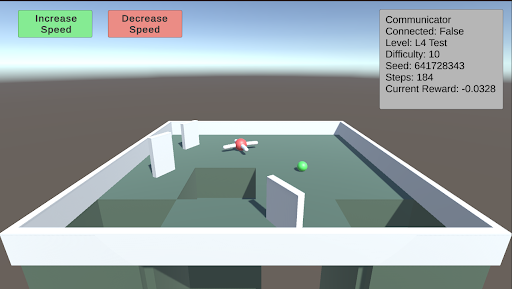
The image is a screenshot of a Unity environment, likely a simulation or game. It shows a simple maze-like structure with a red and white agent and a green sphere. UI elements indicate control buttons and game state information.
### Components/Axes
* **UI Elements (Top):**
* "Increase Speed" button (Green)
* "Decrease Speed" button (Red)
* **Communicator Box (Top-Right):**
* Connected: False
* Level: L4 Test
* Difficulty: 10
* Seed: 641728343
* Steps: 184
* Current Reward: -0.0328
* **Environment:**
* Maze-like structure with white walls and a light green floor.
* Red and white agent (likely the controlled entity).
* Green sphere (likely the target or goal).
### Detailed Analysis or Content Details
* **Increase Speed Button:** Located at the top-left, colored green.
* **Decrease Speed Button:** Located at the top, to the right of the "Increase Speed" button, colored red.
* **Communicator Box:** Located at the top-right.
* "Connected: False" indicates the simulation is not connected to an external source.
* "Level: L4 Test" indicates the current level is "L4 Test".
* "Difficulty: 10" indicates the difficulty level.
* "Seed: 641728343" indicates the random seed used for the simulation.
* "Steps: 184" indicates the number of steps taken in the simulation.
* "Current Reward: -0.0328" indicates the current reward value.
* **Environment:**
* The maze consists of white walls forming corridors.
* The floor is light green.
* The red and white agent is positioned within the maze.
* The green sphere is also positioned within the maze, likely as a target.
### Key Observations
* The simulation is running, as indicated by the "Steps" counter.
* The agent is navigating a maze-like environment.
* The current reward is negative, suggesting the agent has not yet reached the goal or is being penalized.
### Interpretation
The screenshot depicts a reinforcement learning environment within Unity. The agent (red and white) is likely being trained to navigate the maze and reach the green sphere. The "Communicator" box provides real-time information about the simulation's state, including the reward, steps taken, and difficulty level. The negative reward suggests the agent is still learning and has not yet optimized its path to the goal. The "Increase Speed" and "Decrease Speed" buttons likely control the simulation speed for training or observation purposes.