\n
## Diagram: CPU-GPU Frame Processing Pipeline
### Overview
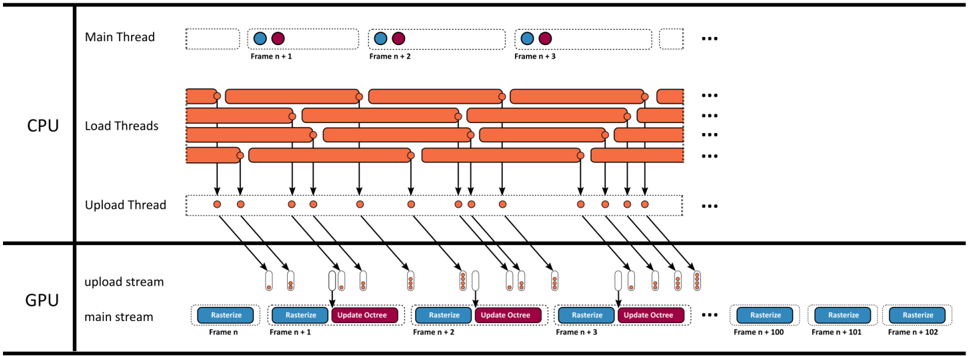
The image depicts a diagram illustrating the flow of frame processing between the CPU and GPU. It shows how frames are processed through multiple threads on the CPU and then uploaded to the GPU for rasterization and octree updates. The diagram is structured as a timeline, showing the progression of frames (n+1, n+2, n+3, etc.).
### Components/Axes
The diagram is divided into two main sections: CPU and GPU. Within the CPU section, there are three thread types: Main Thread, Load Threads, and Upload Thread. The GPU section has two streams: upload stream and main stream. The horizontal axis represents time, with frames progressing from left to right.
### Detailed Analysis or Content Details
**CPU Section:**
* **Main Thread:** Displays a series of light blue rectangles labeled "Frame n+1", "Frame n+2", "Frame n+3", and so on, indicating the sequence of frames. Each frame has two orange circles above it.
* **Load Threads:** Multiple orange rectangles are stacked vertically, representing load threads. These threads appear to be working in parallel on different parts of the frame processing. The number of load threads is not explicitly stated, but there are approximately 8 visible.
* **Upload Thread:** A row of orange circles represents the upload thread. Each circle corresponds to a frame being uploaded to the GPU. Lines connect the upload thread to the load threads, indicating data transfer.
**GPU Section:**
* **Upload Stream:** Lines extend from the upload thread (CPU) to the upload stream (GPU).
* **Main Stream:** The main stream (GPU) consists of alternating light blue rectangles labeled "Rasterize" and light green rectangles labeled "Update Octree". These operations are performed on each frame. The frames are labeled "Frame n+1", "Frame n+2", "Frame n+3", "Frame n+100", "Frame n+101", "Frame n+102".
**Data Flow:**
1. The Main Thread initiates frame processing.
2. Load Threads perform processing tasks on the frame.
3. The Upload Thread transfers the processed frame data to the GPU.
4. The GPU's Upload Stream receives the data.
5. The GPU's Main Stream rasterizes and updates the octree for each frame.
### Key Observations
* The diagram highlights a parallel processing approach, with multiple load threads working concurrently on the CPU.
* The GPU performs alternating rasterization and octree update operations on each frame.
* The diagram shows a clear separation of tasks between the CPU and GPU.
* The number of load threads appears constant, while the number of frames processed is increasing.
* The diagram does not provide specific timing information or performance metrics.
### Interpretation
The diagram illustrates a typical CPU-GPU pipeline for rendering graphics. The CPU handles the initial frame processing and data preparation, while the GPU performs the computationally intensive tasks of rasterization and octree updates. The parallel processing on the CPU (Load Threads) suggests an attempt to optimize performance by utilizing multiple cores. The alternating rasterization and octree update operations on the GPU indicate a common rendering technique used in many graphics applications. The diagram suggests a system designed for continuous frame rendering, with a constant stream of frames being processed. The lack of specific timing information makes it difficult to assess the overall performance of the pipeline, but the diagram provides a clear overview of the data flow and processing steps involved. The diagram is a conceptual representation and does not provide concrete data points. It is a visual aid to understand the process rather than a quantitative analysis.