## Diagram: Multi-Threaded CPU/GPU Processing Pipeline
### Overview
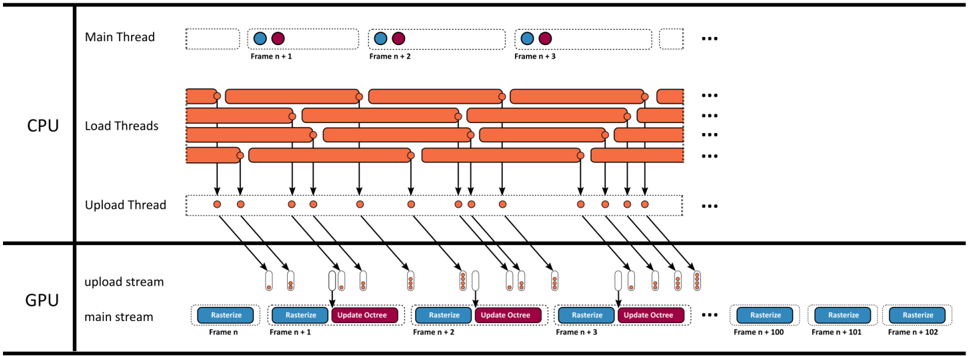
The diagram illustrates a multi-threaded computational pipeline for processing sequential frames (Frame n, n+1, n+2, etc.) across CPU and GPU resources. It emphasizes parallelism, synchronization, and data flow between threads and hardware streams.
### Components/Axes
#### CPU Section
- **Main Thread**: Topmost horizontal bar with alternating blue (Frame n+1) and red (Frame n+2) markers.
- **Load Threads**: Three horizontal bars below Main Thread, representing parallel data-loading operations.
- **Upload Thread**: Single horizontal bar at the bottom of the CPU section, with orange markers.
- **Arrows**: Connect Upload Thread to GPU's upload stream, indicating data transfer.
#### GPU Section
- **Upload Stream**: Vertical column of orange markers (data packets) flowing into the GPU.
- **Main Stream**: Horizontal sequence of blue ("Rasterize") and red ("Update Octree") blocks, representing frame processing steps.
- **Legend**: Located at the bottom, with blue = "Rasterize", red = "Update Octree".
#### Spatial Grounding
- **Legend**: Bottom-center, aligned with GPU main stream.
- **Frame Markers**: Blue (Frame n+1) and red (Frame n+2) consistently placed on Main Thread and GPU main stream.
- **Data Flow**: Arrows from CPU Upload Thread to GPU upload stream, then to GPU main stream.
### Detailed Analysis
1. **CPU Threads**:
- Main Thread processes frames sequentially (n+1, n+2, n+3).
- Load Threads handle parallel data-loading tasks, likely pre-fetching resources.
- Upload Thread transfers processed data to the GPU via orange markers.
2. **GPU Streams**:
- **Upload Stream**: Receives data from CPU Upload Thread (orange markers).
- **Main Stream**: Processes frames in sequence:
- Frame n: Rasterize (blue).
- Frame n+1: Rasterize (blue) → Update Octree (red).
- Frame n+2: Rasterize (blue) → Update Octree (red).
- Frame n+3: Rasterize (blue) → Update Octree (red).
- Frame n+100: Rasterize (blue).
- Frame n+101: Rasterize (blue).
- Frame n+102: Rasterize (blue).
3. **Synchronization**:
- Frame n+1 on Main Thread aligns with Frame n+1 in GPU main stream, suggesting dependency.
- Upload Thread and GPU upload stream act as a bridge between CPU and GPU processing.
### Key Observations
- **Parallelism**: Load Threads and GPU main stream enable concurrent processing.
- **Sequential Dependency**: GPU main stream processes frames in strict order (n → n+1 → n+2).
- **Data Transfer**: Orange markers in Upload Thread and upload stream indicate batched data movement.
- **Asymmetry**: GPU main stream has fewer "Update Octree" steps for later frames (e.g., Frame n+100–n+102 only show Rasterize).
### Interpretation
This pipeline optimizes performance by:
1. **Offloading Workloads**: CPU handles frame processing and data loading, while GPU focuses on rasterization and octree updates.
2. **Overlapping Tasks**: Load Threads and GPU main stream operate in parallel, reducing idle time.
3. **Batched Transfers**: Orange markers suggest efficient data chunking for GPU uploads.
The asymmetry in GPU main stream (fewer Update Octree steps for later frames) may indicate adaptive processing or resource prioritization. The strict synchronization between CPU Main Thread and GPU main stream ensures frame consistency, critical for real-time applications like gaming or simulation.