## Diagram: State Transition with FSA
### Overview
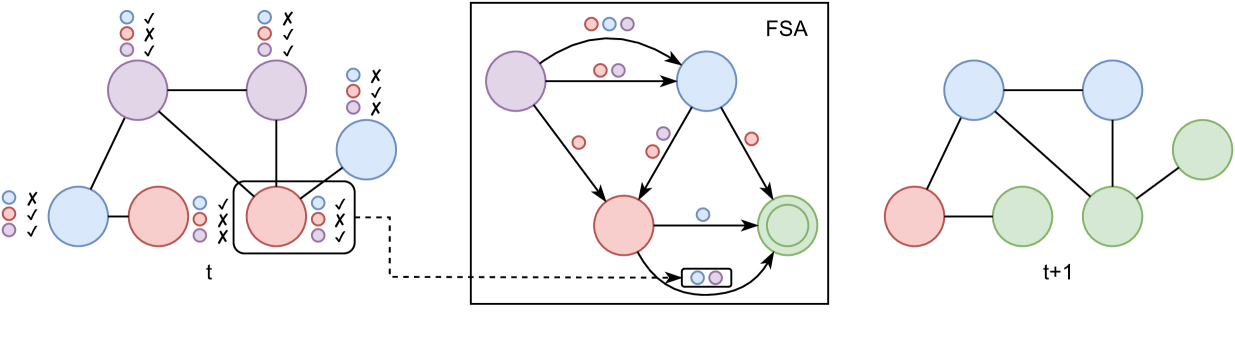
The image depicts a state transition diagram, showing a network of interconnected nodes that change state over time. The diagram is divided into three sections representing the state at time 't', a Finite State Automaton (FSA), and the state at time 't+1'. The nodes are colored blue, red, purple, and green, and are connected by lines indicating relationships or transitions. The FSA section shows transitions between states, with arrows indicating the direction of the transitions.
### Components/Axes
* **Nodes:** Represent states, colored blue, red, purple, and green.
* **Edges:** Represent relationships or transitions between states.
* **FSA (Finite State Automaton):** A boxed section showing state transitions with input/output.
* **Time Labels:** 't' and 't+1' indicate the state at different time points.
* **Validation Marks:** Checkmarks and crosses indicate validation results for each node.
* **Input/Output Indicators:** Small colored circles near nodes and transitions, representing input or output signals.
### Detailed Analysis
**Left Section (Time 't'):**
* Four nodes are present, colored blue, red, and purple.
* The purple nodes at the top are connected to the red node at the bottom.
* The blue node on the left is connected to the red node.
* The red node on the right is enclosed in a rectangle.
* Validation marks (checks and crosses) are present next to each node, indicating the validation status of each color.
* Top-left purple node: Blue - X, Red - Check, Purple - Check
* Top-right purple node: Blue - X, Red - Check, Purple - Check
* Bottom-left blue node: Blue - X, Red - Check, Purple - Check
* Bottom-right red node: Blue - Check, Red - X, Purple - Check
**Middle Section (FSA):**
* A box labeled "FSA" contains a state transition diagram.
* Nodes inside the FSA are colored blue, red, and purple.
* The green node is a double circle, indicating an accepting state.
* Arrows indicate transitions between states.
* Input/output indicators (small colored circles) are present near the transitions.
* Purple node at the top-left has an arrow to the blue node at the top-right. There are two circles above the arrow, one red and one purple.
* Purple node at the top-left has an arrow to the red node at the bottom-left. There is one red circle next to the arrow.
* Blue node at the top-right has an arrow to the red node at the bottom-left. There are two circles next to the arrow, one purple and one red.
* Red node at the bottom-left has an arrow to the green node at the bottom-right. There is one blue circle next to the arrow.
* Blue node at the top-right has an arrow looping back to the purple node at the top-left. There are two circles above the arrow, one blue and one purple.
* A dashed line connects the red node in the left section to the FSA.
* A small box with two circles (blue and purple) is connected to the red-to-green transition.
**Right Section (Time 't+1'):**
* Four nodes are present, colored blue, red, and green.
* The blue node at the top is connected to the red node at the bottom.
* The red node is connected to the green nodes.
* The green nodes are connected to each other.
### Key Observations
* The diagram shows a transition from a state at time 't' to a state at time 't+1', mediated by an FSA.
* The FSA defines the rules for state transitions based on input/output signals.
* The validation marks indicate the correctness of the state at time 't'.
### Interpretation
The diagram illustrates a system that evolves over time, with the FSA acting as a control mechanism. The state at time 't' is transformed into the state at time 't+1' based on the rules defined by the FSA. The input/output indicators suggest that the transitions are influenced by external signals. The validation marks at time 't' might represent the accuracy or reliability of the initial state. The diagram could represent a variety of systems, such as a control system, a decision-making process, or a biological process. The FSA acts as a filter or a transformation function, mapping the initial state to a new state based on specific rules and inputs.