TECHNICAL ASSET FINGERPRINT
254e0a2d6a9c7eec5e280a93
Click to view fullscreen
Press ESC or click to close
FOUND IN PAPERS
EXPERT: healer-alpha-free VERSION 1
RUNTIME: free/openrouter/healer-alpha
INTEL_VERIFIED
## Software Interface Screenshot: Imandra CodeLogician
### Overview
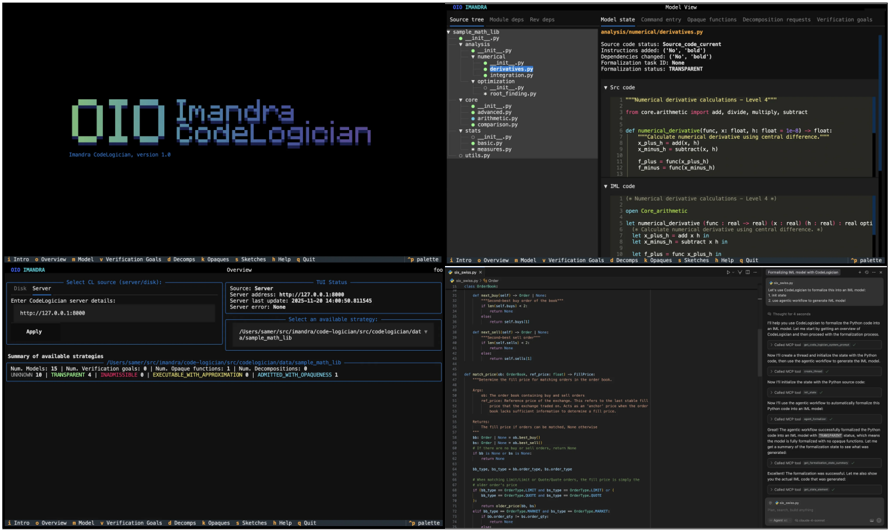
This image is a screenshot of a desktop software application named "Imandra CodeLogician," version 1.0. The interface is a dark-themed, multi-panel Integrated Development Environment (IDE) or verification tool, likely used for formal methods, code analysis, or theorem proving. The screen is divided into four primary quadrants or panels, each serving a distinct function within the workflow.
### Components/Axes (UI Panels & Elements)
The interface is segmented into four main panels:
1. **Top-Left Panel (Splash/Info):**
* **Primary Text:** "OIO Imandra CodeLogician" in large, stylized, pixelated font.
* **Subtext:** "Imandra CodeLogician, version 1.0" in smaller, monospaced font.
* **Function:** Appears to be a splash screen or main title panel.
2. **Top-Right Panel (Source & Model View):**
* **Tab Bar:** Tabs labeled "Source tree," "Module deps," "Rep deps."
* **Source Tree (Left Sub-panel):** A hierarchical file tree showing Python module structure (`__init__.py`, `core.py`, `optimization.py`, etc.). The file `derivative.py` is highlighted.
* **Model State (Right Sub-panel):** Displays metadata about the loaded model.
* **Labels & Values:**
* `Source code status: Source code current`
* `Instructions added: ["def", "numerical_derivative"]`
* `Decompositions: 1`
* `Opaque functions: 1`
* `Formalization status: TRANSPARENT`
* **Code View (Below Model State):** Shows Python source code from `derivative.py`.
* **Header:** `**Numerical derivative calculations - Level 4**`
* **Import Statement:** `from core.arithmetic import add, divide, multiply, subtract`
* **Function Definition:** `def numerical_derivative(func, x, h, /, *, _level=4) -> float:`
* **Docstring:** `Numerical derivative calculation using central difference.`
* **Code Body:** Contains variable assignments (`f_plus`, `f_minus`, `result`) and a return statement.
* **IML Code View (Bottom of panel):** Shows code in a language called IML (Imandra Modeling Language).
* **Header:** `[x] Numerical derivative calculations - Level 4`
* **Code:** Defines a function `numerical_derivative` with type annotations (`func: real -> real`, `x: real`, etc.) and a body using `let` bindings and arithmetic operations.
3. **Bottom-Left Panel (Server & Strategies):**
* **Tab Bar:** Tabs labeled "Intro," "Overview," "Model," "Verification Goals," "Decomps," "Opaques," "Sketches," "Help," "Quit."
* **Sub-panel: "Select CL source (server/local)"**
* **Input Field:** Label "Enter CodeLogician server details:" with a pre-filled URL: `http://127.0.0.1:8000`.
* **Button:** "Apply".
* **Sub-panel: "Overview"**
* **Server Details:**
* `Source: Server`
* `Server URL: http://127.0.0.1:8000`
* `Server last update: 2025-11-26 14:00:49.811545`
* `Server status: Connected`
* **Dropdown:** "Select an available strategy:" with a selected value showing a file path: `/Users/user/.../imandra-code-logician/src/code_logician/test_strategies/derivative_v1.json`.
* **Sub-panel: "Summary of available strategies"**
* **Counts:** Num. Models: 15, Num. Verification goals: 8, Num. Opaque Functions: 1, Num. Decompositions: 0
* **Strategy Table:**
| Strategy Name | Formalization Status | Decomposition Status | Execution Status | Admission Status |
|---------------|----------------------|----------------------|------------------|------------------|
| derivative_v1 | TRANSPARENT | UNDECOMPOSED | EXECUTABLE_WITH_APPROXIMATION | ADMITTED_WITH_APPROXIMATION |
4. **Bottom-Right Panel (Tutorial/Workflow Guide):**
* **Tab Bar:** Same as Bottom-Left panel.
* **Content:** A multi-step tutorial or workflow guide titled "How to use CodeLogician to formalize the above Python code into IML and verify it."
* **Steps (Paraphrased):**
1. Start CodeLogician and connect to the server.
2. Select the strategy `derivative_v1.json`.
3. The system loads the model and shows the source code.
4. The user can inspect the Python code and its IML formalization.
5. The system verifies the formalization against the source code.
6. The verification result is displayed (e.g., "TRANSPARENT").
* **Embedded Code Snippets:** The guide includes small blocks of Python and IML code for illustration.
### Detailed Analysis / Content Details
* **Primary Language:** English. All interface text, code comments, and documentation are in English.
* **Software Purpose:** The tool appears to be designed for the formal verification of Python code. It translates (formalizes) Python functions into a formal modeling language (IML) and then runs verification checks on them.
* **Key Workflow Elements:**
* **Source Code:** Python function `numerical_derivative` for calculating derivatives using central difference.
* **Formal Model:** The corresponding IML function with type signatures (`real -> real`).
* **Verification Status:** The model is marked as `TRANSPARENT`, meaning its implementation is fully visible and analyzable by the prover.
* **Strategy File:** A JSON file (`derivative_v1.json`) defines the verification approach for this specific function.
* **UI Design:** Uses a monospaced font (likely for code), a dark background with light text, and a tabbed interface for navigation. The layout is dense and information-rich, typical of developer tools.
### Key Observations
1. **Integrated Environment:** The tool tightly couples source code viewing, formal model inspection, server management, and verification workflow in a single interface.
2. **State Transparency:** The "Model State" panel explicitly lists the status of the code (`Source code current`), what has been added (`Instructions added`), and the formalization status (`TRANSPARENT`).
3. **Verification Pipeline:** The bottom-left panel shows a clear pipeline from a strategy file to a verification outcome (`ADMITTED_WITH_APPROXIMATION`), indicating the proof was successful but used approximation methods.
4. **Pedagogical Design:** The inclusion of a detailed, step-by-step tutorial panel suggests the tool is designed for users learning formal methods or the specific Imandra ecosystem.
### Interpretation
This screenshot captures a session in a sophisticated software verification tool. The data suggests a workflow where a developer or verification engineer is using Imandra CodeLogician to prove properties about a numerical Python function. The system has successfully formalized the Python code into a mathematical model (IML) and verified it using a predefined strategy, achieving a "TRANSPARENT" and "ADMITTED" status.
The interface is designed for **technical users** who need to manage the complexity of formal verification. It provides multiple synchronized views of the same artifact (the derivative function) at different levels of abstraction: as Python source, as a file in a project tree, as a formal IML specification, and as a verified model with associated metadata. The presence of a server connection and strategy files indicates this is part of a larger, possibly collaborative, verification infrastructure. The tool bridges the gap between practical programming (Python) and formal assurance (IML/theorem proving), aiming to make rigorous code verification more accessible and integrated into a development workflow.
DECODING INTELLIGENCE...