## Software Interface: Imandra Code Logician
### Overview
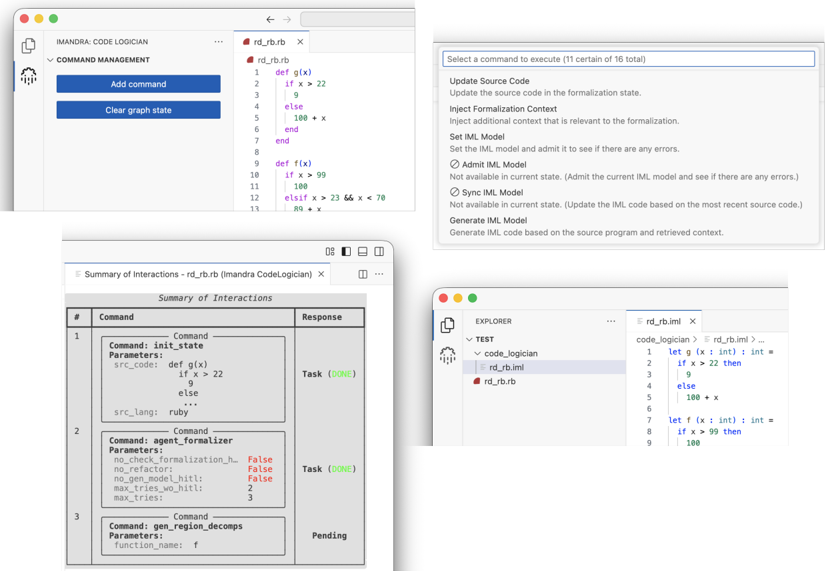
The image shows a software interface, likely for a tool named "Imandra Code Logician." It displays various panels related to code analysis, command execution, and interaction summaries. The interface includes code editors, command management options, and a summary of interactions.
### Components/Axes
* **Top-Left Panel:**
* Header: "IMANDRA: CODE LOGICIAN"
* Section: "COMMAND MANAGEMENT"
* Buttons: "Add command", "Clear graph state"
* **Top-Center Panel:**
* File Name: "rd_rb.rb"
* Code Editor: Contains Ruby code defining functions `g(x)` and `f(x)`.
* **Top-Right Panel:**
* Title: "Select a command to execute (11 certain of 16 total)"
* List of Commands: "Update Source Code", "Inject Formalization Context", "Set IML Model", "Admit IML Model" (Not available in current state), "Sync IML Model" (Not available in current state), "Generate IML Model"
* **Bottom-Left Panel:**
* Title: "Summary of Interactions - rd_rb.rb (Imandra CodeLogician)"
* Table: "Summary of Interactions" with columns "#", "Command", and "Response".
* **Bottom-Right Panel:**
* Explorer: Shows a file tree with "TEST" as the root, containing "code_logician", "rd_rb.iml", and "rd_rb.rb".
* Code Editor: Displays the content of "rd_rb.iml", which contains code defining functions `g(x)` and `f(x)` using a syntax similar to OCaml.
### Detailed Analysis
**Top-Left Panel:**
* The "COMMAND MANAGEMENT" section provides buttons to "Add command" and "Clear graph state".
**Top-Center Panel:**
* The file "rd_rb.rb" contains the following Ruby code:
```ruby
def g(x)
if x > 22
9
else
100 + x
end
end
def f(x)
if x > 99
100
elsif x > 23 && x < 70
89 + x
end
end
```
**Top-Right Panel:**
* The command selection panel indicates that 11 out of 16 commands are available.
* The "Admit IML Model" and "Sync IML Model" commands are "Not available in current state".
**Bottom-Left Panel:**
* The "Summary of Interactions" table has the following entries:
* **Row 1:**
* Command: `init_state`
* Parameters:
* `src_code`: `def g(x) if x > 22 9 else end`
* `src_lang`: `ruby`
* Response: `Task (DONE)`
* **Row 2:**
* Command: `agent_formalizer`
* Parameters:
* `no_check_formalization_h`: `False`
* `no_refactor`: `False`
* `no_gen_model_hitl`: `False`
* `max_tries_wo_hitl`: `2`
* `max_tries`: `3`
* Response: `Task (DONE)`
* **Row 3:**
* Command: `gen_region_decomps`
* Parameters:
* `function_name`: `f`
* Response: `Pending`
**Bottom-Right Panel:**
* The file "rd_rb.iml" contains the following code:
```
let g (x : int) : int =
if x > 22 then
9
else
100 + x
let f (x : int) : int =
if x > 99 then
100
```
### Key Observations
* The interface allows users to manage commands, view and edit code in different languages (Ruby and a language similar to OCaml), and see a summary of interactions.
* Some commands are not available in the current state, suggesting dependencies or preconditions.
* The "Summary of Interactions" table provides information about the commands executed, their parameters, and their responses.
### Interpretation
The Imandra Code Logician appears to be a tool for analyzing and formalizing code. It allows users to define functions, execute commands to analyze the code, and view the results of these commands. The tool supports multiple programming languages and provides a structured way to interact with the code analysis process. The "Summary of Interactions" table is a key component, providing a record of the analysis steps and their outcomes. The fact that some commands are not always available suggests a stateful analysis process where the order of operations matters.