## Screenshot: Imandra Code Logician Interface
### Overview
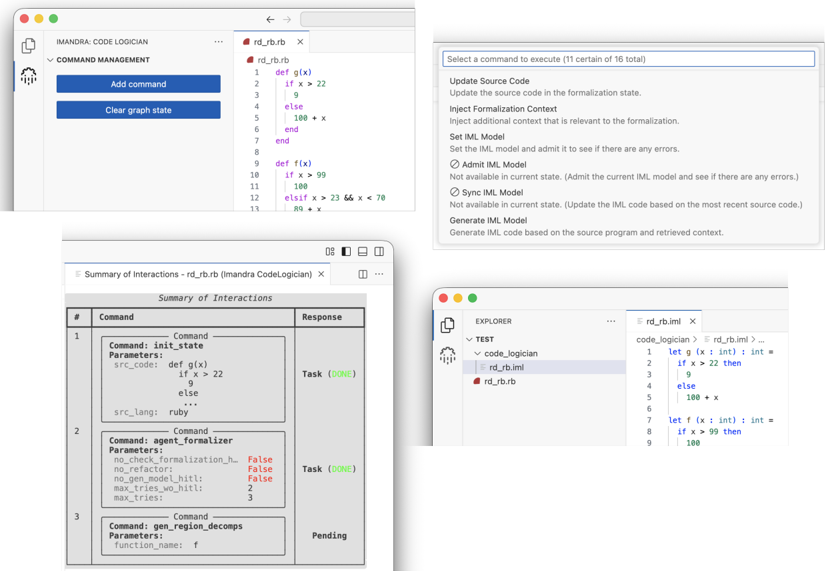
The image is a composite screenshot of a software application named "Imandra Code Logician." It displays multiple panels and windows that collectively illustrate a workflow for formalizing and analyzing source code (specifically Ruby code) into a formal model (IML - Imandra Modeling Language). The interface appears to be a development or verification environment.
### Components/Axes
The screenshot is divided into four primary regions or panels:
1. **Top-Left Panel: Command Management & Code Editor**
* **Header:** "IMANDRA: CODE LOGICIAN"
* **Section:** "COMMAND MANAGEMENT"
* **Buttons:** "Add command", "Clear graph state"
* **Code Editor Tab:** "rd_rb.rb"
* **Code Content:** Ruby source code defining two functions, `g(x)` and `f(x)`.
2. **Top-Right Panel: Command Selection Dropdown**
* **Prompt:** "Select a command to execute (11 certain of 16 total)"
* **List of Commands:**
* Update Source Code
* Inject Formalization Context
* Set IML Model
* Admit IML Model (with note: "Not available in current state...")
* Sync IML Model (with note: "Not available in current state...")
* Generate IML Model
3. **Bottom-Left Panel: Summary of Interactions Table**
* **Header:** "Summary of Interactions - rd_rb.rb (Imandra CodeLogician)"
* **Table Columns:** "#", "Command", "Response"
* **Table Rows:** A log of executed commands and their status.
4. **Bottom-Right Panel: Explorer & Generated Code**
* **Header:** "EXPLORER"
* **File Tree:** Under a "TEST" folder, a "code_logician" subfolder contains two files: `rd_rb.iml` (selected) and `rd_rb.rb`.
* **Code Editor Tab:** "rd_rb.iml"
* **Code Content:** The generated IML formal model corresponding to the Ruby source.
### Detailed Analysis
**1. Top-Left Panel: Source Code (`rd_rb.rb`)**
The Ruby code defines two functions:
```ruby
def g(x)
if x > 22
9
else
100 + x
end
end
def f(x)
if x > 99
100
elsif x > 23 && x < 70
80 + x
end
end
```
**2. Top-Right Panel: Command List**
The dropdown lists available actions. The notes indicate that "Admit IML Model" and "Sync IML Model" are context-dependent and not currently available. The primary action appears to be "Generate IML Model."
**3. Bottom-Left Panel: Interaction Log**
The table logs the sequence of operations:
* **Row 1:** Command `init_state` with parameter `src_code` containing the Ruby code above and `src_lang: "ruby"`. Response: `Task (DONE)`.
* **Row 2:** Command `agent_formalizer` with parameters including `no_refactor: False`, `no_gen_model_hint: False`, `max_model_hint: 2`, `max_tries: 3`. Response: `Task (DONE)`.
* **Row 3:** Command `gen_region_decomps` with parameter `function_name: "f"`. Response: `Pending`.
**4. Bottom-Right Panel: Generated IML Code (`rd_rb.iml`)**
The generated formal model translates the Ruby logic into IML syntax:
```iml
let g (x : int) : int =
if x > 22 then
9
else
100 + x
let f (x : int) : int =
if x > 99 then
100
else if x > 23 && x < 70 then
80 + x
```
### Key Observations
* **Workflow Sequence:** The interaction log shows a clear sequence: initialize state with source code, run the formalizer agent, and then attempt to generate region decompositions for function `f`. The last task is pending.
* **Code Translation:** The tool successfully translates the Ruby functions `g` and `f` into syntactically correct IML functions, preserving the conditional logic.
* **UI State:** The "Admit/Sync IML Model" commands are grayed out or noted as unavailable, suggesting the system is in a state where a model has been generated but not yet admitted or synced for verification.
* **Pending Operation:** The `gen_region_decomps` command for function `f` is pending, indicating the next step in the analysis pipeline is likely a formal verification or analysis task that has been queued.
### Interpretation
This screenshot captures a moment in the workflow of a **formal methods tool** designed for **code verification or analysis**. The "Imandra Code Logician" acts as a bridge between conventional programming (Ruby) and formal logic (IML).
* **Purpose:** The tool's purpose is to take source code, formalize it into a mathematical model (IML), and then perform advanced reasoning tasks on that model (like "region decomposition," which likely involves analyzing the function's behavior across different input ranges).
* **Process Flow:** The visible flow is: **Source Code Input -> Formalization -> Analysis**. The pending `gen_region_decomps` command suggests the system is poised to perform a deep, automated analysis of the function `f`'s properties.
* **Significance:** This represents a sophisticated development environment where code correctness can be formally proven or properties can be exhaustively checked, moving beyond traditional testing. The interface manages the complexity of this translation and analysis process, providing logs and state management for the developer. The separation of the source (`rd_rb.rb`) and the model (`rd_rb.iml`) is a core architectural feature.