## Diagram: Agent Design Paradigms
### Overview
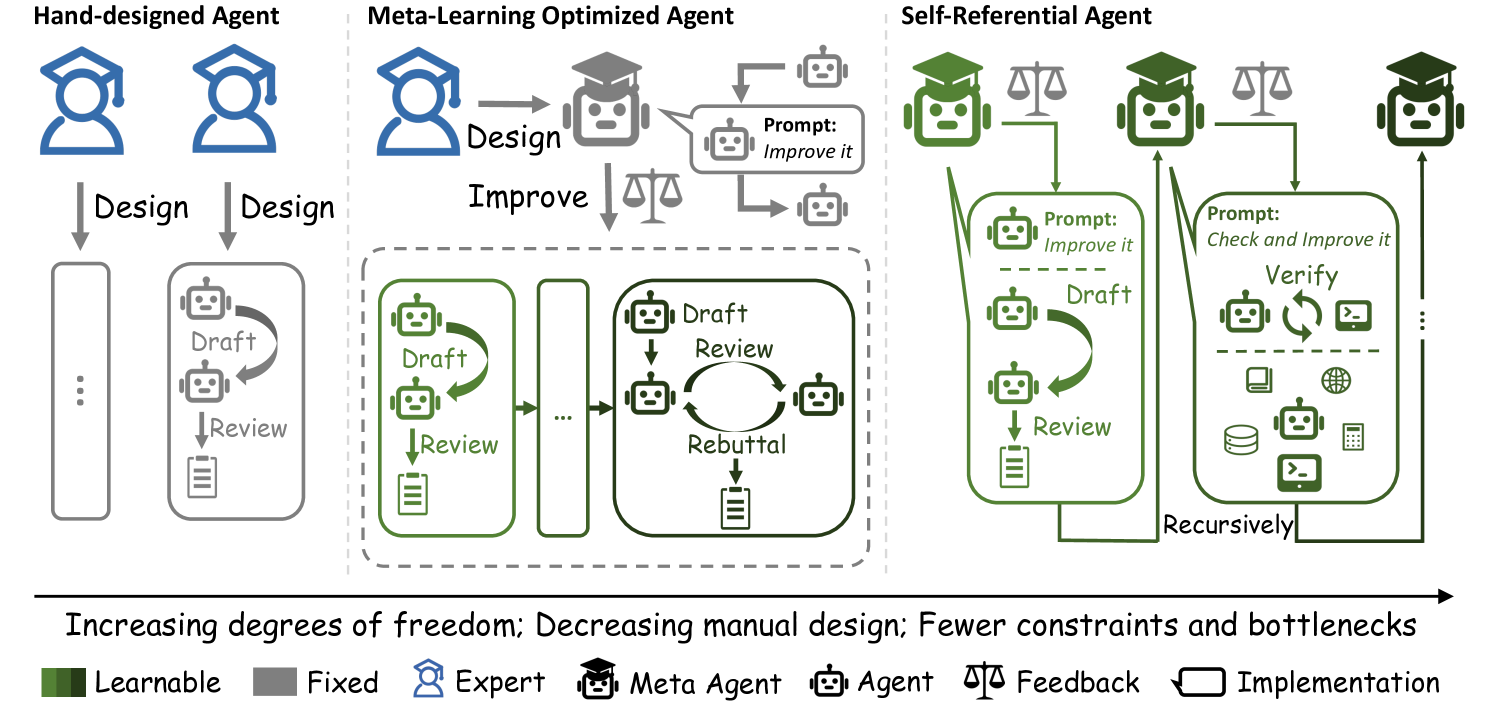
The image presents a diagram comparing three agent design paradigms: Hand-designed Agent, Meta-Learning Optimized Agent, and Self-Referential Agent. The diagram illustrates the design and implementation processes for each type, highlighting the increasing degrees of freedom and decreasing manual design as one moves from left to right.
### Components/Axes
* **Titles:**
* Hand-designed Agent (top-left)
* Meta-Learning Optimized Agent (top-center)
* Self-Referential Agent (top-right)
* **Legend:** (bottom)
* Learnable (dark green square)
* Fixed (gray square)
* Expert (blue person icon with graduation cap)
* Meta Agent (black robot icon with graduation cap)
* Agent (gray robot icon)
* Feedback (scales icon)
* Implementation (rectangle icon)
* **Process Steps:** Design, Draft, Review, Rebuttal, Verify
* **Agents:** Represented by robot icons, colored gray or green.
* **Directional Arrows:** Indicate the flow of processes.
* **Prompts:** Text boxes indicating instructions given to the agents.
* **Icons within "Verify" box:** Represent various data types and operations (e.g., database, globe, calculator, code).
* **Horizontal Axis:** "Increasing degrees of freedom; Decreasing manual design; Fewer constraints and bottlenecks" (bottom)
### Detailed Analysis
**1. Hand-designed Agent (Left)**
* **Design:** Two blue "Expert" icons (person with graduation cap) are at the top, each with a "Design" arrow pointing downwards.
* **Implementation:** A gray vertical rectangle with three dots inside represents the implementation phase. A gray "Agent" drafts and reviews.
* **Process:** The "Draft" step has a gray robot icon, and the "Review" step has a gray robot icon and a document icon.
**2. Meta-Learning Optimized Agent (Center)**
* **Design & Improve:** A blue "Expert" icon designs, which leads to a gray "Meta Agent" (robot with graduation cap). The Meta Agent is prompted to "Improve it" by two gray "Agent" icons. Feedback (scales icon) is provided.
* **Implementation:** A dashed gray rectangle surrounds the implementation phase.
* **Process:** The "Draft" and "Review" steps are performed by green "Agent" icons. A "Rebuttal" loop connects the "Draft" and "Review" steps. A gray vertical rectangle with three dots inside represents the implementation phase.
**3. Self-Referential Agent (Right)**
* **Design & Improve:** A green "Meta Agent" (robot with graduation cap) is at the top. Feedback (scales icon) is provided.
* **Implementation:** A dashed green rectangle surrounds the implementation phase.
* **Process:** The "Draft" and "Review" steps are performed by green "Agent" icons. A "Rebuttal" loop connects the "Draft" and "Review" steps. A "Verify" step, prompted by "Check and Improve it", contains icons representing data and operations. The entire process is labeled "Recursively". A vertical line with three dots inside represents the implementation phase.
### Key Observations
* The diagram illustrates a progression from manual design (Hand-designed Agent) to automated design and improvement (Meta-Learning Optimized Agent and Self-Referential Agent).
* The color changes from gray to green indicate a shift from fixed to learnable components.
* The "Rebuttal" loop in the Meta-Learning Optimized and Self-Referential Agents suggests an iterative refinement process.
* The "Verify" step in the Self-Referential Agent indicates a self-checking mechanism.
### Interpretation
The diagram demonstrates how agent design can evolve from a fully manual process to one that leverages meta-learning and self-reference. The Hand-designed Agent relies heavily on human expertise, while the Meta-Learning Optimized Agent uses a meta-agent to improve the design. The Self-Referential Agent takes this a step further by incorporating a self-checking and recursive improvement mechanism. This progression suggests a move towards more autonomous and adaptive agents with fewer constraints and bottlenecks. The increasing degrees of freedom imply that the agents are given more control over their own design and operation.