## Diagram: Kernel Task Transition
### Overview
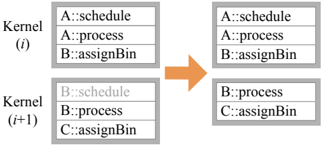
The image illustrates the transition of tasks within two consecutive kernel iterations, labeled Kernel (i) and Kernel (i+1). It shows the tasks scheduled, processed, and assigned to bins in each kernel iteration, and how these tasks change from one iteration to the next.
### Components/Axes
* **Kernel (i):** Represents the initial kernel iteration.
* Tasks:
* A::schedule
* A::process
* B::assignBin
* **Kernel (i+1):** Represents the subsequent kernel iteration.
* Tasks:
* B::schedule (grayed out)
* B::process
* C::assignBin
* **Arrow:** An orange arrow pointing from the left side (Kernel i) to the right side (Kernel i+1), indicating the transition or flow of tasks.
* **Right Side (After Transition):** Shows the tasks present after the transition.
* Top Block:
* A::schedule
* A::process
* B::assignBin
* Bottom Block:
* B::process
* C::assignBin
### Detailed Analysis or ### Content Details
**Kernel (i) - Left Side (Before Transition):**
* The top block, labeled "Kernel (i)", contains the following tasks:
* A::schedule
* A::process
* B::assignBin
* The bottom block, labeled "Kernel (i+1)", contains the following tasks:
* B::schedule (grayed out)
* B::process
* C::assignBin
**Transition (Arrow):**
* An orange arrow points from the left side to the right side, indicating a transition or flow.
**Right Side (After Transition):**
* The top block contains the following tasks:
* A::schedule
* A::process
* B::assignBin
* The bottom block contains the following tasks:
* B::process
* C::assignBin
### Key Observations
* Task "B::schedule" is present in Kernel (i+1) on the left side but is grayed out, suggesting it might be inactive or pending.
* The tasks in the top block on the right side (after transition) are identical to the tasks in Kernel (i) on the left side (before transition).
* The tasks in the bottom block on the right side (after transition) are identical to the tasks in Kernel (i+1) on the left side (before transition), except the grayed out "B::schedule" is missing.
### Interpretation
The diagram illustrates a potential task scheduling or processing flow between two kernel iterations. The grayed-out "B::schedule" in Kernel (i+1) suggests that this task might be delayed, skipped, or conditionally executed. The arrow indicates a transition where the tasks from Kernel (i) and Kernel (i+1) are potentially re-arranged or re-scheduled in the subsequent state. The diagram could be demonstrating a hand-off of tasks between kernel iterations, or a re-prioritization of tasks based on some condition.