## [Multi-Panel Figure]: Visual Recognition Task Analysis (PSVRT, Pentomino, CIFAR-100)
### Overview
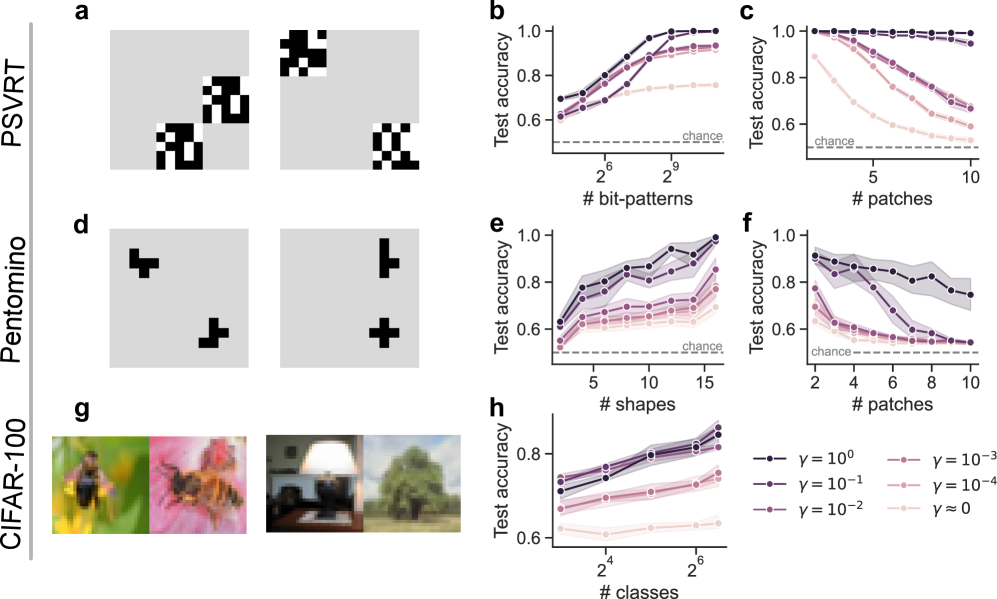
The image is a composite of 8 panels (a–h) analyzing three visual recognition datasets: **PSVRT** (top row), **Pentomino** (middle row), and **CIFAR-100** (bottom row). Each dataset includes a visual example (a, d, g) and two test accuracy plots (b–c, e–f, h) with varying parameters (γ values) and task complexities (x-axes: number of bit-patterns, shapes, classes, or patches).
### Components/Axes
- **Datasets (Rows)**:
- Top: PSVRT (panels a, b, c)
- Middle: Pentomino (panels d, e, f)
- Bottom: CIFAR-100 (panels g, h)
- **Visual Examples (a, d, g)**:
- **a (PSVRT)**: Black/white pixel patterns (bit-patterns) on a gray background (two sets of patterns).
- **d (Pentomino)**: Black pentomino shapes (T, L, cross) on a gray background (two sets of shapes).
- **g (CIFAR-100)**: Color natural images (bee on flower, lamp, tree) on a gray background.
- **Accuracy Plots (b, c, e, f, h)**:
- **Y-axis**: Test accuracy (range: 0.6–1.0).
- **X-axes**:
- b: Number of bit-patterns (2⁶=64 to 2⁹=512).
- c: Number of patches (5–10).
- e: Number of shapes (5–15).
- f: Number of patches (2–10).
- h: Number of classes (2⁴=16 to 2⁶=64).
- **Legend (bottom-right)**: γ values (γ=10⁰, 10⁻¹, 10⁻², 10⁻³, 10⁻⁴, γ≈0) with line styles/colors (dark purple → light pink).
### Detailed Analysis
#### Panel a (PSVRT Visuals)
Two sets of black/white pixel patterns (bit-patterns) on a gray background. Left: Two blocky patterns; right: Two patterns (one checkerboard, one blocky).
#### Panel b (PSVRT: # bit-patterns vs Test Accuracy)
- **X**: Number of bit-patterns (2⁶=64, 2⁷=128, 2⁸=256, 2⁹=512).
- **Y**: Test accuracy (0.6–1.0).
- **Trend**: All lines *increase* with # bit-patterns.
- γ=10⁰ (dark purple): Highest accuracy (~1.0 at 2⁹).
- γ≈0 (lightest pink): Lowest accuracy (~0.75 at 2⁹).
#### Panel c (PSVRT: # patches vs Test Accuracy)
- **X**: Number of patches (5–10).
- **Y**: Test accuracy (0.6–1.0).
- **Trend**: All lines *decrease* with # patches.
- γ=10⁰ (dark purple): Highest accuracy (~1.0 at 5, ~0.95 at 10).
- γ≈0 (lightest pink): Lowest accuracy (~0.75 at 5, ~0.7 at 10).
#### Panel d (Pentomino Visuals)
Two sets of black pentomino shapes (T, L, cross) on a gray background. Left: T and L; right: L and cross.
#### Panel e (Pentomino: # shapes vs Test Accuracy)
- **X**: Number of shapes (5–15).
- **Y**: Test accuracy (0.6–1.0).
- **Trend**: All lines *increase* with # shapes.
- γ=10⁰ (dark purple): Highest accuracy (~0.95 at 15).
- γ≈0 (lightest pink): Lowest accuracy (~0.7 at 15).
#### Panel f (Pentomino: # patches vs Test Accuracy)
- **X**: Number of patches (2–10).
- **Y**: Test accuracy (0.6–1.0).
- **Trend**: All lines *decrease* with # patches.
- γ=10⁰ (dark purple): Highest accuracy (~0.9 at 2, ~0.85 at 10).
- γ≈0 (lightest pink): Lowest accuracy (~0.65 at 2, ~0.6 at 10).
#### Panel g (CIFAR-100 Visuals)
Four color natural images:
- Left: Bee on a yellow flower.
- Middle-left: Bee on a pink flower.
- Middle-right: Lamp on a table.
- Right: Tree in a landscape.
#### Panel h (CIFAR-100: # classes vs Test Accuracy)
- **X**: Number of classes (2⁴=16, 2⁵=32, 2⁶=64).
- **Y**: Test accuracy (0.6–1.0).
- **Trend**: All lines *increase* with # classes.
- γ=10⁰ (dark purple): Highest accuracy (~0.9 at 2⁶).
- γ≈0 (lightest pink): Lowest accuracy (~0.65 at 2⁶).
### Key Observations
1. **γ Impact**: Higher γ (e.g., γ=10⁰) consistently yields higher test accuracy across all datasets. Lower γ (e.g., γ≈0) reduces accuracy.
2. **Task Complexity**:
- For PSVRT (b) and Pentomino (e), increasing the number of bit-patterns/shapes *improves* accuracy.
- For PSVRT (c) and Pentomino (f), increasing the number of patches *decreases* accuracy.
- For CIFAR-100 (h), increasing the number of classes *improves* accuracy.
3. **Visual Diversity**: Each dataset uses distinct input types (pixel blocks, pentomino shapes, natural images), highlighting task-specific challenges.
### Interpretation
This figure explores how a parameter γ (likely a regularization/scaling factor) and task complexity (number of patterns, shapes, classes, or patches) influence test accuracy in visual recognition. Higher γ values improve performance, suggesting γ controls a trade-off (e.g., between model complexity and generalization). The x-axis variations reveal how task complexity (more patterns/shapes/classes) or data granularity (more patches) impacts recognition. The visual examples contextualize the tasks, showing input data diversity. This analysis informs model optimization for visual tasks by clarifying how parameters and task characteristics interact.