\n
## Diagram: Conversation History and Recall
### Overview
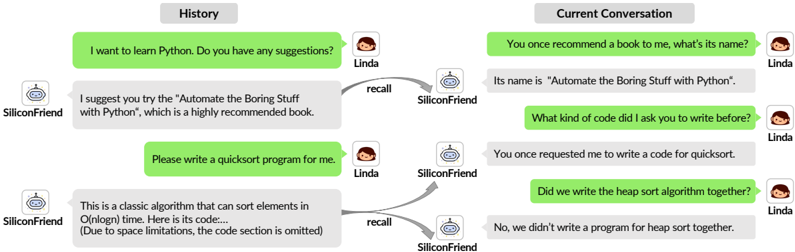
The image depicts a diagram illustrating a conversation history between a user ("Linda") and an AI assistant ("SiliconFriend"). It also shows how the AI assistant recalls previous interactions to inform the current conversation. The diagram is split into two main sections: "History" and "Current Conversation", connected by "recall" arrows. The conversation is presented as a series of speech bubbles.
### Components/Axes
The diagram consists of:
* **Two main sections:** "History" (left) and "Current Conversation" (right).
* **Speech Bubbles:** Representing individual messages in the conversation.
* **Avatars:** Representing the speakers (Linda and SiliconFriend).
* **"Recall" Arrows:** Indicating the AI's retrieval of past information.
* **Labels:** Identifying the speakers and the context of the conversation.
### Detailed Analysis or Content Details
**History Section (Left):**
1. **Message 1:** (Linda, top-left) "I want to learn Python. Do you have any suggestions?"
2. **Message 2:** (SiliconFriend, below Message 1) "I suggest you try the “Automate the Boring Stuff with Python”, which is a highly recommended book."
3. **Message 3:** (Linda, below Message 2) "Please write a quicksort program for me."
4. **Message 4:** (SiliconFriend, bottom-left) "This is a classic algorithm that can sort elements in O(nlogn) time. Here is its code… (Due to space limitations, the code section is omitted)"
**Current Conversation Section (Right):**
1. **Message 1:** (Linda, top-right) "You once recommend a book to me, what’s its name?"
2. **Message 2:** (SiliconFriend, below Message 1) "Its name is “Automate the Boring Stuff with Python”."
3. **Message 3:** (Linda, below Message 2) "What kind of code did I ask you to write before?"
4. **Message 4:** (SiliconFriend, below Message 3) "You once requested me to write a code for quicksort."
5. **Message 5:** (Linda, bottom-right) "Did we write the heap sort algorithm together?"
6. **Message 6:** (SiliconFriend, bottom-right) "No, we didn’t write a program for heap sort together."
**Recall Arrows:**
* An arrow originates from Message 1 in the "Current Conversation" (Linda asking about the book) and points to Message 2 in the "History" section (SiliconFriend recommending the book).
* An arrow originates from Message 3 in the "Current Conversation" (Linda asking about previous code) and points to Message 4 in the "History" section (SiliconFriend providing the quicksort code).
### Key Observations
* The diagram demonstrates the AI's ability to recall past interactions and use them to answer current questions.
* The "recall" arrows clearly show the connection between the current conversation and the relevant historical data.
* The conversation flows logically, with Linda asking questions and SiliconFriend providing answers based on its memory.
* The AI correctly recalls the book recommendation and the quicksort request.
* The AI also correctly recalls that they did *not* work on a heap sort algorithm together.
### Interpretation
This diagram illustrates a basic form of conversational memory in an AI assistant. The AI doesn't just respond to the immediate input but also leverages its history of interactions with the user to provide more relevant and informed responses. The "recall" mechanism is crucial for maintaining context and creating a more natural and engaging conversational experience. The diagram highlights the importance of storing and retrieving past interactions for AI systems designed to engage in ongoing conversations. The omission of the code in the history section suggests a practical limitation of displaying large amounts of data within the diagram. The diagram effectively demonstrates a simple but powerful application of memory in an AI conversational agent.