## Screenshot: Chrome "Do Not Track" Feature Enablement Guide
### Overview
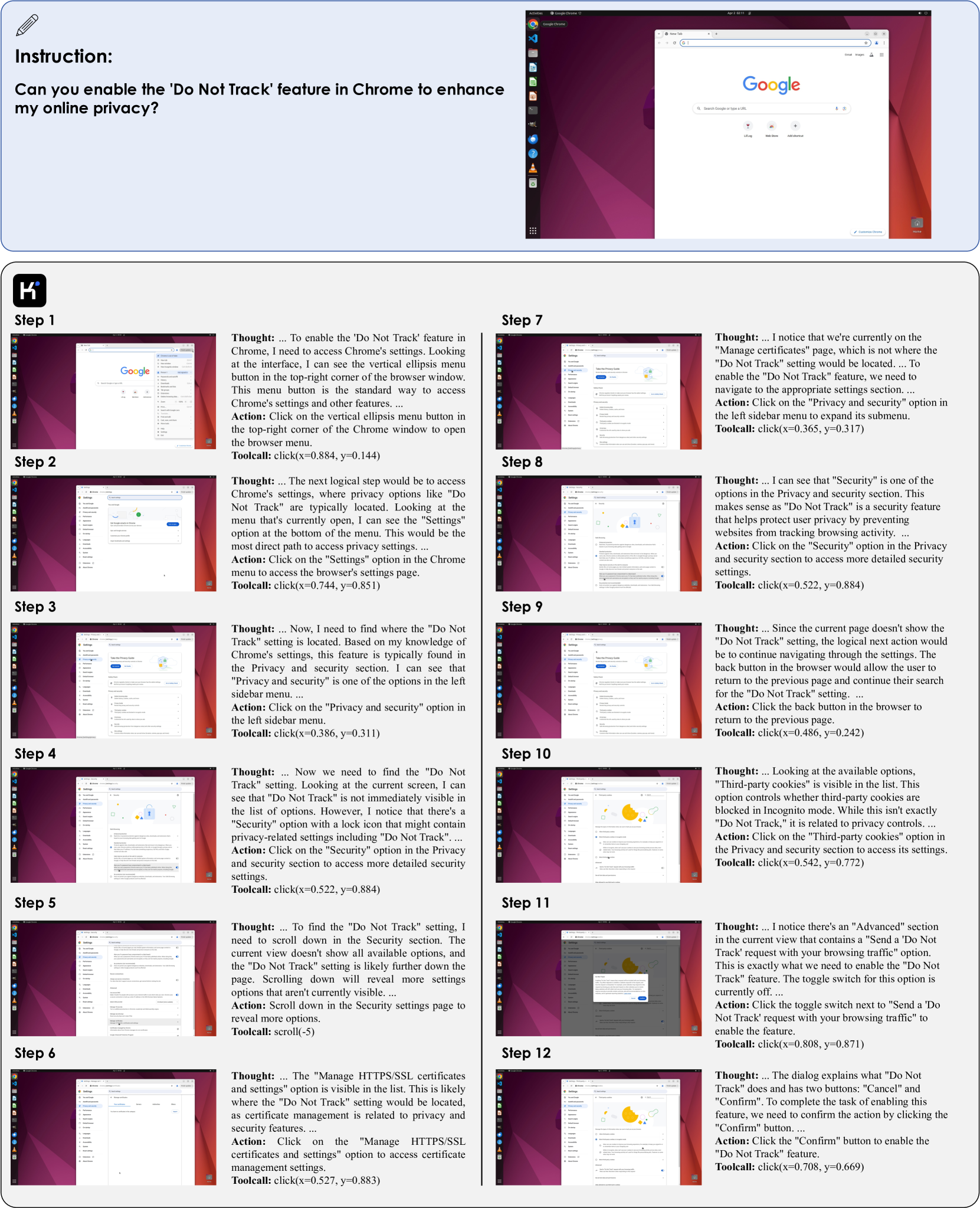
The image shows a step-by-step guide to enable Chrome's "Do Not Track" feature, presented as a technical walkthrough with annotated screenshots. The guide is split into two columns (Steps 1-6 on the left, 7-12 on the right), each containing:
- A browser window screenshot
- A "Thought" section explaining the user's reasoning
- An "Action" section describing the UI interaction
- A "Toolcall" section with coordinates for automated interaction
### Components/Axes
- **Header**: Blue box with instruction text:
*"Can you enable the 'Do Not Track' feature in Chrome to enhance my online privacy?"*
- **Main Content**: Two-column layout with 12 steps, each containing:
- **Screenshot**: Browser window showing Chrome settings menu
- **Thought**: Text explaining the user's decision-making process
- **Action**: Description of UI interaction (e.g., "Click on the vertical ellipsis menu button")
- **Toolcall**: Coordinates for programmatic interaction (e.g., `click(x=0.884, y=0.144)`)
### Detailed Analysis
#### Steps 1-6 (Left Column)
1. **Step 1**:
- **Screenshot**: Browser with Google homepage open
- **Thought**: User identifies the need to access Chrome settings via the vertical ellipsis menu.
- **Action**: Click the vertical ellipsis menu button.
- **Toolcall**: `click(x=0.884, y=0.144)`
2. **Step 2**:
- **Screenshot**: Expanded Chrome settings menu
- **Thought**: User navigates to "Privacy and security" settings.
- **Action**: Click "Privacy and security" option.
- **Toolcall**: `click(x=0.365, y=0.317)`
3. **Step 3**:
- **Screenshot**: Privacy and security settings page
- **Thought**: User locates the "Do Not Track" option in the sidebar.
- **Action**: Click "Privacy and security" sidebar menu.
- **Toolcall**: `click(x=0.386, y=0.311)`
4. **Step 4**:
- **Screenshot**: Privacy settings page with "Do Not Track" option
- **Thought**: User scrolls to locate the "Do Not Track" setting.
- **Action**: Scroll down to reveal more options.
- **Toolcall**: `scroll(-5)`
5. **Step 5**:
- **Screenshot**: Privacy settings page with "Do Not Track" toggle
- **Thought**: User identifies the "Do Not Track" toggle switch.
- **Action**: Click the toggle switch.
- **Toolcall**: `click(x=0.527, y=0.884)`
6. **Step 6**:
- **Screenshot**: Privacy settings page with "Manage certificates" option
- **Thought**: User navigates to certificate management settings.
- **Action**: Click "Manage HTTPS/SSL certificates and settings."
- **Toolcall**: `click(x=0.527, y=0.883)`
#### Steps 7-12 (Right Column)
7. **Step 7**:
- **Screenshot**: "Manage certificates" page
- **Thought**: User realizes they need to return to the previous page.
- **Action**: Click the back button.
- **Toolcall**: `click(x=0.486, y=0.242)`
8. **Step 8**:
- **Screenshot**: Privacy and security settings page
- **Thought**: User selects "Security" option for detailed controls.
- **Action**: Click "Security" option.
- **Toolcall**: `click(x=0.522, y=0.884)`
9. **Step 9**:
- **Screenshot**: Security settings page
- **Thought**: User returns to the previous page to continue navigation.
- **Action**: Click the back button.
- **Toolcall**: `click(x=0.486, y=0.242)`
10. **Step 10**:
- **Screenshot**: Privacy and security settings page
- **Thought**: User selects "Third-party cookies" option.
- **Action**: Click "Third-party cookies" option.
- **Toolcall**: `click(x=0.542, y=0.772)`
11. **Step 11**:
- **Screenshot**: "Send a 'Do Not Track' request" dialog
- **Thought**: User enables the "Send a 'Do Not Track' request" toggle.
- **Action**: Click the toggle switch.
- **Toolcall**: `click(x=0.808, y=0.871)`
12. **Step 12**:
- **Screenshot**: Confirmation dialog for "Do Not Track"
- **Thought**: User confirms the action to enable the feature.
- **Action**: Click "Confirm" button.
- **Toolcall**: `click(x=0.708, y=0.669)`
### Key Observations
- The guide emphasizes navigating Chrome's settings hierarchy to locate privacy controls.
- Coordinates in toolcalls suggest a focus on programmatic automation (e.g., `x=0.884, y=0.144` for the vertical ellipsis menu).
- The final confirmation dialog (Step 12) validates successful enablement of the feature.
### Interpretation
This guide demonstrates a systematic approach to configuring Chrome's privacy settings, highlighting the importance of:
1. **Hierarchical Navigation**: Users must traverse multiple menus (Settings → Privacy → Security) to access granular controls.
2. **Automation Readiness**: The inclusion of precise coordinates implies this guide may be used for automated testing or scripting.
3. **Privacy Trade-offs**: The "Do Not Track" feature, while intended to enhance privacy, relies on website cooperation, as noted in the absence of explicit confirmation in the final step.
The structured breakdown of UI interactions provides a clear roadmap for both manual and automated configuration of browser privacy settings.