## Game Simulation: Environment and Agent
### Overview
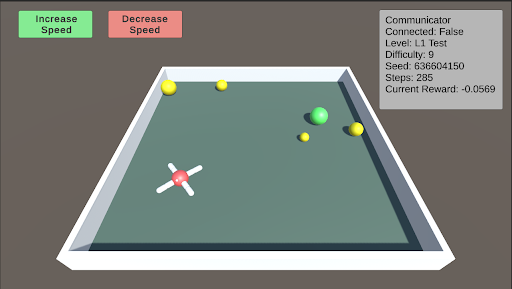
The image depicts a simulated environment, likely a game or reinforcement learning scenario. It shows a rectangular arena with an agent (a red and white object) and several colored spheres. The simulation's status is displayed in a text box in the top-right corner, including connection status, level, difficulty, seed, steps, and current reward. There are also "Increase Speed" and "Decrease Speed" buttons at the top-left.
### Components/Axes
* **Environment:** A rectangular arena with a light gray floor and white walls.
* **Agent:** A red and white object with four extensions, positioned near the bottom-left corner of the arena.
* **Spheres:** Several spheres of varying sizes and colors (yellow and green) are scattered within the arena.
* **UI Elements:**
* "Increase Speed" button (green background) at the top-left.
* "Decrease Speed" button (red background) at the top-left.
* Status box (top-right) containing:
* "Communicator"
* "Connected: False"
* "Level: L1 Test"
* "Difficulty: 9"
* "Seed: 636604150"
* "Steps: 285"
* "Current Reward: -0.0569"
### Detailed Analysis
* **Agent:** The agent appears to be a central red sphere with four white extensions radiating outwards.
* **Spheres:** There are at least five spheres visible:
* Three yellow spheres of varying sizes.
* Two green spheres of varying sizes.
* **Status Box:** The status box provides information about the simulation's current state. The communicator is not connected ("Connected: False"). The simulation is at level "L1 Test" with a difficulty of 9. The random seed is 636604150. The simulation has run for 285 steps, and the current reward is -0.0569.
* **Buttons:** The "Increase Speed" and "Decrease Speed" buttons suggest that the simulation speed can be adjusted.
### Key Observations
* The agent is positioned near the bottom-left corner of the arena.
* The spheres are scattered throughout the arena, with the green spheres clustered towards the top-right.
* The current reward is negative, suggesting that the agent is not performing optimally.
### Interpretation
The image represents a reinforcement learning environment where an agent interacts with its surroundings to achieve a goal. The agent's objective is likely to collect or interact with the spheres in some way, with the reward signal indicating the agent's success. The negative reward suggests that the agent is either not collecting the spheres efficiently or is incurring penalties for certain actions. The "Increase Speed" and "Decrease Speed" buttons suggest that the simulation can be sped up or slowed down for training or observation purposes. The "Seed" value indicates that the simulation is reproducible, allowing for consistent experimentation. The "Difficulty" level suggests that the environment can be made more or less challenging.