## Workflow Diagram: Lean Proof Generation
### Overview
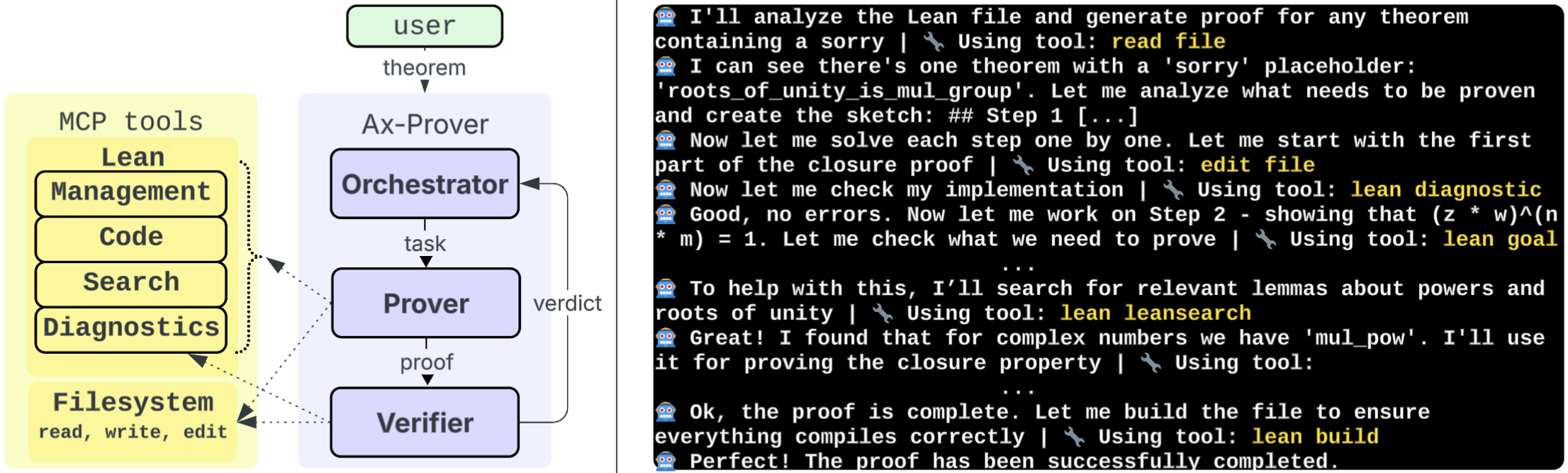
The image presents a workflow diagram illustrating the process of generating a proof using Lean, an interactive theorem prover. It shows the interaction between a user, the Ax-Prover system, MCP tools, and the filesystem, along with a textual representation of the steps involved in the proof generation process.
### Components/Axes
* **User:** Represented by a green rounded rectangle at the top, labeled "user". The user provides a "theorem" as input.
* **Ax-Prover:** A light blue rounded rectangle encompassing the "Orchestrator", "Prover", and "Verifier" components.
* **Orchestrator:** A rounded rectangle within Ax-Prover. It receives the "theorem" from the user and outputs a "task" to the Prover. It also receives a "verdict" from the Verifier.
* **Prover:** A rounded rectangle within Ax-Prover. It receives a "task" from the Orchestrator and outputs a "proof" to the Verifier.
* **Verifier:** A rounded rectangle within Ax-Prover. It receives a "proof" from the Prover and outputs a "verdict" to the Orchestrator.
* **MCP tools:** A yellow rounded rectangle containing the following components:
* Lean
* Management
* Code
* Search
* Diagnostics
* **Filesystem:** A yellow rounded rectangle labeled "Filesystem" with the actions "read, write, edit".
* **Textual Description:** A black rectangle on the right side containing a step-by-step description of the proof generation process, including the tools used at each step.
### Detailed Analysis or ### Content Details
**Workflow:**
1. The user inputs a "theorem" to the "Orchestrator".
2. The "Orchestrator" generates a "task" for the "Prover".
3. The "Prover" attempts to find a "proof" for the "task".
4. The "proof" is sent to the "Verifier".
5. The "Verifier" checks the "proof" and sends a "verdict" back to the "Orchestrator".
6. The "MCP tools" and "Filesystem" interact with the "Ax-Prover" system.
**Textual Description (Right Side):**
The text describes the automated proof generation process, with the system interacting with the Lean theorem prover. Each step is marked with a robot emoji. The steps include:
1. "I'll analyze the Lean file and generate proof for any theorem containing a sorry | Using tool: read file"
2. "I can see there's one theorem with a 'sorry' placeholder: 'roots\_of\_unity\_is\_mul\_group'. Let me analyze what needs to be proven and create the sketch: ## Step 1 [...]"
3. "Now let me solve each step one by one. Let me start with the first part of the closure proof | Using tool: edit file"
4. "Now let me check my implementation | Using tool: lean diagnostic"
5. "Good, no errors. Now let me work on Step 2 - showing that (z \* w)^(n \* m) = 1. Let me check what we need to prove | Using tool: lean goal"
6. "To help with this, I'll search for relevant lemmas about powers and roots of unity | Using tool: lean leansearch"
7. "Great! I found that for complex numbers we have 'mul\_pow'. I'll use it for proving the closure property | Using tool:"
8. "Ok, the proof is complete. Let me build the file to ensure everything compiles correctly | Using tool: lean build"
9. "Perfect! The proof has been successfully completed."
Each step also indicates the tool being used, such as "read file", "edit file", "lean diagnostic", "lean goal", "lean leansearch", and "lean build". A wrench emoji is shown before the tool name.
### Key Observations
* The diagram illustrates a cyclical workflow within the Ax-Prover system, with the Orchestrator, Prover, and Verifier continuously interacting.
* The MCP tools and Filesystem provide support and resources to the Ax-Prover system.
* The textual description provides a detailed, step-by-step account of the proof generation process, highlighting the tools and techniques used.
### Interpretation
The diagram and textual description together provide a comprehensive overview of the automated proof generation process using Lean. The Ax-Prover system orchestrates the proof search, leveraging MCP tools and the filesystem to find and verify proofs. The textual description offers insights into the specific steps and tools involved, demonstrating the system's ability to analyze Lean files, identify theorems with "sorry" placeholders, and generate complete proofs. The process involves reading files, editing files, running diagnostics, setting goals, searching for relevant lemmas, and building the final proof file.