# Technical Document Extraction: Pipeline Replay Tool Interface
## Header Section
- **Title**: MA ADP-MA
- **Mode**: Live Mode
- **Action Button**: Replay Mode (highlighted in blue)
- **Icon**: Settings gear icon
- **Refresh Icon**: Circular arrow
## Main Content
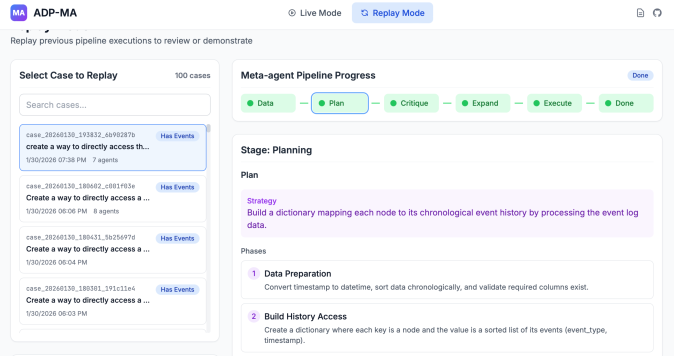
### Left Panel: Case Selection
**Title**: Select Case to Replay
**Total Cases**: 100
**Search Bar**: "Search cases..."
**Case List**:
1. **Case ID**: `case_20260130_193832_ab690287b`
- **Description**: "create a way to directly access th..."
- **Timestamp**: 1/30/2028 07:38 PM
- **Agents**: 7
- **Status**: Has Events (blue highlight)
2. **Case ID**: `case_20260130_180802_c081f03e`
- **Description**: "Create a way to directly access a..."
- **Timestamp**: 1/30/2028 06:06 PM
- **Agents**: 8
3. **Case ID**: `case_20260130_180431_3025697d`
- **Description**: "Create a way to directly access a..."
- **Timestamp**: 1/30/2028 06:04 PM
4. **Case ID**: `case_20260130_180301_191c11e4`
- **Description**: "Create a way to directly access a..."
- **Timestamp**: 1/30/2028 06:03 PM
---
### Right Panel: Pipeline Progress
**Title**: Meta-agent Pipeline Progress
**Status**: Done (blue button)
**Progress Stages** (green boxes with checkmarks):
1. **Data**
2. **Plan** (highlighted with blue outline)
3. **Critique**
4. **Expand**
5. **Execute**
6. **Done**
**Stage Details**:
**Stage**: Planning
**Plan**:
- **Strategy**:
> "Build a dictionary mapping each node to its chronological event history by processing the event log data."
**Phases**:
1. **Data Preparation**
- Convert timestamp to datetime
- Sort data chronologically
- Validate required columns exist
2. **Build History Access**
- Create a dictionary where each key is a node and the value is a sorted list of its events (event_type, timestamp)
---
### Legend & Spatial Grounding
- **Legend Location**: Top-right of progress bar
- **Legend Colors**:
- Green: All pipeline stages
- Blue: "Plan" stage outline
### Notes
- No numerical data or charts present.
- All text is in English.
- Case descriptions are truncated; full text not visible.
- Progress stages follow sequential order (Data → Plan → Critique → Expand → Execute → Done).