## Image Sequence Comparison: Action Control: Forward
### Overview
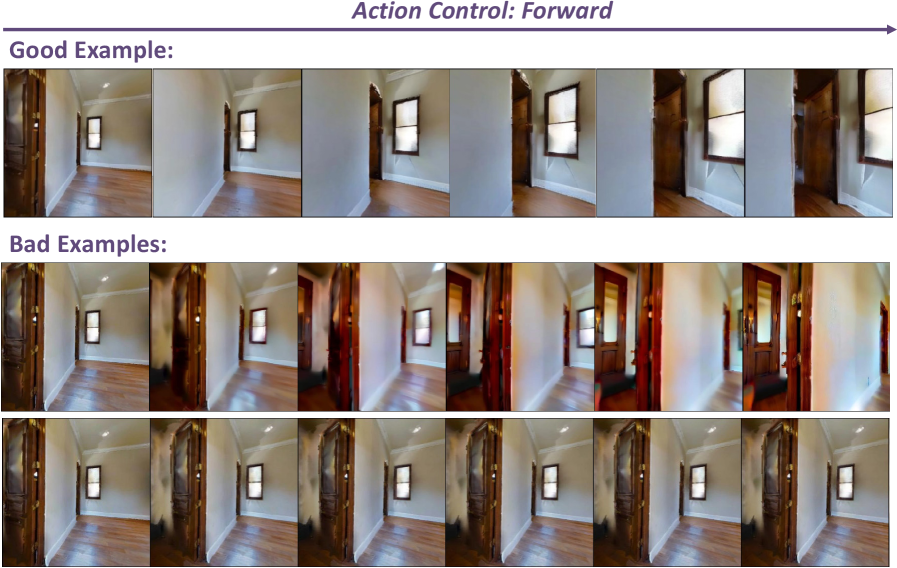
The image displays a comparative analysis of image sequences generated under "Action Control: Forward" conditions. It contrasts a "Good Example" with two "Bad Examples" through side-by-side visualizations of a room interior with a door opening. The sequences demonstrate varying levels of coherence, alignment, and artifact presence across three rows of six images each.
### Components/Axes
- **Title**: "Action Control: Forward" (top center, bold text with rightward arrow)
- **Labels**:
- "Good Example:" (top row, left-aligned)
- "Bad Examples:" (bottom two rows, left-aligned)
- **Image Structure**:
- **Good Example Row**: 6 sequential images showing progressive door opening with consistent lighting, perspective, and spatial alignment.
- **Bad Example Rows**:
- Row 1: 6 images with progressive blurring, misalignment, and color distortion.
- Row 2: 6 images with severe spatial warping, ghosting artifacts, and inconsistent lighting.
### Detailed Analysis
- **Good Example**:
- Images depict a static room with a wooden door opening from left to right.
- Consistent lighting (natural window illumination), uniform flooring texture, and unaltered wall geometry.
- No visible artifacts or distortions across the sequence.
- **Bad Example Row 1**:
- Initial images show minor blurring near the door frame.
- Mid-sequence images exhibit progressive misalignment between door edges and wall geometry.
- Final images display color bleeding and overexposure in the doorway area.
- **Bad Example Row 2**:
- Early images show spatial warping in the door frame.
- Mid-sequence images feature ghosting artifacts and inconsistent shadowing.
- Final images exhibit extreme perspective distortion and loss of structural coherence.
### Key Observations
1. **Coherence**: The good example maintains spatial and temporal consistency, while bad examples degrade rapidly.
2. **Artifacts**: Bad examples exhibit blurring (Row 1), warping (Row 2), and ghosting (Row 2).
3. **Lighting**: Good example preserves natural lighting; bad examples show inconsistent illumination.
4. **Perspective**: Good example retains architectural accuracy; bad examples distort spatial relationships.
### Interpretation
This comparison illustrates the impact of motion control algorithms on image generation quality. The good example likely employs robust motion vector alignment and spatial coherence techniques, preserving structural integrity during action simulation. The bad examples demonstrate failure modes:
- **Row 1**: Indicates issues with temporal consistency, possibly due to inadequate motion tracking.
- **Row 2**: Suggests failures in spatial reasoning, such as incorrect perspective projection or object-occlusion handling.
The progression from minor to severe distortions highlights the sensitivity of generative models to input parameters. These results could inform improvements in action-conditioned image synthesis by identifying critical failure points in motion control pipelines.