## Flowchart: Sokoban Mini Game Development and Deployment
### Overview
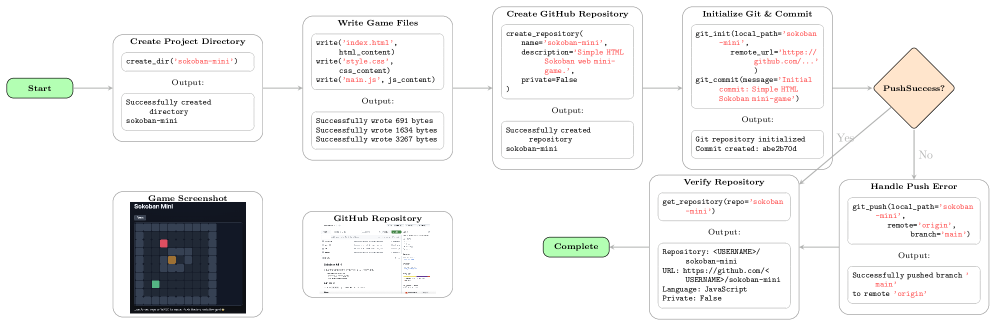
The image is a flowchart illustrating the steps involved in creating, initializing, and deploying a simple HTML Sokoban mini-game to a GitHub repository. The flowchart starts with creating a project directory and ends with either a successful push or handling a push error.
### Components/Axes
The flowchart consists of several rectangular boxes representing different stages of the process, connected by arrows indicating the flow of actions. A diamond shape represents a decision point. The stages are:
1. **Start**: Initial node.
2. **Create Project Directory**: Creates a directory named 'sokoban-mini'.
3. **Write Game Files**: Writes 'index.html', 'style.css', and 'main.js' files.
4. **Create GitHub Repository**: Creates a GitHub repository named 'sokoban-mini'.
5. **Initialize Git & Commit**: Initializes a Git repository and commits the initial files.
6. **PushSuccess?**: A decision point to check if the push was successful.
7. **Verify Repository**: Verifies the repository details on GitHub.
8. **Handle Push Error**: Handles the error if the push was unsuccessful.
9. **Game Screenshot**: Shows a screenshot of the Sokoban mini-game.
10. **GitHub Repository**: Shows a screenshot of the GitHub repository.
11. **Complete**: Final node.
### Detailed Analysis or ### Content Details
* **Start**:
* Shape: Green rounded rectangle.
* Text: "Start"
* **Create Project Directory**:
* Shape: Rounded rectangle.
* Action: `create_dir('sokoban-mini')`
* Output: "Successfully created directory sokoban-mini"
* **Write Game Files**:
* Shape: Rounded rectangle.
* Actions:
* `write('index.html', html_content)`
* `write('style.css', css_content)`
* `write('main.js', js_content)`
* Output:
* "Successfully wrote 691 bytes"
* "Successfully wrote 1634 bytes"
* "Successfully wrote 3267 bytes"
* **Create GitHub Repository**:
* Shape: Rounded rectangle.
* Action:
* `create_repository(`
* `name='sokoban-mini',`
* `description='Simple HTML Sokoban web mini-game.',`
* `private=False`
* `)`
* Output: "Successfully created repository sokoban-mini"
* **Initialize Git & Commit**:
* Shape: Rounded rectangle.
* Actions:
* `git_init(local_path='sokoban-mini', remote_url='https://github.com/...')`
* `git_commit(message='Initial commit: Simple HTML Sokoban mini-game')`
* Output:
* "Git repository initialized"
* "Commit created: abe2b70d"
* **PushSuccess?**:
* Shape: Orange diamond.
* Text: "PushSuccess?"
* Yes path leads to "Verify Repository"
* No path leads to "Handle Push Error"
* **Verify Repository**:
* Shape: Rounded rectangle.
* Action: `get_repository(repo='sokoban-mini')`
* Output:
* `Repository: <USERNAME>/sokoban-mini`
* `URL: https://github.com/<USERNAME>/sokoban-mini`
* `Language: JavaScript`
* `Private: False`
* **Handle Push Error**:
* Shape: Rounded rectangle.
* Action: `git_push(local_path='sokoban-mini', remote='origin', branch='main')`
* Output: "Successfully pushed branch 'main' to remote 'origin'"
* **Game Screenshot**:
* Shape: Rounded rectangle.
* Content: A screenshot of the Sokoban mini-game, showing a grid-based puzzle with a player (green), boxes (orange), and a goal (red).
* **GitHub Repository**:
* Shape: Rounded rectangle.
* Content: A screenshot of a GitHub repository interface, showing file listings and commit history.
* **Complete**:
* Shape: Green rounded rectangle.
* Text: "Complete"
### Key Observations
* The flowchart outlines a typical workflow for creating and deploying a web-based project to GitHub.
* The process includes creating project files, initializing a Git repository, and pushing the code to a remote repository.
* The "PushSuccess?" decision point indicates a potential error handling path.
* The screenshots provide visual context for the game and the GitHub repository.
### Interpretation
The flowchart illustrates the steps required to create and deploy a simple HTML Sokoban mini-game to GitHub. It demonstrates the integration of local development with version control and remote repository hosting. The process begins with setting up the project structure, writing the necessary code files (HTML, CSS, JavaScript), and then transitioning to version control using Git. The code is then pushed to a GitHub repository, allowing for collaboration, version tracking, and deployment. The inclusion of error handling (the "Handle Push Error" step) indicates a robust approach to development, acknowledging that issues may arise during the deployment process. The screenshots provide a visual representation of the final product (the game) and the platform used for hosting the code (GitHub). Overall, the flowchart provides a clear and concise overview of the entire development and deployment pipeline.