## Flowchart: Sokoban-mini Game Deployment Process
### Overview
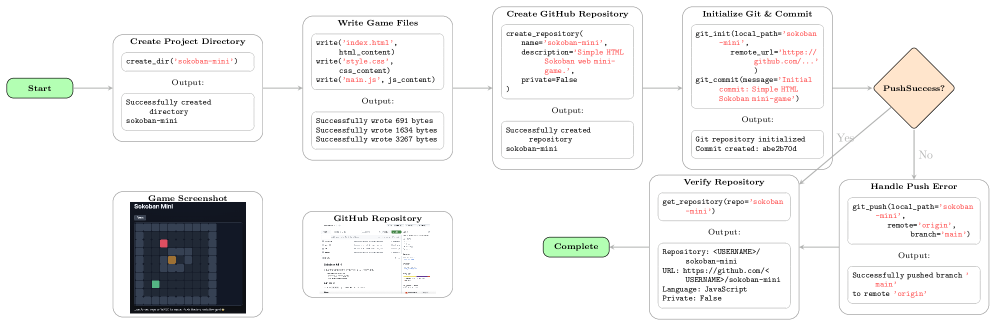
This flowchart illustrates the process of creating a Sokoban-mini game, writing the game files, creating a GitHub repository, initializing Git, verifying the repository, and handling potential push errors. The process begins with creating a directory and ends with a "Complete" state. The flowchart uses rectangular boxes to represent actions, diamond shapes for decision points, and rounded rectangles for start and end states.
### Components/Axes
The flowchart consists of the following components:
* **Start:** Initial state of the process.
* **Create Game Directory:** Creates a directory named "sokoban-mini".
* **Write Game Files:** Writes `index.html`, `style.css`, and `main.js` files.
* **Create GitHub Repository:** Creates a repository named "sokoban-mini" on GitHub.
* **Initialize Git & Commit:** Initializes a Git repository and commits the changes.
* **Push Success?:** A decision point to check if the push to the remote repository was successful.
* **Handle Push Error:** Actions to take if the push fails.
* **Verify Repository:** Verifies the repository details.
* **Complete:** Final state of the process.
* **Game Screenshot:** A visual representation of the Sokoban-mini game.
* **GitHub Repository:** A screenshot of the GitHub repository page.
### Detailed Analysis or Content Details
The flowchart details the following steps and outputs:
1. **Create Game Directory:**
- Command: `create_dir("sokoban-mini")`
- Output: "Successfully created directory sokoban-mini"
2. **Write Game Files:**
- Command: `write("index.html", html_content)`
- Output: "Successfully wrote 690 bytes"
- Command: `write("style.css", css_content)`
- Output: "Successfully wrote 1694 bytes"
- Command: `write("main.js", js_content)`
- Output: "Successfully wrote 3287 bytes"
3. **Create GitHub Repository:**
- Command: `create_repository(name="sokoban-mini", description="Simple HTML Sokoban web mini-game", pass="", private=False)`
- Output: "Successfully created repository sokoban-mini"
4. **Initialize Git & Commit:**
- Command: `git_init(local_path="sokoban-mini", remote_url="https://github.com/")`
- Command: `git_commit(message="Initial commit - Simple HTML Sokoban mini-game")`
- Output: "Git repository initialized"
- Output: "Commit created: abcd704"
5. **Push Success?:**
- If "Yes", the process proceeds to "Complete".
- If "No", the process proceeds to "Handle Push Error".
6. **Handle Push Error:**
- Command: `git_push(local_path="sokoban-mini", remote="origin", branch="main")`
- Output: "Successfully pushed branch 'main' to remote 'origin'"
7. **Verify Repository:**
- Command: `get_repository(repo="sokoban-mini")`
- Output:
- Repository: `<USERNAME>/sokoban-mini`
- URL: `https://github.com/<USERNAME>/sokoban-mini`
- Language: JavaScript
- Private: False
The "Game Screenshot" shows a grid-based game with a player character (represented by a red square) and boxes (represented by green squares) on a green background. The "GitHub Repository" screenshot shows the repository's file structure and commit history.
### Key Observations
The process is linear with a single decision point for push success. The outputs of each step are clearly defined, providing a detailed record of the deployment process. The use of Git for version control is evident. The game is written in JavaScript, HTML, and CSS.
### Interpretation
This flowchart demonstrates a streamlined process for deploying a simple web-based game (Sokoban-mini) to a GitHub repository. It highlights the key steps involved, from initial directory creation to version control and remote repository management. The inclusion of file sizes and commit hashes suggests a focus on tracking and reproducibility. The "Push Success?" decision point indicates an awareness of potential network or permission issues during the deployment process, and the "Handle Push Error" step provides a recovery mechanism. The screenshots of the game and repository provide visual context and confirm the successful completion of the process. The process is well-documented and appears to be designed for automation or easy replication.