## Technical Document Layout: Debugging Workflow Interface
### Overview
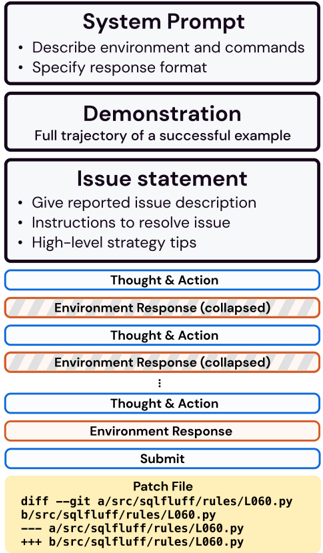
The image depicts a structured technical document interface designed for debugging workflows. It combines textual instructions, color-coded components, and a code patch visualization. The layout emphasizes step-by-step problem resolution through a combination of natural language prompts, environmental interactions, and code modifications.
### Components/Axes
1. **Header Sections** (Top 1/3 of image):
- **System Prompt** (Blue background):
- Text: "Describe environment and commands • Specify response format"
- **Demonstration** (Blue background):
- Text: "Full trajectory of a successful example"
- **Issue Statement** (Blue background):
- Text: "Give reported issue description • Instructions to resolve issue • High-level strategy tips"
2. **Main Workflow** (Middle 2/3 of image):
- **Thought & Action** (Blue box with white text):
- Repeated 3x with alternating blue/red color coding
- **Environment Response** (Red box with gray text):
- Labeled "collapsed" in parentheses
- Appears 3x with alternating blue/red color coding
- **Submit** (Blue box with black text):
- Contains code patch details
3. **Legend** (Bottom of image):
- Color key:
- Blue: Thought & Action
- Red: Environment Response
- Yellow: Patch File
4. **Code Patch** (Bottom section):
- Yellow background with code diff:
```
diff --git a/src/sqlfluff/rules/L060.py
b/src/sqlfluff/rules/L060.py
--- a/src/sqlfluff/rules/L060.py
+++ b/src/sqlfluff/rules/L060.py
```
### Detailed Analysis
1. **System Prompt Section**:
- Contains two bullet points specifying requirements for environment description and response formatting
- Positioned at top-left, establishing foundational guidelines
2. **Demonstration Section**:
- Single-line instruction emphasizing example-based learning
- Positioned centrally, acting as transitional element
3. **Issue Statement Section**:
- Three bullet points outlining required components for issue reporting
- Positioned top-right, providing resolution framework
4. **Workflow Components**:
- **Thought & Action** (Blue):
- Contains reasoning steps (text not visible in image)
- Alternates with Environment Response in iterative pattern
- **Environment Response** (Red):
- Contains system feedback (text not visible in image)
- Marked as "collapsed" suggesting expandable/collapsible UI elements
- **Submit** (Blue):
- Contains code modification instructions
- Positioned at bottom-center, acting as final action point
5. **Color Coding**:
- Blue (#0000FF): Primary workflow elements (Thought & Action, Submit)
- Red (#FF0000): System feedback (Environment Response)
- Yellow (#FFFF00): Code modification section
- Gray text in red boxes suggests secondary importance
### Key Observations
1. **Structured Progression**:
- Top-to-bottom flow from problem definition (System Prompt) to resolution (Submit)
- Left-to-right organization within sections
2. **Color-Coded Workflow**:
- Blue dominates (66% of elements), emphasizing active problem-solving
- Red (33%) highlights system feedback
- Yellow (1 element) draws attention to code changes
3. **Collapsible Elements**:
- Environment Responses marked as "collapsed" suggest expandable interface components
- Implies iterative interaction between user and system
4. **Code Patch Specificity**:
- Shows exact file path and modification instructions
- Uses standard git diff format for version control integration
### Interpretation
This interface appears designed for collaborative debugging workflows, combining natural language instructions with code modification capabilities. The color coding creates a visual hierarchy that separates:
1. **Problem Definition** (System Prompt)
2. **Example Reference** (Demonstration)
3. **Issue Specification** (Issue Statement)
4. **Interactive Resolution** (Thought/Action ↔ Environment Response)
5. **Implementation** (Submit/Patch)
The collapsed environment responses suggest a step-by-step debugging process where users can expand/collapse system feedback as needed. The code patch section's prominent placement indicates that implementation is the final, critical step in the workflow. The use of standard git diff format implies integration with version control systems, making this interface particularly valuable for developers working in collaborative codebases.
The layout's strength lies in its clear separation of concerns while maintaining a logical flow. However, the lack of visible text in the Thought & Action and Environment Response sections limits understanding of the specific debugging strategies employed. The interface seems optimized for technical users familiar with both natural language debugging and code modification workflows.