## Diagram: Multi-Level Projection Frustum with Screen-Space Constraints
### Overview
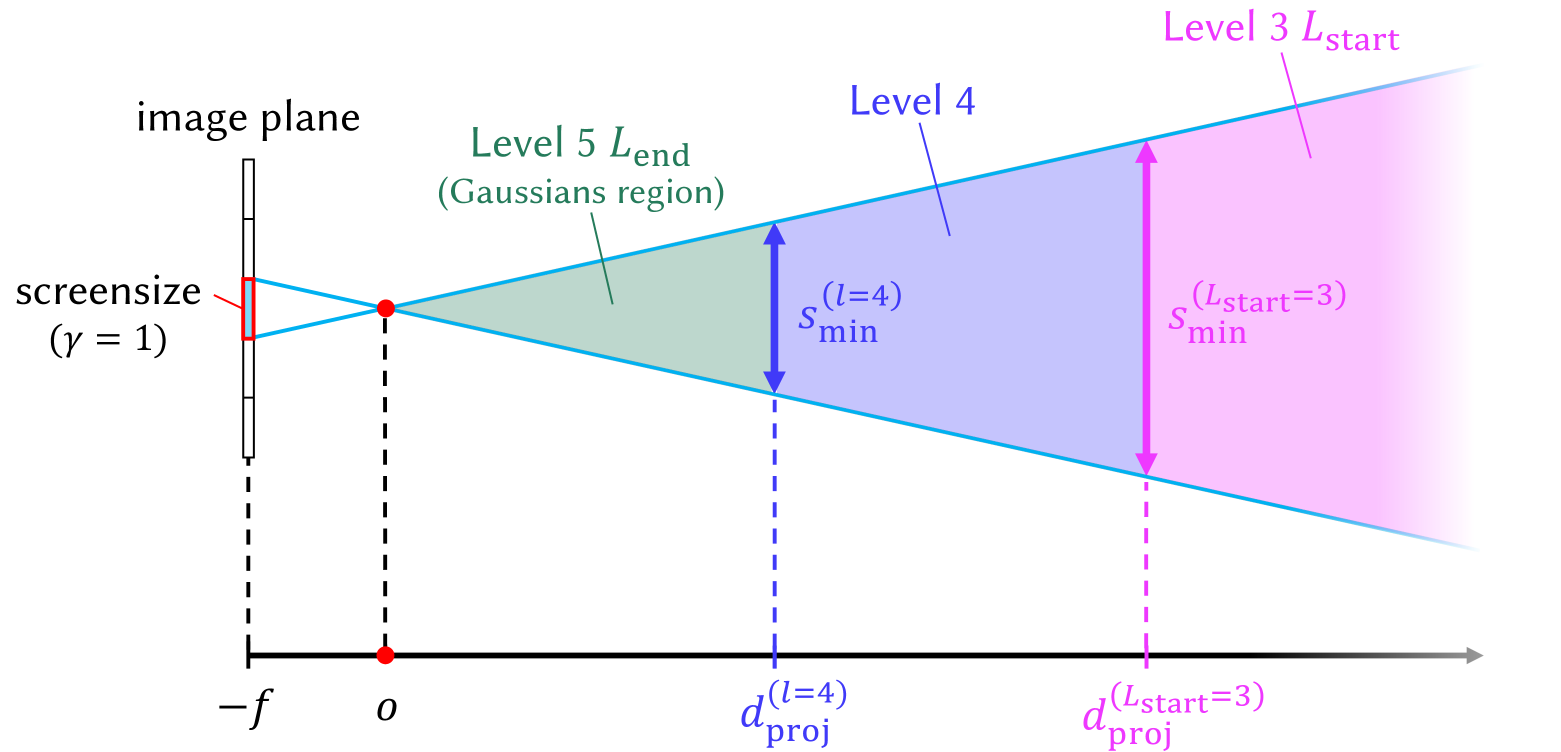
This image is a technical diagram illustrating a multi-level projection or level-of-detail (LOD) scheme, likely used in computer graphics or rendering. It depicts how a viewing frustum is segmented into different regions (Levels 3, 4, and 5) based on distance from the camera, with associated minimum screen-space size constraints ($s_{\text{min}}$) for each level. The diagram establishes a relationship between world-space distance ($d_{\text{proj}}$), the image plane, and the projected size of objects.
### Components/Axes
**1. Primary Axis (Horizontal):**
* A horizontal black arrow at the bottom represents the primary distance axis, pointing to the right.
* **Key Markers:**
* $-f$: Located at the far left, aligned with the image plane. This likely represents the camera's focal length or near plane position in a negative coordinate system.
* $o$: A red dot on the axis, representing the origin or camera center.
* $d_{\text{proj}}^{(l=4)}$: A blue dashed vertical line marking the projection distance for Level 4.
* $d_{\text{proj}}^{(L_{\text{start}}=3)}$: A magenta dashed vertical line marking the projection distance for the start of Level 3.
**2. Image Plane & Projection Geometry (Left Side):**
* **Image Plane:** A vertical black line on the left, labeled "image plane".
* **Screensize Indicator:** A small red rectangle on the image plane, labeled "screensize ($\gamma = 1$)". This defines a reference screen-space size.
* **Projection Lines:** Two cyan lines originate from the top and bottom of the "screensize" rectangle, converge at the red dot (origin $o$), and then diverge to form the boundaries of the viewing frustum extending to the right.
**3. Frustum Levels & Regions (Main Area):**
The diverging cyan lines define a frustum divided into three colored, sequential regions:
* **Level 5 $L_{\text{end}}$ (Gaussians region):** The leftmost region, shaded in green. It is bounded on the right by the blue dashed line at $d_{\text{proj}}^{(l=4)}$. The label indicates this is the end of Level 5 and is associated with a "Gaussians region," suggesting a specific rendering technique (e.g., Gaussian splatting).
* **Level 4:** The middle region, shaded in blue. It spans from the blue dashed line ($d_{\text{proj}}^{(l=4)}$) to the magenta dashed line ($d_{\text{proj}}^{(L_{\text{start}}=3)}$).
* **Level 3 $L_{\text{start}}$:** The rightmost region, shaded in magenta. It begins at the magenta dashed line and extends to the right, fading out. The label indicates this is the start of Level 3.
**4. Minimum Screen-Size Constraints:**
Vertical double-headed arrows within each region define the minimum projected size ($s_{\text{min}}$) an object must have at that distance to be rendered at that level.
* **For Level 4:** A blue arrow labeled $s_{\text{min}}^{(l=4)}$ spans the height of the blue frustum region at distance $d_{\text{proj}}^{(l=4)}$.
* **For Level 3:** A magenta arrow labeled $s_{\text{min}}^{(L_{\text{start}}=3)}$ spans the height of the magenta frustum region at distance $d_{\text{proj}}^{(L_{\text{start}}=3)}$.
### Detailed Analysis
The diagram defines a precise geometric and parametric relationship:
1. **Reference Setup:** A screen-space pixel or reference size ("screensize", $\gamma=1$) is defined on the image plane. Its projection through the camera center ($o$) creates the viewing frustum.
2. **Level Segmentation:** The frustum is partitioned along the depth axis into discrete levels (5, 4, 3). The partitioning is not arbitrary but is tied to specific projection distances ($d_{\text{proj}}$).
3. **Screen-Space Constraint:** For each level $l$, there is a minimum screen-space size $s_{\text{min}}^{(l)}$. This is visualized as the height of the frustum at the level's starting distance. An object at distance $d_{\text{proj}}^{(l)}$ must project to at least this size to be considered for rendering at level $l$.
4. **Direction of Progression:** The level numbers decrease (5 -> 4 -> 3) as distance from the camera increases. This is a common pattern in LOD systems where lower detail levels are used for farther objects.
5. **Color Coding:** The diagram uses a consistent color scheme for clarity:
* **Green:** Level 5 / Gaussians region.
* **Blue:** Level 4 and its associated parameters ($s_{\text{min}}^{(l=4)}$, $d_{\text{proj}}^{(l=4)}$).
* **Magenta:** Level 3 and its associated parameters ($s_{\text{min}}^{(L_{\text{start}}=3)}$, $d_{\text{proj}}^{(L_{\text{start}}=3)}$).
### Key Observations
* **Hierarchical Structure:** The diagram implies a hierarchical or multi-resolution rendering pipeline where scene elements are assigned to different levels based on their projected size.
* **Gaussians Region:** The specific mention of "Gaussians region" for Level 5 strongly suggests this diagram is from a paper or system involving **3D Gaussian Splatting** or a similar point-based/splatting rendering technique. Level 5 may represent the highest-detail level where individual Gaussian primitives are used.
* **Inverse Relationship:** The geometry shows that $s_{\text{min}}$ increases with distance ($s_{\text{min}}^{(L_{\text{start}}=3)} > s_{\text{min}}^{(l=4)}$). This is because the frustum expands; a constant angular size corresponds to a larger linear size at greater distances.
* **Parameter Notation:** The use of $(l=4)$ and $(L_{\text{start}}=3)$ in the subscripts indicates these are level-specific parameters. $L_{\text{start}}$ may denote the first distance at which Level 3 becomes active.
### Interpretation
This diagram is a **conceptual model for a level-of-detail selection mechanism in a rendering engine, likely one using Gaussian Splatting**. Its purpose is to define the rules for when to switch between different representation levels of a 3D scene.
* **What it demonstrates:** It visually formalizes the core LOD criterion: an object's importance (and thus the detail level at which it is rendered) is a function of its **screen-space projected size**. Objects that project smaller than $s_{\text{min}}^{(l)}$ at distance $d_{\text{proj}}^{(l)}$ are either not rendered at level $l$ or are aggregated into a simpler representation (e.g., from Level 5 Gaussians to a lower-detail mesh or impostor in Level 4/3).
* **Relationship between elements:** The image plane and screensize define the camera's view. The projection lines translate this into a 3D frustum. The $d_{\text{proj}}$ markers slice this frustum into zones. The $s_{\text{min}}$ arrows are the critical thresholds that link the 3D world (distance) back to the 2D image (screen size), creating a closed-loop system for LOD management.
* **Significance:** This is a fundamental optimization strategy in real-time graphics. By rendering distant or small objects with less detail (Levels 4, 3), the system saves computational resources (memory, processing power) while maintaining visual quality for important, close-up objects (Level 5). The "Gaussians region" label points to a modern, neural rendering context where this LOD scheme might be applied to manage the complexity of a scene represented by millions of Gaussian primitives. The diagram provides the mathematical and geometric foundation for implementing such an LOD policy.