## Diagram: Quantization Methods Comparison
### Overview
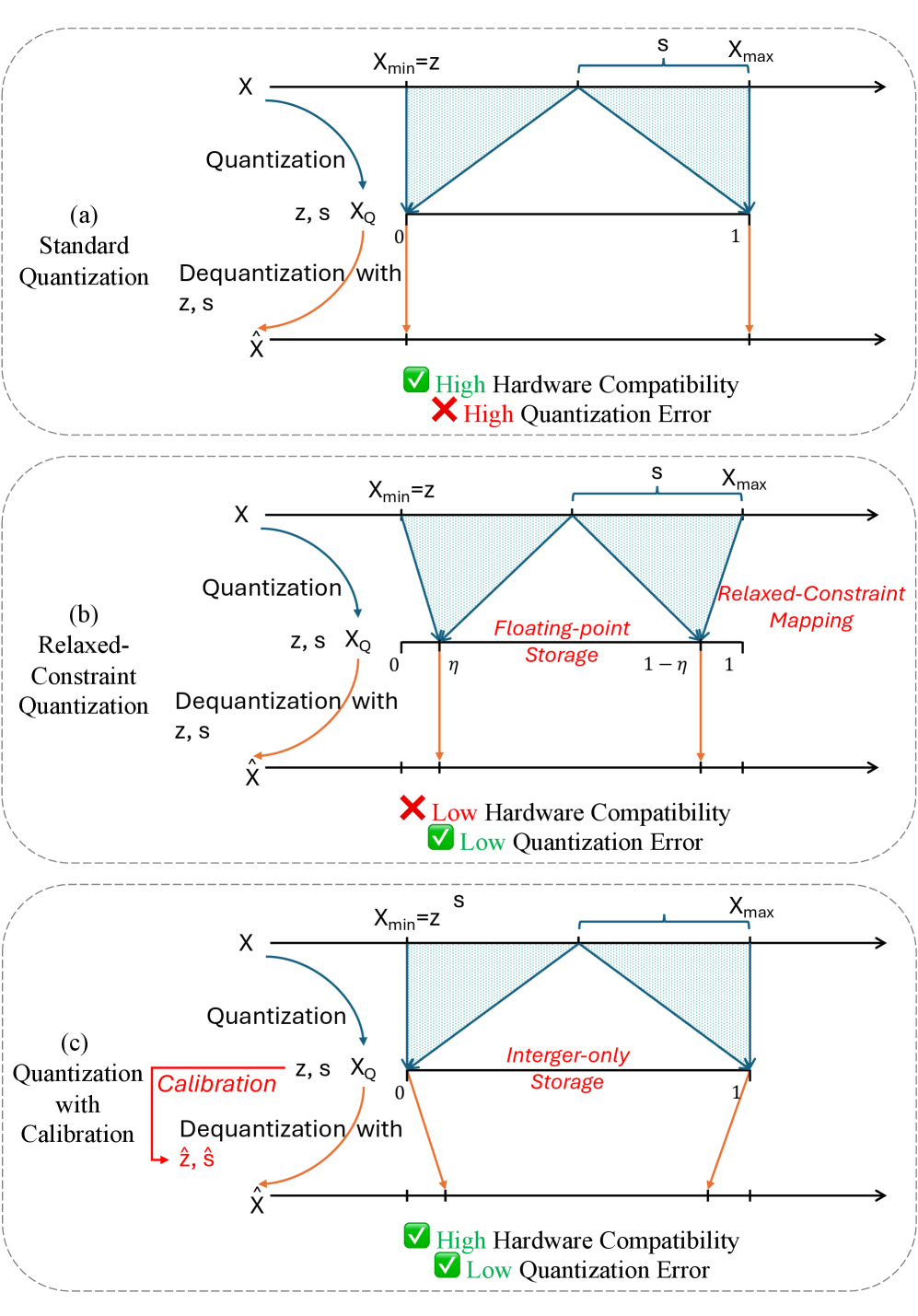
The diagram illustrates three quantization techniques:
1. **Standard Quantization** (a)
2. **Relaxed-Constraint Quantization** (b)
3. **Quantization with Calibration** (c)
Each method maps original data (`X`) to quantized values (`X_Q`) and back to reconstructed data (`X̂`), with trade-offs in hardware compatibility and quantization error.
---
### Components/Axes
- **Axes**:
- Horizontal axis labeled `X` (original data range: `X_min = z` to `X_max`).
- Horizontal axis labeled `X̂` (reconstructed data range: `0` to `1`).
- **Key Elements**:
- **Quantization**: Arrows from `X` to `X_Q` (quantized value).
- **Dequantization**: Arrows from `X_Q` to `X̂`.
- **Shaded Regions**: Represent mapping ranges (e.g., triangular/trapezoidal shapes).
- **Checkmarks/Crosses**:
- Green check: High hardware compatibility / Low quantization error.
- Red cross: Low hardware compatibility / High quantization error.
- **Legend**:
- Green: High hardware compatibility, low error.
- Red: High error.
- Blue: Quantization range (`X_min` to `X_max`).
---
### Detailed Analysis
#### (a) Standard Quantization
- **Quantization**: Maps `X` to `X_Q` using `z` and `s` (step size).
- **Dequantization**: Reconstructs `X̂` with `z` and `s`.
- **Shaded Region**: Triangular, indicating linear mapping.
- **Hardware Compatibility**: ✅ High (green check).
- **Quantization Error**: ❌ High (red cross).
#### (b) Relaxed-Constraint Quantization
- **Quantization**: Maps `X` to `X_Q` with `z` and `s`.
- **Dequantization**: Reconstructs `X̂` with `z` and `s`.
- **Shaded Region**: Trapezoidal, with floating-point storage (`η`).
- **Hardware Compatibility**: ❌ Low (red cross).
- **Quantization Error**: ✅ Low (green check).
#### (c) Quantization with Calibration
- **Quantization**: Maps `X` to `X_Q` with `z` and `s`.
- **Calibration**: Adjusts parameters (`ẑ`, `ŝ`).
- **Dequantization**: Reconstructs `X̂` with `z` and `s`.
- **Shaded Region**: Triangular, with integer-only storage.
- **Hardware Compatibility**: ✅ High (green check).
- **Quantization Error**: ✅ Low (green check).
---
### Key Observations
1. **Trade-offs**:
- Standard quantization prioritizes hardware compatibility but introduces high error.
- Relaxed-constraint quantization sacrifices compatibility for lower error.
- Calibration balances both, achieving high compatibility and low error.
2. **Storage**:
- (a) and (b) use floating-point storage (`η`), while (c) uses integer-only storage.
3. **Error Distribution**:
- Shaded regions’ shapes correlate with error magnitude (e.g., trapezoidal regions in (b) suggest broader error tolerance).
---
### Interpretation
The diagram highlights the **trade-off between hardware efficiency and accuracy** in quantization.
- **Standard Quantization** (a) is hardware-friendly but error-prone, likely due to simplistic mapping.
- **Relaxed-Constraint Quantization** (b) uses floating-point storage to reduce error but requires less compatible hardware.
- **Calibration** (c) optimizes both by adjusting parameters (`ẑ`, `ŝ`) and using integer storage, suggesting it is the most efficient method for systems prioritizing accuracy and compatibility.
The use of **integer-only storage** in (c) likely reduces computational overhead, aligning with high hardware compatibility. The **floating-point storage** in (b) enables finer granularity, lowering error but increasing hardware demands.
This analysis underscores the importance of calibration in balancing practical constraints and performance in quantization systems.