## Screenshot: Survey Interface for Observation Evaluation
### Overview
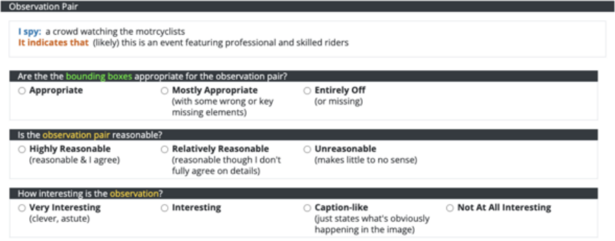
The image depicts a structured survey interface designed to evaluate observation pairs. It includes three sequential evaluation questions with multiple-choice options, each accompanied by highlighted keywords. The interface uses color-coded text to emphasize specific terms and phrases.
### Components/Axes
1. **Header Section**:
- **Label**: "Observation Pair" (bold, black text on dark gray background).
- **Content**:
- "I spy: a crowd watching the motorcyclists" (blue text).
- "It indicates that (likely) this is an event featuring professional and skilled riders" (orange text for "It indicates that," gray text for the rest).
2. **Bounding Box Appropriateness Question**:
- **Label**: "Are the the bounding boxes appropriate for the observation pair?" (bold, white text on dark gray background).
- **Options**:
- "Appropriate" (bold, black text).
- "Mostly Appropriate (with some wrong or key missing elements)" (bold, black text).
- "Entirely Off (or missing)" (bold, black text).
- **Highlight**: "bounding boxes" (green text).
3. **Reasonableness Question**:
- **Label**: "Is the observation pair reasonable?" (bold, white text on dark gray background).
- **Options**:
- "Highly Reasonable (reasonable & I agree)" (bold, black text).
- "Relatively Reasonable (reasonable though I don't fully agree on details)" (bold, black text).
- "Unreasonable (makes little to no sense)" (bold, black text).
- **Highlight**: "observation pair" (yellow text).
4. **Interest Question**:
- **Label**: "How interesting is the observation?" (bold, white text on dark gray background).
- **Options**:
- "Very Interesting (clever, astute)" (bold, black text).
- "Interesting" (bold, black text).
- "Caption-like (just states what's obviously happening in the image)" (bold, black text).
- "Not At All Interesting" (bold, black text).
- **Highlight**: "observation" (yellow text).
### Detailed Analysis
- **Textual Structure**:
- The interface follows a top-down flow, with each section separated by horizontal dark gray bars.
- Key terms (e.g., "bounding boxes," "observation pair," "observation") are highlighted in green and yellow to draw attention.
- Parenthetical explanations clarify the intent of each option (e.g., "(reasonable & I agree)" for "Highly Reasonable").
- **Color Coding**:
- Blue text highlights the observation description ("I spy...").
- Orange text emphasizes the inference ("It indicates that...").
- Green and yellow highlights denote technical terms ("bounding boxes," "observation pair," "observation").
### Key Observations
1. The survey evaluates three dimensions:
- **Bounding box accuracy** (spatial alignment).
- **Reasonableness** (logical consistency).
- **Interest level** (engagement potential).
2. Parenthetical explanations provide context for each option, ensuring clarity.
3. Color highlights guide the user’s focus to critical terms.
### Interpretation
This interface is likely part of a user study or data annotation task, where participants assess the quality of generated observations (e.g., for computer vision or NLP systems). The structured questions ensure standardized evaluations, while color highlights and parenthetical notes reduce ambiguity. The progression from observation description to evaluation suggests a workflow for validating automated systems’ outputs.
**Note**: No numerical data or visual trends are present, as this is a textual survey interface.