## Screenshot: Observation Pair Evaluation Form
### Overview
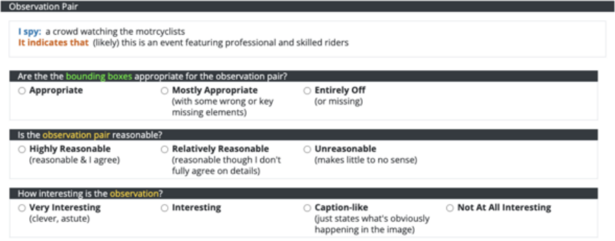
The image is a screenshot of a digital form or survey interface designed to evaluate an "Observation Pair." The form is structured with a dark header bar and a series of questions with multiple-choice radio button responses. The content appears to be part of a data labeling, quality assessment, or model evaluation task, likely within the field of computer vision or multimodal AI.
### Components/Axes
The interface is divided into distinct sections:
1. **Header Bar (Dark Background):**
* **Title:** "Observation Pair" (white text on a dark gray/black background).
2. **Observation Pair Display (Light Background):**
* **Label:** "I spy:" followed by the text "a crowd watching the motorycyclists" (note the typo: "motorycyclists").
* **Label:** "It indicates that (likely)" followed by the text "this is an event featuring professional and skilled riders".
3. **Question 1: Bounding Box Appropriateness**
* **Question Text:** "Are the the bounding boxes appropriate for the observation pair?" (note the repeated "the").
* **Response Options (Radio Buttons):**
* "Appropriate"
* "Mostly Appropriate (with some wrong or key missing elements)"
* "Entirely Off (or missing)"
4. **Question 2: Observation Pair Reasonableness**
* **Question Text:** "Is the observation pair reasonable?"
* **Response Options (Radio Buttons):**
* "Highly Reasonable (reasonable & I agree)"
* "Relatively Reasonable (reasonable though I don't fully agree on details)"
* "Unreasonable (makes little to no sense)"
5. **Question 3: Interest Level**
* **Question Text:** "How interesting is the observation?"
* **Response Options (Radio Buttons):**
* "Very Interesting (clever, astute)"
* "Interesting"
* "Caption-like (just states what's obviously happening in the image)"
* "Not At All Interesting"
### Detailed Analysis
* **Spatial Layout:** The form follows a top-down, linear structure. The "Observation Pair" header is at the very top. The specific observation text is directly below it. The three evaluation questions are stacked vertically, each with its set of radio button options listed horizontally beneath the question.
* **Textual Content:** The core data being evaluated is the pair: an observation ("a crowd watching the motorycyclists") and its inferred meaning ("this is an event featuring professional and skilled riders").
* **Evaluation Criteria:** The form assesses the pair on three dimensions:
1. **Technical Accuracy:** The appropriateness of associated "bounding boxes" (implying a visual grounding task).
2. **Logical Soundness:** The reasonableness of the link between the observation and its indication.
3. **Qualitative Value:** The subjective interest or insightfulness of the observation.
### Key Observations
* **Typos:** There are two noticeable typos in the source text: "motorycyclists" (should be "motorcyclists") and the repeated "the the" in the first question.
* **Scale Design:** The response scales are not uniform. The first question uses a 3-point scale of appropriateness. The second uses a 3-point scale of agreement/reasonableness. The third uses a 4-point scale of interest, with the third option ("Caption-like") serving as a specific critique of being too obvious.
* **Context Clues:** The mention of "bounding boxes" strongly suggests this form is used in a pipeline for training or evaluating AI models that perform visual grounding or image captioning, where the model must identify regions in an image (bounding boxes) that correspond to textual descriptions.
### Interpretation
This image captures a tool for human evaluation of AI-generated or human-annotated multimodal data. The "Observation Pair" represents a model's or annotator's output: a visual observation and its higher-level interpretation. The form is designed to collect structured feedback on this output's quality.
The data suggests a focus on both technical precision (bounding boxes) and semantic quality (reasonableness, interest). The inclusion of a "Caption-like" option indicates a concern for generating observations that are insightful rather than merely descriptive. The typos in the interface itself might imply it is a prototype, an internal tool, or a crowdsourcing platform where such minor errors are present. The form's structure is a direct window into the criteria used to judge the performance of systems that connect visual data to textual understanding.