# Technical Document Extraction: Task Automation Examples
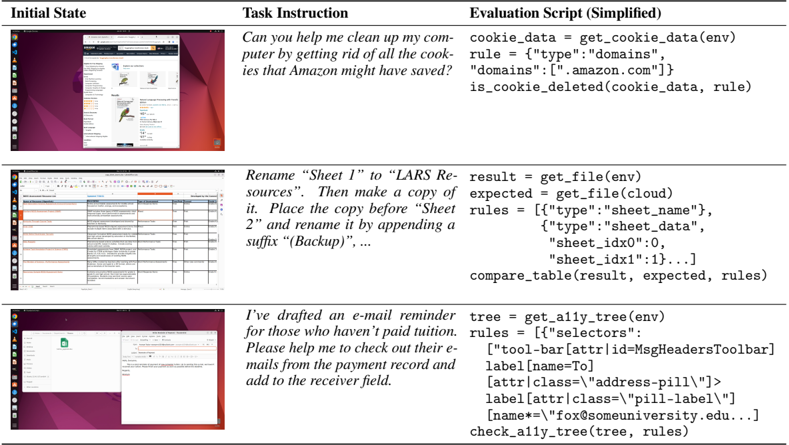
This document provides a detailed extraction of the information contained in the provided image, which illustrates three examples of computer task automation. The image is structured as a table with three columns: **Initial State**, **Task Instruction**, and **Evaluation Script (Simplified)**.
---
## Table Structure and Content
| Initial State | Task Instruction | Evaluation Script (Simplified) |
| :--- | :--- | :--- |
| **Cookie Deletion Task**: A screenshot of a Linux desktop (Ubuntu) showing a web browser open to an Amazon search results page for "Natural Language Processing with Python". | "Can you help me clean up my computer by getting rid of all the cookies that Amazon might have saved?" | ```python\ncookie_data = get_cookie_data(env)\nrule = {"type": "domains",\n "domains": [".amazon.com"]}\nis_cookie_deleted(cookie_data, rule)\n``` |
| **Spreadsheet Manipulation Task**: A screenshot of a spreadsheet application (LibreOffice Calc) containing a detailed data table with multiple rows and columns. | "Rename 'Sheet 1' to 'LARS Resources'. Then make a copy of it. Place the copy before 'Sheet 2' and rename it by appending a suffix '(Backup)', ..." | ```python\nresult = get_file(env)\nexpected = get_file(cloud)\nrules = [{"type": "sheet_name"},\n {"type": "sheet_data",\n "sheet_idx0": 0,\n "sheet_idx1": 1}...]\ncompare_table(result, expected, rules)\n``` |
| **Email Automation Task**: A screenshot of a Linux desktop showing two windows: a file manager/spreadsheet on the left and an email composition window (Thunderbird) on the right. | "I've drafted an e-mail reminder for those who haven't paid tuition. Please help me to check out their e-mails from the payment record and add to the receiver field." | ```python\ntree = get_a11y_tree(env)\nrules = [{"selectors":\n ["tool-bar[attr|id=MsgHeadersToolbar]\n label[name=To]\n [attr|class=\"address-pill\"] >\n label[attr|class=\"pill-label\"]\n [name*=\"fox@someuniversity.edu..."]\ncheck_a11y_tree(tree, rules)\n``` |
---
## Component Analysis
### 1. Header Region
The image contains a header row with three bolded labels:
* **Initial State**: Displays the visual context of the desktop environment before the task is executed.
* **Task Instruction**: Provides the natural language prompt given to the automation agent.
* **Evaluation Script (Simplified)**: Shows the programmatic logic used to verify if the task was completed successfully.
### 2. Visual Trends and Patterns
* **Environment:** All "Initial State" images feature a consistent Ubuntu Linux desktop environment with a vertical sidebar on the left.
* **Logic Flow:** The diagram follows a horizontal flow from left to right: **Visual Context** $\rightarrow$ **User Intent** $\rightarrow$ **Verification Logic**.
* **Scripting Style:** The evaluation scripts use a Python-like syntax, utilizing high-level functions (e.g., `get_cookie_data`, `compare_table`, `get_a11y_tree`) to interact with the environment (`env`).
### 3. Technical Details in Scripts
* **Row 1** focuses on browser data filtering using domain matching.
* **Row 2** focuses on file-state comparison between a local environment and a "cloud" reference using specific metadata rules (sheet names and indices).
* **Row 3** utilizes the Accessibility Tree (`a11y_tree`) to locate specific UI elements (labels and address pills) within an application's DOM-like structure to verify text entry.
---
**Language Declaration:** The primary language of this document and the source image is English. No other languages were detected.