## Screenshot: Technical Task Automation Document
### Overview
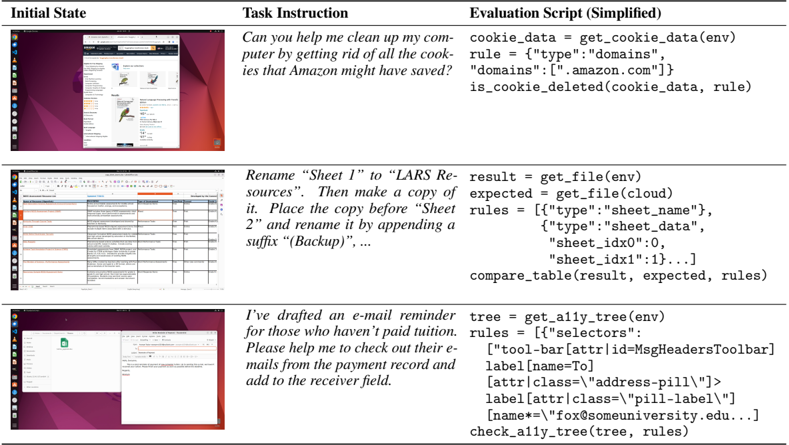
The image shows a technical document divided into three sections: "Initial State," "Task Instruction," and "Evaluation Script (Simplified)." Each section includes a screenshot of a computer interface and corresponding text instructions/code snippets. The document appears to demonstrate automated task execution using code, likely for system administration or workflow automation.
### Components/Axes
- **Initial State**: Screenshots of a computer interface showing:
1. A browser window with Amazon.co.uk open
2. A spreadsheet application (likely Excel/Google Sheets)
3. An email client interface
- **Task Instruction**: Text describing specific tasks to be automated
- **Evaluation Script (Simplified)**: Python-like code snippets for task validation
### Detailed Analysis
#### Initial State
1. **Browser Window**:
- URL: `https://www.amazon.co.uk`
- Visible elements: Product listings, search bar, navigation menu
2. **Spreadsheet**:
- Table with columns: "Name," "Email," "Status," "Notes"
- Rows contain sample data (e.g., "John Doe," "john@example.com")
3. **Email Client**:
- Open email with subject: "Reminder: Unpaid Tuition"
- Email body contains payment instructions
#### Task Instruction
1. **Cookie Cleanup Task**:
- Instruction: "Can you help me clean up my computer by getting rid of all the cookies that Amazon might have saved?"
- Evaluation Script:
```python
cookie_data = get_cookie_data(env)
rule = {"type":"domains"}
domains = ["amazon.com"]
is_cookie_deleted(cookie_data, rule)
```
2. **Spreadsheet Renaming Task**:
- Instruction: "Rename 'Sheet 1' to 'CLARS Resources'. Then make a copy of it. Place the copy before 'Sheet 2' and rename it by appending a suffix '(Backup)'..."
- Evaluation Script:
```python
result = get_file(env)
expected = get_file(cloud)
rules = [{"type":"sheet_name"}, {"type":"sheet_data"}, {"sheet_idx":0}, {"sheet_idx":1}]
compare_table(result, expected, rules)
```
3. **Email Reminder Task**:
- Instruction: "I've drafted an e-mail reminder for those who haven't paid tuition. Please help me check out their e-mails from the payment record and add to the receiver field."
- Evaluation Script:
```python
tree = get_all_tree(env)
rules = [{"selectors": [{"tool-bar": {"attr-id": "MsgHeadersToolbar"}}]}, {"label": {"name": "To"}}, {"attr": {"class": "address-pill"}}]
check_all_tree(tree, rules)
```
### Key Observations
1. The document follows a structured format for task automation:
- Visual context (Initial State)
- Natural language instruction (Task Instruction)
- Code validation logic (Evaluation Script)
2. All code snippets use consistent variable naming conventions (`get_*`, `check_*`, `compare_*`)
3. The Evaluation Scripts appear to validate both data integrity and UI state changes
4. No numerical data or charts present in the visible content
### Interpretation
This document demonstrates a systematic approach to automating repetitive tasks through:
1. **Context Capture**: Screenshots establish the starting state
2. **Task Specification**: Natural language instructions define desired outcomes
3. **Validation Framework**: Code snippets verify successful execution
The structure suggests this could be part of:
- A technical training manual for system administrators
- An automation framework documentation
- A workflow optimization guide for office productivity
The code examples indicate integration with:
- Browser automation (cookie management)
- Spreadsheet manipulation
- Email client interaction
The absence of numerical data implies this is a procedural demonstration rather than statistical analysis. The focus on cookie management and spreadsheet operations suggests potential applications in e-commerce data maintenance or academic record keeping.